Byter: See Where Your Mobile Data Really Goes
Your phone hotspot bundle has a way of vanishing. You tether the laptop for an hour, close the lid, and a few days later your carrier sends the "you have used 80%" text. Which hour was it? Which app? Macs do not tell you much by default.
Picture a simple scenario. You are on a train, the Wi-Fi is hopeless, so you tether your laptop to your phone for a video call and a few downloads. Nothing feels heavy. Then the carrier text arrives at the end of the month and the bundle is gone. A single total would not help you here. What you want to know is how much that one hotspot session cost, compared with your home Wi-Fi. That is the question Byter answers.
What Byter does
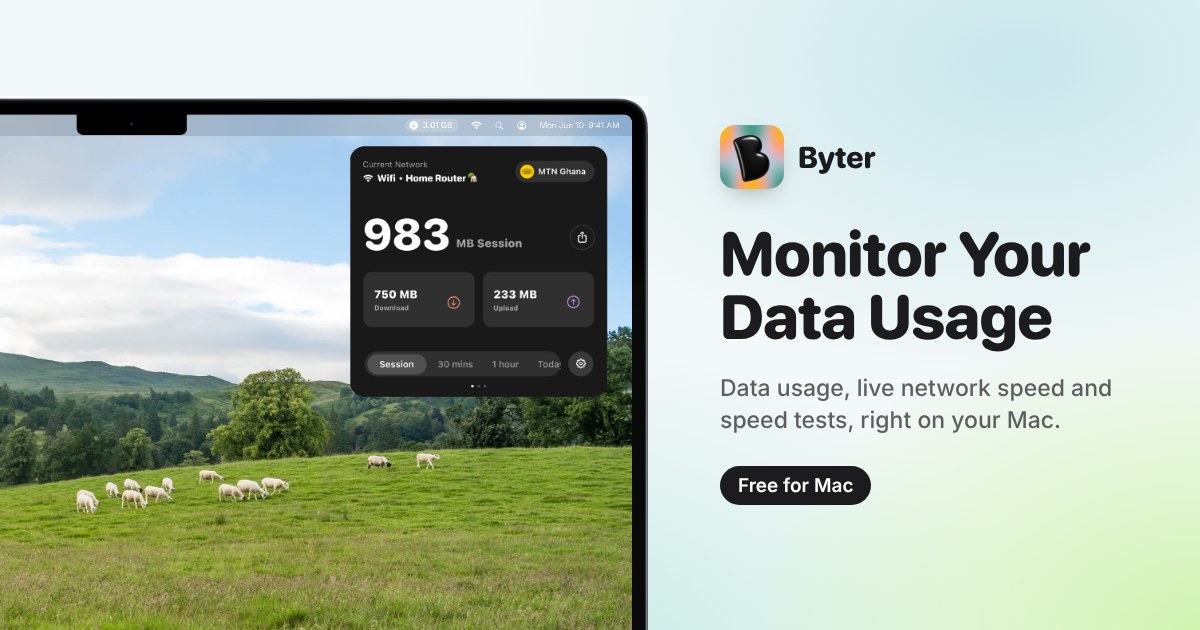
Byter lives in the menu bar and counts how much data passes through your connections. The trick that makes it useful is that it keeps the count per network. Home Wi-Fi, the office, a phone hotspot, a wired connection: each gets its own total, so you can see what the hotspot cost you instead of one blurry grand total.
You also get a live view of download and upload speed, a speed test (download, upload, ping) when you want to settle an argument with your ISP, and charts that run from days up to years. It shows your ISP and IP details too, which is handy when you are on a network you do not know.
It stays on your Mac
This is the part worth reading twice. According to the official site, Byter only measures how much data goes through your connections. It cannot see which websites you visit or what you send. Your usage history stays on your Mac and is not uploaded. There is no account and no sign-up: install it and it starts counting.
Two honest notes from the site itself. Location Services are used only to recognise which Wi-Fi or hotspot you are on, so the usage lands in the right bucket. And you can opt in to share aggregated usage data to help improve the app; it is optional. If you ever want a clean slate, there is a button that deletes everything it has recorded.
Free, with no ads
Byter is free to download and use, with no ads. The developer asks for support if you find it useful, which is how it stays free. That makes it an easy one to try.
The catch
It is a Mac app, and it needs macOS 14 Sonoma or later (Apple silicon and Intel both work). A Windows version is announced as coming, not available yet. It is also a young project: Product Hunt lists it as a 2026 launch, so expect it to keep changing.
Verdict
If you share your phone connection with a laptop, travel with a limited bundle, or just want to know what your internet costs you in gigabytes, Byter is a small, focused answer. Install it, let it count for a week, then look at which network ate the most.
Get it from the official site: https://getbyter.com/ (Product Hunt page: https://www.producthunt.com/products/byter).