Llama: Your Own Private AI in the Windows Tray
Picture this: it's 11 PM, you have one question for an AI, and three things stand in the way. A subscription you meant to cancel. A privacy policy you never read. A Wi-Fi connection that picked tonight to act up. Now picture the alternative: a tiny llama sitting in your system tray, running everything on your own machine, asking for none of the above.
That app exists, it's called Llama, and I've used it connected to my editor. It's exactly what it sounds like, and a bit better.
What Llama actually is
Llama is a free, open-source (MIT) tray app for Windows 11, built by the llama.cpp team together with Hugging Face. It's the Windows port of their Mac app, and its whole job is running open AI models locally without making you read forum threads about quantization flags.
Click the tray icon and a clean flyout lists your installed models, plus recommendations chosen to fit your machine. One click downloads a model from the Hugging Face Hub. Llama picks sensible settings for your hardware on its own, and when you open a model's details you get a context-length picker with a memory estimate for each option, so you know what you're signing your RAM up for. If you do know what you're doing, every llama.cpp setting is still there in one plain-text file.
If you just want to talk to a model, the menu's Open chat button opens a full chat window in your browser - the ChatGPT experience, minus the account.
A local API your other apps can use
Here's the part that turns Llama from a toy into infrastructure. It runs a small local server that speaks the OpenAI API. Anything that normally talks to OpenAI - coding agents, editors, chat apps, your own scripts - can be pointed at it and just works. No API key, no usage meter, no end-of-month invoice.
Hook an editor up to it and the workflow is the same as with a cloud provider, except the requests never leave the machine and the only bill is the electricity you were already paying for. It also supports the modern API features - streaming, tool calling, structured output, even vision for models that understand images - so it's a real backend, not a demo.
Thoughtful little things
Press Alt+Space from any app and a chat overlay pops up, Spotlight-style. It hides instead of closing, so when you summon it again your conversation is still exactly where you left it.
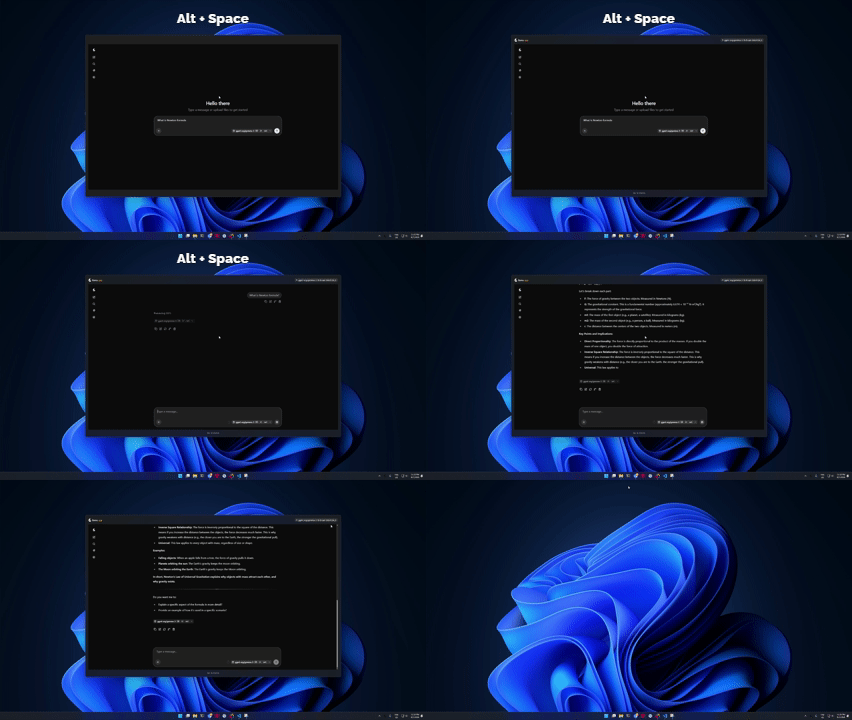
Models load when something asks for them and unload after five minutes idle, so Llama isn't hogging memory all day. Each model is stored once, in the standard Hugging Face cache shared with llama.cpp and other tools - no per-app 20 GB duplicates. And on privacy, the project is blunt: no telemetry, no analytics, no install ID. The only outbound traffic is model downloads, update checks, and your own local requests.
The catch
You need Windows 11, on x64 or ARM64. Local models need disk space and memory; Llama's recommendations help you pick, but physics is physics and a small PC runs small models. For genuinely hard problems, a big cloud model still wins. And when something misbehaves, you're your own support desk - though the GitHub repo is active.
Verdict
Llama is the shortest path from "I should try local AI someday" to actually using it every day. Free, open source, offline-friendly, and built by the people behind llama.cpp itself. Installation is a double-click on the installer from the GitHub releases page, or one PowerShell command from the official site.
If you have a reasonably recent PC and like the idea of an AI that still works on airplane mode, give it fifteen minutes.