tabsh: Your Shells and AI Agents in One Browser Tab
If you code with AI agents these days, you know the floor plan: one terminal window per agent, another for the dev server, and a browser full of tabs where the actual work lives. The terminal is the last tool stuck one Cmd-Tab away from everything it touches. tabsh wants to bring it home. I found it in this week's Product Hunt launches; everything below comes from the project's own README and site, so my terminals are exactly as messy as before.
What tabsh is
tabsh is a free, open-source (MIT) app for macOS and Linux that moves your shells and coding agents into a browser tab. A small Rust daemon runs on your machine, and the tab next to your work becomes the terminal. Close the tab, reload it, shut the laptop: your shells survive and reattach when you come back, with folders and scrollback restored. Install is one command (a curl script, Homebrew, or cargo for the Rust-inclined), and the app opens already paired with your browser. There are twelve themes and nine fonts, because even a terminal deserves a costume.
The pitch is simple: the issue is in a tab, the pull request is in a tab, the docs are in a tab, the app you're building runs on localhost in a tab. Why should the terminal be the only thing living somewhere else?
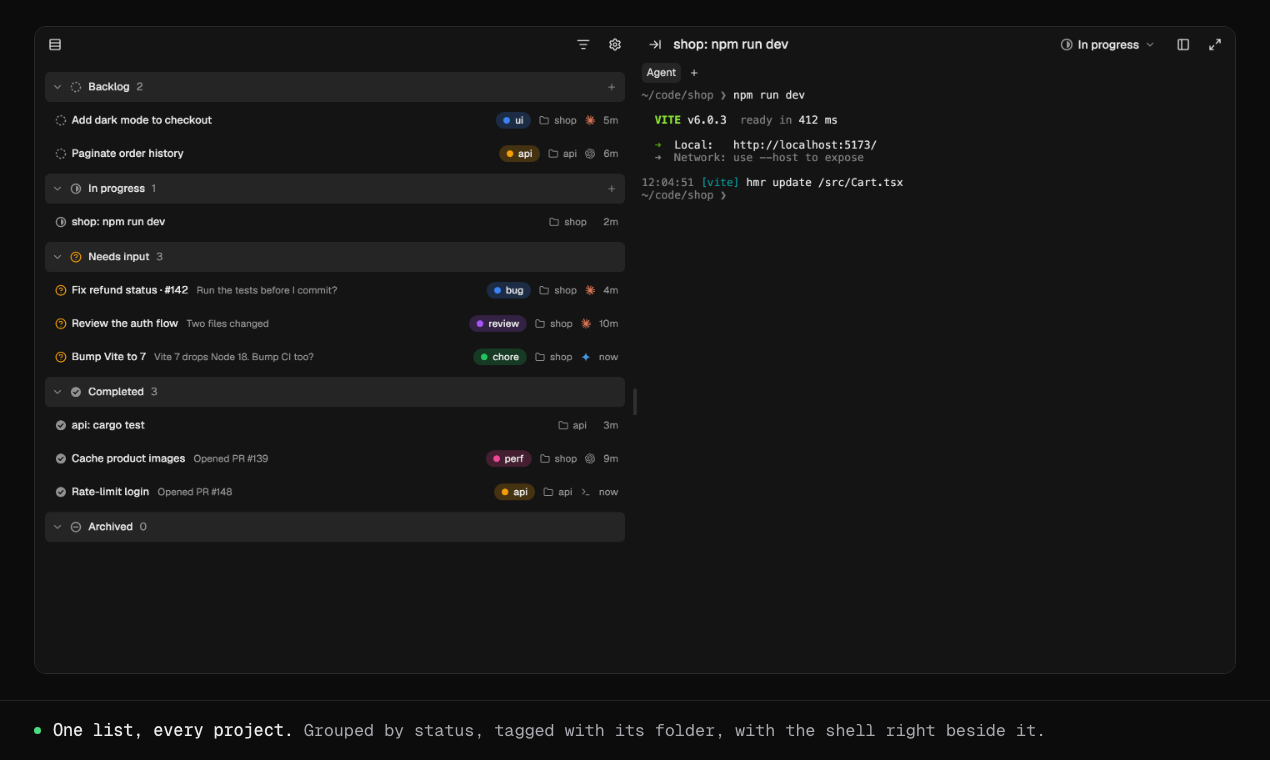
A kanban board your agents update themselves
Every shell or agent becomes a card on a board: Backlog, In progress, Needs input, Completed, plus a quiet archive. A list view gathers every card from every project into one scroll, so you see what's moving, what's waiting on you, and what's done without window-hunting. The clever part: run tabsh setup once and your agent (Claude Code, Codex, Cursor CLI, OpenCode, or anything with hooks) wires itself to report its status. It moves its own card to In progress while it works, to Needs input when it needs your permission, and to Completed when the job is done.
You can start an agent straight from a new card: type a first prompt and it opens in a terminal view or a chat panel. Drag a file onto a shell and its path types itself. And when a shell rings its bell, the tab's favicon gets a badge, which beats cycling through five black windows to find the one that beeped.
Nothing leaves your machine
The app is a plain web page talking to the daemon over loopback only. Keystrokes stay on 127.0.0.1, there is no company server in between, and the pairing token lives in the URL fragment, which browsers never send to anyone. For a tool that sees every command you type, this is the architecture you want.
The honest limits
This is a very young project: the repository is only a few weeks old at the time of writing, so expect rough edges and fast-moving changes. It's macOS and Linux only; Windows users are out for now. Safari (and every iOS browser) won't let the hosted page reach the daemon, so tabsh serves a local copy of the app on a special address instead. It works, but it's exactly the kind of quirk that tells you how new all this is.
And tabsh only matters if your day actually involves shells and coding agents. If your terminal opens twice a year, this one won't change your life.
Verdict: a sharp idea, executed with taste and the right local-first instincts. If you juggle agents all day, it's worth the one-command install.
Where to get it
Official website and docs: https://tabsh.cc/
Source code: https://github.com/Blaise1030/tabsh