CrystalDiskInfo
Free drive health monitor that turns S.M.A.R.T. data into early warnings for HDDs and SSDs
Download Now
Free for Windows. No registration required.
One of over 130 tools we've selected. No paid listings.
How we review software →Screenshots
About CrystalDiskInfo
Every hard drive and SSD in your PC is quietly keeping a diary of its own health. CrystalDiskInfo reads that diary. It pulls the S.M.A.R.T. (Self-Monitoring, Analysis and Reporting Technology) data built into your drives and translates it into a clear verdict - Good, Caution, or Bad - backed by live temperature readings and the raw attributes that technicians actually inspect. It is the difference between replacing a drive on your schedule and losing everything on its schedule.
A Traffic Light for Your Drives
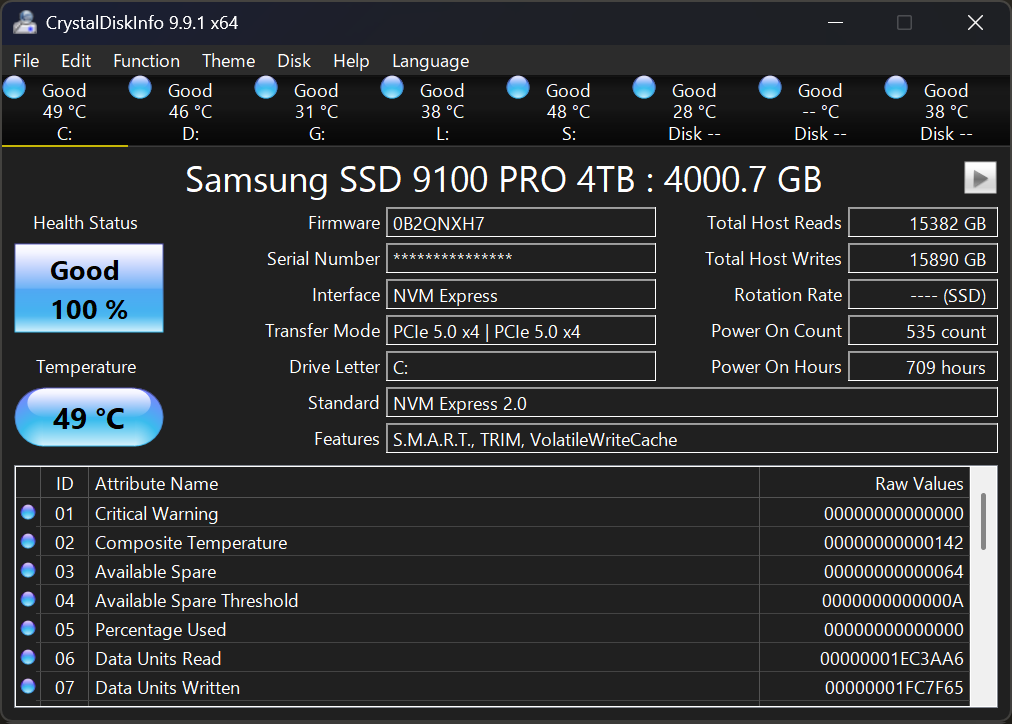
The main window leads with the two readings that matter: health status and temperature. A healthy drive shows a blue Good badge. When reallocated or pending sectors start piling up, the badge flips to yellow Caution or red Bad, so the problem is impossible to miss even if you never read a single attribute. For SSDs it goes further, estimating remaining life from the wear indicators each vendor exposes - exactly what you want to know before trusting an aging boot drive with another year of work. Model, firmware, serial number, interface and total host reads and writes are all one glance away too, which makes the first five minutes of any diagnosis much faster.
Early Warnings, Not Autopsies
The point of monitoring is to hear about trouble while you can still act. CrystalDiskInfo can sit in the system tray and raise an alarm when a drive crosses a temperature threshold you set, and it can send an alert email when health status changes, which is handy for a home server or a family PC you maintain from a distance. A graph view tracks S.M.A.R.T. values over time, so you can tell whether an error count is stable or climbing week after week.
Reads Almost Any Drive You Plug In
Beyond internal SATA disks, it handles NVMe SSDs, many USB external drives and enclosures, and Intel RAID setups, covering HDDs and SSDs from virtually every manufacturer. Power users can adjust AAM and APM settings to trade acoustics and power draw against responsiveness on drives that support it, and a portable edition runs without installation for a quick check on someone else's machine.
Things to Know Before You Rely on It
S.M.A.R.T. is a warning system, not a crystal ball: drives can and do fail suddenly with clean readings, so monitoring complements backups rather than replacing them. Some USB enclosures do not pass diagnostic data through their bridge chip, so an external drive may simply not appear. The interface is dense with hexadecimal attribute values that mean little without research, and it is Windows-only - there is no Mac or Linux edition.
Editorial Note
CrystalDiskInfo is the tool technicians reach for first when a PC feels off, and it is the check worth running before buying a used drive, after a power outage, or the moment Windows starts stuttering. Free under the MIT license, with no ads and no upsell, it earns its place on any Windows machine.
Key Features
Health Status at a Glance
Color-coded Good, Caution or Bad verdicts for every drive, plus estimated remaining life for SSDs based on vendor wear indicators.
Temperature Alarms and Alert Mail
System tray alarm and email alerts when a drive passes your temperature threshold or its health status changes.
S.M.A.R.T. Graphs Over Time
Track any attribute over days and weeks to see whether an error count is stable or climbing.
NVMe, USB and RAID Support
Reads internal SATA drives, NVMe SSDs, many USB enclosures and Intel RAID setups, HDD and SSD alike.
Pros & Cons
Pros
- Completely free under the MIT license, including commercial use
- Instant color-coded health verdict anyone can read
- Covers NVMe SSDs, USB externals and Intel RAID, not just SATA HDDs
- Lightweight, with a portable edition for quick diagnostics
Cons
- Windows only; no macOS or Linux version
- S.M.A.R.T. can miss sudden failures, and some USB enclosures hide drive data
Frequently Asked Questions
What does a Caution or Bad health status mean?
Caution means the drive shows early warning signs, such as reallocated or pending sectors, or SSD remaining life at 10% or less. Bad means failure may be imminent. In both cases, back up your important data right away and plan a replacement.
Can CrystalDiskInfo predict every drive failure?
No. S.M.A.R.T. monitoring catches many developing problems, but drives can fail suddenly with clean readings. Treat it as an early-warning layer alongside regular backups, not a guarantee.
Does it work with NVMe SSDs and USB external drives?
Yes for NVMe on Windows 10 or later. Many USB enclosures work too, but some bridge chips do not pass diagnostic data through, so a drive may not appear.
Screenshots