
FreeMind
Premier mind mapping tool for visualizing and organizing your ideas
Download Now
Free for Windows, macOS, Linux. No registration required.
One of over 130 tools we've selected. No paid listings.
How we review software →Screenshots
About FreeMind
FreeMind is a powerful and versatile mind mapping software that has revolutionized the way individuals and teams organize their thoughts and ideas. As a free, open-source application, FreeMind provides users with an intuitive platform to create visual representations of complex concepts, making it an essential tool for brainstorming, project planning, and knowledge management.
Developed using Java technology, FreeMind runs seamlessly across multiple operating systems including Windows, macOS, and Linux. This cross-platform compatibility ensures that users can access their mind maps regardless of their preferred computing environment.
The software's lightweight design means it doesn't require significant system resources, making it accessible even on older computers.
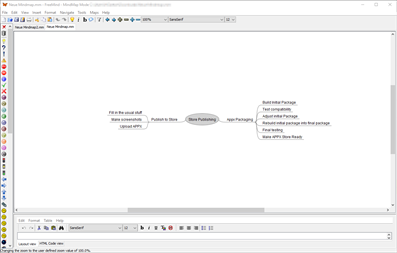
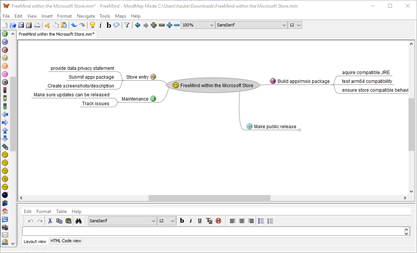
At its core, FreeMind enables users to create hierarchical tree structures where ideas branch out from a central concept. Each node can contain:
- Text content
- Hyperlinks
- Custom icons
- Rich formatting options
The software supports unlimited nodes and levels, giving users the freedom to explore their ideas without constraints.
Navigation
One of FreeMind's standout features is its keyboard-centric navigation system. Power users appreciate the extensive keyboard shortcuts that enable rapid mind map creation without constantly reaching for the mouse.
This efficiency-focused design makes FreeMind particularly popular among professionals who need to capture ideas quickly during meetings or brainstorming sessions.
Export and share
The application supports various export formats including:
- HTML
- PNG
- JPEG
This makes it easy to share mind maps with colleagues or integrate them into presentations and documents. Additionally, FreeMind files use an open XML format, ensuring long-term accessibility and compatibility with other mind mapping tools.
Collaborative features
FreeMind also offers collaborative features through its ability to insert links to local files, folders, or web pages within nodes. This functionality transforms mind maps into interactive knowledge bases where users can quickly navigate to relevant resources.
Who is it for?
Whether you're a student organizing study notes, a project manager planning complex workflows, or a creative professional developing new concepts, FreeMind provides a flexible and reliable solution.
Its active community ensures continuous improvement and provides extensive documentation and user support, making it one of the most trusted mind mapping tools available today.
Key Features
Hierarchical Mind Mapping
Create unlimited hierarchical tree structures with branches extending from central concepts
Keyboard-Centric Navigation
Extensive keyboard shortcuts enable rapid mind map creation without mouse usage
Multiple Export Formats
Export mind maps to HTML, PDF, PNG, JPEG and other formats for easy sharing
Pros & Cons
Pros
- Completely free and open-source
- Cross-platform compatibility (Windows, macOS, Linux)
- Lightweight and doesn't require heavy system resources
- Active community with extensive documentation
Cons
- Outdated user interface design
- Requires Java Runtime Environment to be installed
- Limited modern collaboration features
Frequently Asked Questions
Is FreeMind completely free?
Yes, FreeMind is completely free and open-source software distributed under the GNU GPL license. You can use it for personal or commercial purposes without any cost.
Do I need Java installed to use FreeMind?
Yes, FreeMind requires Java Runtime Environment (JRE) to be installed on your system. You can download JRE for free from the official Oracle or OpenJDK websites.
Screenshots