Greenshot
A lightweight screenshot tool for Windows with powerful annotation features
Download Now
Free for Windows. No registration required.
One of over 130 tools we've selected. No paid listings.
How we review software →Screenshots
About Greenshot
Greenshot is a powerful, lightweight screenshot software tool designed specifically for Windows users who need quick and efficient screen capturing capabilities. This open-source application has become a favorite among professionals, content creators, and casual users alike, thanks to its intuitive interface and comprehensive feature set.
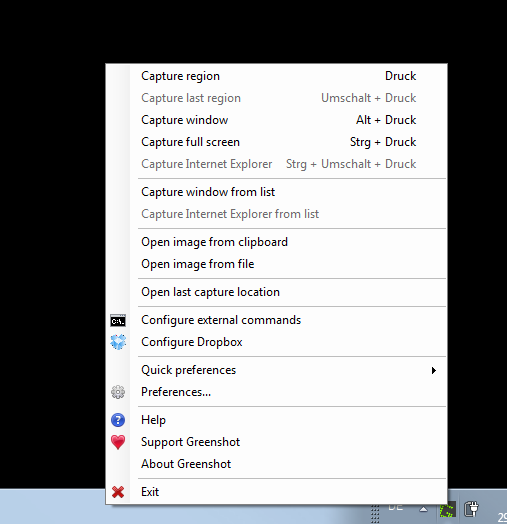
What sets Greenshot apart from other screenshot tools is its remarkable speed and efficiency. The application runs silently in the system tray, ready to capture your screen at a moment's notice with customizable keyboard shortcuts. Whether you need to capture a full screen, a specific window, or a selected region, Greenshot handles it all with ease.
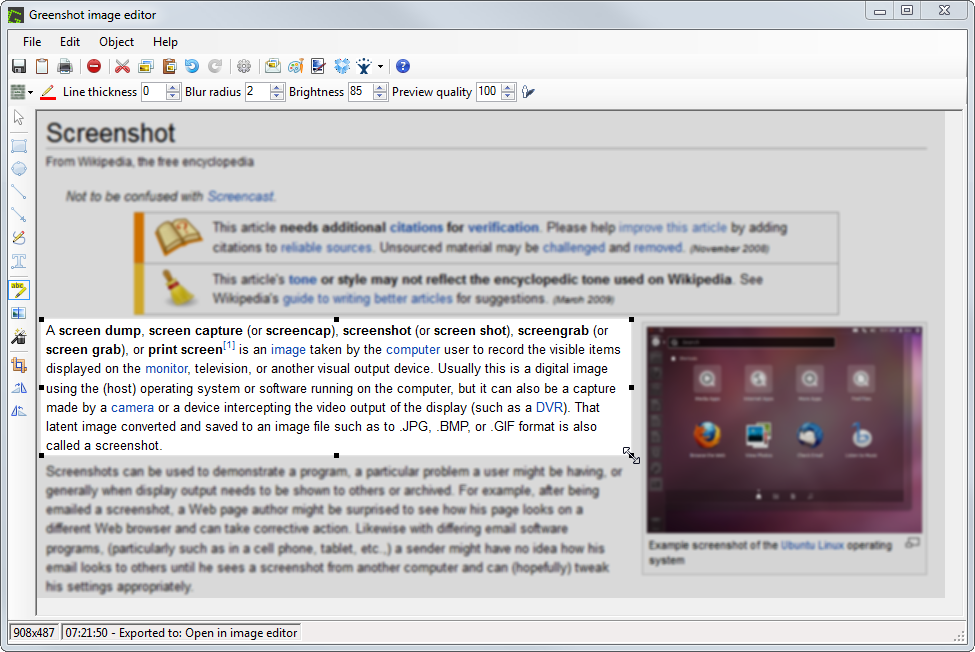
The built-in image editor is where Greenshot truly shines. After capturing a screenshot, users can immediately annotate their images with arrows, text boxes, highlights, and shapes. This eliminates the need for external image editing software for basic annotations. The editor includes tools for adding borders, drop shadows, and even pixelating sensitive information – perfect for creating professional documentation or tutorials.
Greenshot supports multiple export options, allowing users to save images in various formats including PNG, JPG, and BMP. You can also send screenshots directly to printers, clipboards, email clients, or cloud storage services like Imgur. The software integrates seamlessly with popular office applications such as Microsoft Word and Excel.
The application is highly customizable, offering extensive configuration options for capture settings, output preferences, and keyboard shortcuts. Users can set up automated workflows to streamline repetitive tasks. Despite its rich feature set, Greenshot maintains a small footprint and minimal resource usage.
As a free and open-source solution, Greenshot provides exceptional value for anyone needing reliable screenshot functionality without the cost of premium alternatives.
Key Features
Multiple Export Options
Save to various formats, send to clipboard, printer, email, or cloud services like Imgur
Quick Screenshot Capture
Capture full screen, window, or region instantly with customizable keyboard shortcuts
Built-in Image Editor
Add annotations, arrows, text, shapes, and effects directly to screenshots without external software
Customizable Keyboard Shortcuts
Configure your preferred hotkeys for different capture modes and quickly access screenshot functions
Pros & Cons
Pros
- Extremely lightweight and fast
- Free and open-source software
- Portable version available
- Highly customizable settings
Cons
- Windows-only application
- Interface may feel dated to some users
Frequently Asked Questions
Is Greenshot completely free to use?
Yes, Greenshot is completely free and open-source software under the GPL license. There are no premium versions or hidden costs.
Can I customize the keyboard shortcuts?
Yes, Greenshot allows full customization of keyboard shortcuts through its preferences menu. You can set up your preferred key combinations for different capture modes.
Screenshots