
HopToDesk
Free Remote Desktop Software with End-to-End Encryption
Download Now
Free for Windows, macOS, Linux, Android, iOS. No registration required.
One of over 130 tools we've selected. No paid listings.
How we review software →Screenshots

About HopToDesk
HopToDesk is a powerful, free, and open-source remote desktop software designed to provide seamless access to computers and devices from anywhere in the world. Whether you're working from home, providing IT support, or managing remote servers, HopToDesk offers a reliable solution that prioritizes security, performance, and ease of use.
What Makes HopToDesk Stand Out
Unlike many commercial remote desktop tools that charge fees or impose usage limits, HopToDesk is completely free for both personal and business use. Built on open-source principles, it gives users full transparency and the freedom to customize their remote access experience without vendor lock-in or hidden costs.
End-to-End Encryption for Maximum Security
Security is at the core of HopToDesk's design. All communications between connected devices are protected with true end-to-end encryption, ensuring that screen sharing sessions, file transfers, and chat messages remain completely private. This means HopToDesk servers cannot access or view any data exchanged during remote sessions, giving users peace of mind when handling sensitive information.
Cross-Platform Compatibility
HopToDesk works seamlessly across multiple platforms including Windows, macOS, Linux, Android, iOS, and even Raspberry Pi. This extensive compatibility makes it an ideal choice for mixed-device environments, allowing users to connect from a smartphone to a desktop computer or between different operating systems without switching tools.
Simple Setup, No Complicated Configuration
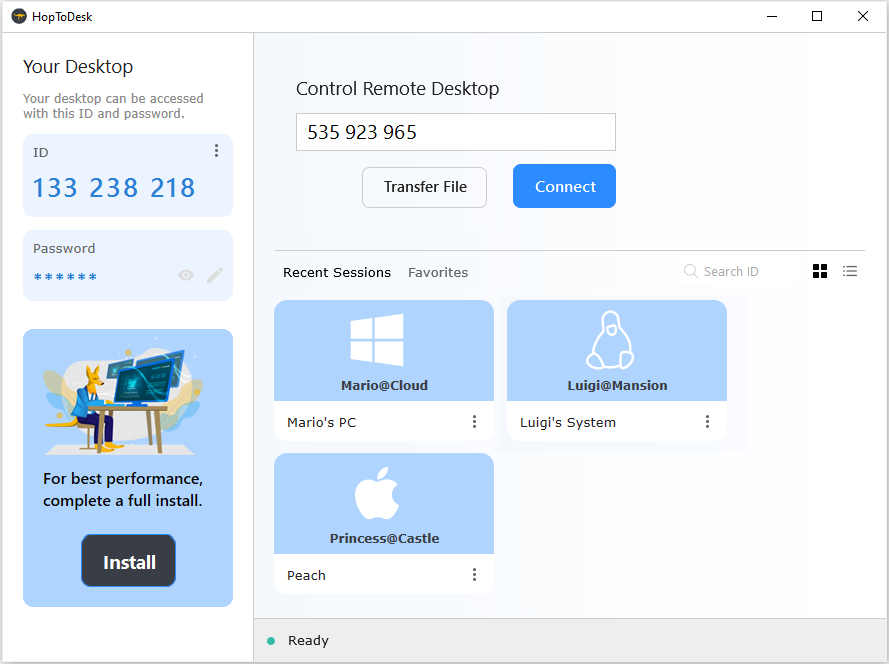
Getting started with HopToDesk is incredibly straightforward. There's no need to configure routers, open firewall ports, or deal with complex network settings. Simply install the application on both devices, enter the remote device's ID, and you're ready to connect. For users who prefer portability, HopToDesk can even run as a standalone application without installation.
Comprehensive Feature Set
HopToDesk includes all essential remote desktop features: screen sharing, remote control, file transfer, live chat, clipboard synchronization, multi-monitor support, and session recording. Advanced features like Wake-on-LAN, two-factor authentication, unattended access, and custom branding are also available, making it suitable for both individual users and IT professionals managing multiple devices.
Perfect for Remote Work and IT Support
Whether you need to access your work computer from home, help family members troubleshoot technical issues, or provide professional IT support to clients, HopToDesk delivers the performance and reliability required for productive remote sessions with minimal latency.
Key Features
End-to-End Encryption
All remote connections are protected with military-grade end-to-end encryption ensuring complete privacy for screen sharing, file transfers, and chat messages
Cross-Platform Support
Works seamlessly across Windows, macOS, Linux, Android, iOS, and Raspberry Pi allowing remote access between any devices
No Setup Required
Simple plug-and-play operation without complex router configuration, port forwarding, or firewall settings
Pros & Cons
Pros
- Completely free for both personal and business use
- Works across all major platforms without switching tools
- No complex configuration or router setup needed
- Open source with transparent security
Cons
- Requires both devices to have HopToDesk installed
Frequently Asked Questions
Is HopToDesk free to use?
Yes, HopToDesk is completely free for both personal and commercial use with no limitations or hidden fees. There are no premium tiers or paid features.
How secure is HopToDesk?
HopToDesk uses true end-to-end encryption for all communications including screen sharing, file transfers, and chats. The servers cannot access your data during remote sessions, ensuring maximum privacy and security.
Screenshots