
KeePass Password Safe
Free and secure open source password manager
Download Now
Free for Windows, macOS, Linux. No registration required.
One of over 130 tools we've selected. No paid listings.
How we review software →Screenshots

About KeePass Password Safe
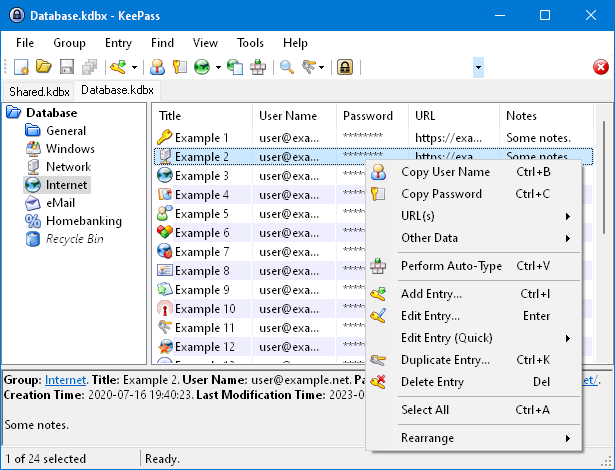
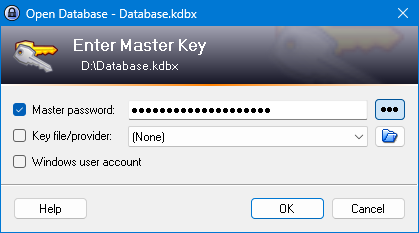
KeePass Password Safe is a free, open source password manager that helps you organize and secure your passwords in an encrypted database protected with a master key. In today's digital landscape, where the average person manages dozens of online accounts across various platforms, the challenge of maintaining unique, strong passwords for each service has become increasingly critical. KeePass addresses this fundamental security concern by providing a robust, professional-grade password management solution that prioritizes user control, security, and privacy without imposing subscription fees or cloud dependencies.
As a lightweight yet powerful application, KeePass has earned the trust of millions of users worldwide, from individual home users to enterprise IT departments and security professionals. The software operates on a simple but effective principle: all your passwords, credentials, notes, and sensitive information are stored in a single encrypted database file that is protected by one master password, a key file, or a combination of both authentication methods. This approach ensures that you only need to remember one strong master password while maintaining unique, complex passwords for all your online accounts.
KeePass employs industry-leading encryption standards, including AES-256 (Advanced Encryption Standard with 256-bit keys) and ChaCha20, both recognized as military-grade encryption algorithms. The database format, KDBX, is specifically designed for security and includes multiple layers of protection against various attack vectors. These encryption methods ensure that even if someone gains access to your database file, they cannot read its contents without your master password.
One of KeePass's standout features is its auto-type functionality, which allows you to automatically enter login credentials into applications and websites using customizable keyboard shortcuts. This feature not only saves time but also protects against keyloggers by simulating keyboard input directly at the system level. The password generator built into KeePass enables users to create cryptographically secure passwords with customizable parameters, including length, character sets, and pattern rules, ensuring that each generated password meets specific security requirements.
The open-source nature of KeePass is a significant advantage for security-conscious users and organizations. The complete source code is publicly available for audit and review, allowing security experts worldwide to verify that the software contains no backdoors, vulnerabilities, or malicious code. This transparency has led to extensive community scrutiny and continuous improvement, making KeePass one of the most trusted password managers in the security community.
The plugin ecosystem extends KeePass's functionality far beyond its core features, with hundreds of community-developed plugins available for tasks such as cloud synchronization, browser integration, enhanced import/export capabilities, and specialized security features. This extensibility makes KeePass incredibly versatile, allowing users to customize their password management experience to match their specific workflow and security requirements. Whether you need integration with your favorite browser or advanced reporting capabilities, there's likely a plugin available.
For enterprise environments, KeePass offers several advantages including centralized policy management, shared password databases with granular access controls, and integration with existing IT infrastructure. Organizations appreciate the zero licensing costs and the ability to maintain complete control over their password data without vendor lock-in. The portable mode allows users to run KeePass directly from USB drives without installation, making it ideal for IT professionals who need to access passwords across multiple systems securely.
Cross-platform compatibility ensures that KeePass can be used on Windows, macOS, and Linux systems, with official and community-maintained implementations available for mobile platforms including Android and iOS. This flexibility means you can access your passwords regardless of which device or operating system you're using, maintaining a consistent security posture across your entire digital ecosystem.
While KeePass lacks built-in cloud synchronization, this design decision actually enhances security by giving users complete control over their data storage location. Users can manually sync their database files using cloud storage services like Dropbox, Google Drive, OneDrive, or self-hosted solutions, maintaining full ownership and control. This approach means you decide where your encrypted database lives and who has access to the infrastructure hosting it.
The key derivation functions used by KeePass, including AES-KDF and Argon2, add additional layers of protection by making brute-force attacks computationally expensive and time-consuming. Security features include database encryption even in memory, protection against dictionary attacks through key derivation, secure deletion of sensitive data, and automatic database locking after periods of inactivity. These multiple layers of defense create a robust security architecture that protects your passwords from various attack vectors.
KeePass is particularly valuable for users who prioritize privacy, security professionals who need granular control over their password management solution, and organizations seeking a cost-effective, auditable security tool without recurring subscription costs or vendor lock-in. Whether you're protecting personal accounts or managing enterprise credentials, KeePass provides the security, flexibility, and control you need without compromising on features or forcing you into a proprietary ecosystem.
Key Features
AES-256 Encryption
Industry-standard 256-bit Advanced Encryption Standard (AES) and ChaCha20 encryption to protect your password database with maximum security
Auto-Type Functionality
Automatically enter login credentials into applications and websites with customizable keyboard shortcuts and sequences
Plugin Support
Extensive plugin architecture allows users to add custom functionality and integrations with other applications and services
Password Generator
Built-in secure password generator with customizable rules for length, characters, and complexity to create strong, unique passwords
Pros & Cons
Pros
- Completely free and open source with no subscription fees
- Strong AES-256 and ChaCha20 encryption ensures maximum security
- Extensive plugin ecosystem for enhanced functionality
- Portable version runs from USB without installation
- Cross-platform with versions available for Windows, macOS, and Linux
Cons
- User interface is dated and not as modern as commercial alternatives
- No built-in cloud sync, requires manual setup or third-party solutions
- Steeper learning curve compared to more user-friendly commercial options
Frequently Asked Questions
Is KeePass Password Safe really free?
Yes, KeePass is completely free and open source software licensed under GPL-2.0. There are no hidden costs, subscription fees, or premium versions. You can use all features without any limitations forever.
How secure is KeePass?
KeePass is extremely secure. It uses military-grade AES-256 and ChaCha20 encryption to protect your database. Your passwords are stored in an encrypted database locked with a master password and/or key file. The database remains encrypted at all times, even in memory, protecting against unauthorized access.
Can I sync my KeePass database across multiple devices?
Yes, but KeePass doesn't have built-in cloud sync. You can store your database file on cloud storage services like Dropbox, Google Drive, OneDrive, or other file sync services, and access it from multiple devices. Just ensure you close the database on one device before opening it on another to avoid conflicts.
Screenshots