
NAPS2
Free, open-source scanner software to turn paper into searchable PDFs
Download Now
Free for Windows, macOS, Linux. No registration required.
One of over 130 tools we've selected. No paid listings.
How we review software →Screenshots
About NAPS2
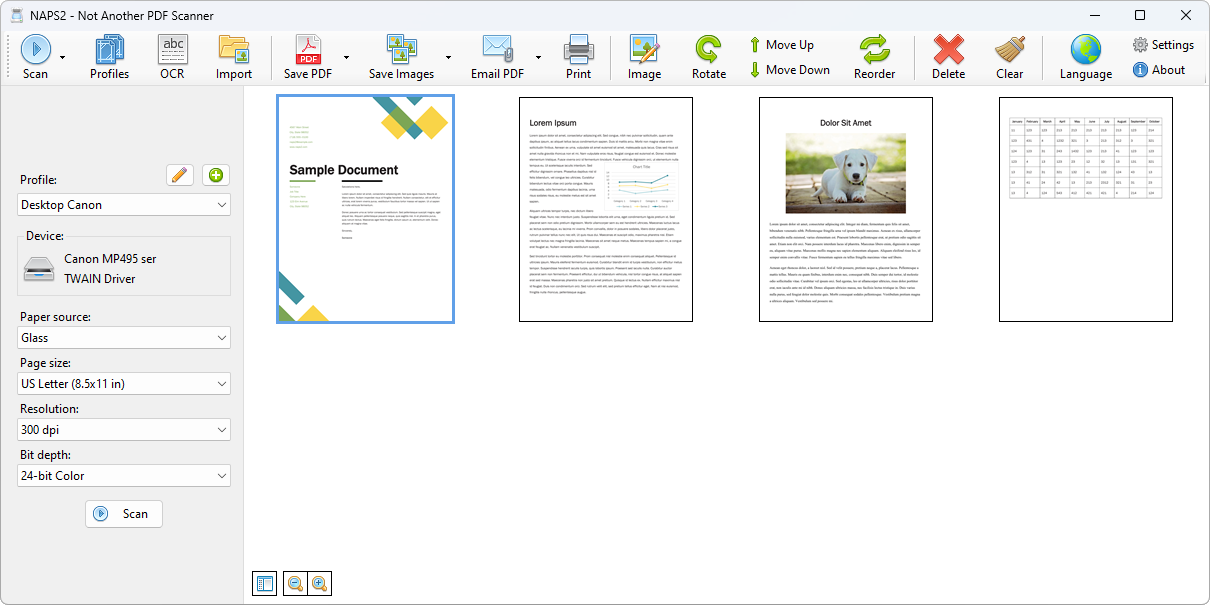
NAPS2 (Not Another PDF Scanner) is a free and open-source scanning application for Windows, Mac and Linux. It focuses on one job: getting paper documents from your scanner into clean PDF, TIFF, JPEG or PNG files with as few clicks as possible. Where the software bundled with printers often hides scanning behind accounts, upsells and cluttered menus, NAPS2 keeps one clear window: pick a profile, press Scan, save. It is the kind of tool you reach for when a stack of receipts, a signed contract or an old family document needs to become a file you can keep.
Works With the Scanner You Already Have
NAPS2 talks to scanners from Canon, Brother, HP, Epson, Fujitsu and many others. On Windows you can choose between WIA and TWAIN drivers, whichever behaves better with your device; on Linux it uses SANE, and it also supports driverless ESCL scanning. Flatbeds and automatic document feeders are both covered, including duplex scanning when your hardware allows it. Settings like DPI, page size and bit depth are saved as profiles, so the next batch of the same kind takes a single click.
Clean Up and Rearrange Pages
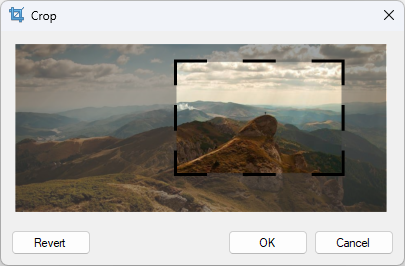
Once pages are scanned, drag and drop them into the order you need. The interleave tool is built for a common real-world case: scanning a two-sided document on a one-sided feeder, where you scan the fronts, flip the stack and let NAPS2 merge the pages in the right sequence. Pages can be rotated by hand or automatically deskewed, and simple image tools crop or adjust brightness and contrast before you save.
Searchable PDFs With OCR
NAPS2 includes optical character recognition based on Tesseract, in over 100 languages. Run OCR on a scanned contract or receipt and the resulting PDF carries a text layer: you can search inside it, copy passages out, and find the document months later by its content instead of its filename. For anyone digitizing a paper archive, this is what turns a folder of images into a usable library.
Built for Offices and Power Users
Behind the simple default window, NAPS2 offers an optional command-line interface for automation and scripting, an MSI installer with application-level configuration for group policy deployment, and portable builds that run without installation. Scanners can also be shared across a local network, so one USB scanner can serve a whole household or small office.
Things to Know Before You Rely on It
Results depend on your scanner's drivers: a device with poor WIA or TWAIN support may take some trial and error, and very old or exotic models can fall back to limited modes. OCR quality follows scan quality; a skewed, low-resolution scan of faint text will not recognize well. There is no built-in cloud storage integration, mobile app or account sync - files stay on your computer, which some will count as a feature. The interface is deliberately plain.
Editorial Note
The screenshots on this listing come from the official NAPS2 website (naps2.com) and show the Windows version; the Mac and Linux versions offer the same core workflow with a native interface.
Key Features
Works with almost any scanner
WIA, TWAIN, SANE and ESCL driver support, with flatbed, feeder and duplex scanning.
Page cleanup and reordering
Drag-and-drop ordering, rotation, automatic deskew, cropping and brightness/contrast tools.
OCR in over 100 languages
Tesseract-based text recognition adds a searchable text layer to scanned PDFs.
Reusable scan profiles
Save DPI, page size, bit depth and driver choices per job for one-click repeat scans.
Pros & Cons
Pros
- Free and open source under the GPL license
- Works with most scanners through WIA, TWAIN, SANE and ESCL drivers
- OCR in over 100 languages makes scanned PDFs searchable
- Windows, macOS and Linux versions, with a portable option that needs no installation
Cons
- No built-in cloud storage integration or mobile companion app
- OCR quality depends on scan quality, and scanner driver quirks can require trial and error
Frequently Asked Questions
Is NAPS2 free?
Yes. NAPS2 is free and open source, released under the GNU General Public License v2 or later.
Which operating systems does NAPS2 run on?
Windows, macOS and Linux, with portable builds that run without installation.
Which scanners work with NAPS2?
Most scanners from Canon, Brother, HP, Epson, Fujitsu and others, through WIA or TWAIN drivers on Windows, SANE on Linux, and driverless ESCL where supported.
Quick Info
Screenshots