PhotoFiltre 7
Quick, lightweight photo editor for everyday image retouching and creative effects
Download Now
Free for Windows. No registration required.
One of over 130 tools we've selected. No paid listings.
How we review software →Screenshots

About PhotoFiltre 7
PhotoFiltre 7 is a compact, practical image editor for Windows that has stuck around because it just works. It sits in that useful middle ground between overly simple paint programs and heavyweight professional suites. If you have ever needed to quickly crop a screenshot, touch up a photo, adjust brightness and contrast, add text overlays, or apply a filter, PhotoFiltre handles all of that without forcing you through a maze of menus or confusing panels.
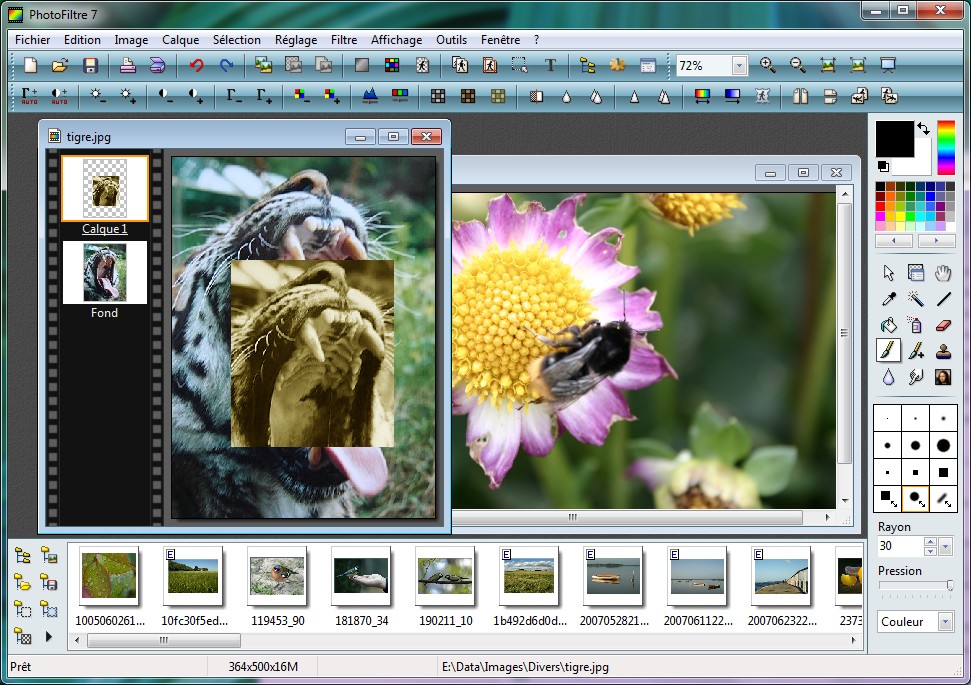
The interface is straightforward. Most tools are right there on the toolbar, and the layout follows the kind of windowed application style that feels familiar to anyone who has used Windows software over the years. There is no steep learning curve. You can open an image and start editing within seconds. That simplicity is part of why it has remained relevant for so long, even as newer editors with flashier interfaces have come and gone.
What Makes It Useful
PhotoFiltre 7 was built on the core engine of PhotoFiltre Studio, which means it inherited some fairly capable features for a free program. The biggest addition over the older PhotoFiltre 6 is proper layer support. You can work with multiple bitmap layers, text layers that remain editable, adjustment layers for things like gamma and hue, and color layers for transparency work. That layer system includes alpha channel support, which opens the door to more polished edits than you would expect from something this lightweight.
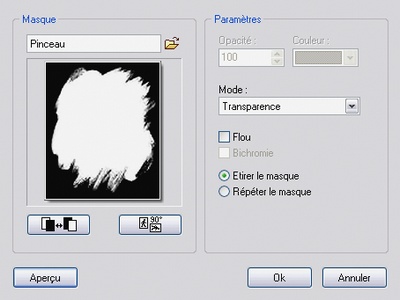
Selections are more flexible than in most free editors at this level. You can draw automatic vector shapes like rectangles, ellipses, triangles, rhombuses, and rounded rectangles, or switch to lasso and polygon modes for more manual control. Selections can also be saved and reused, which is a real time-saver if you find yourself doing similar work across multiple files.
Filters and adjustments are where the software really shines for everyday use. Standard corrections like brightness, contrast, saturation, gamma, and tint are easy to access, but there is also a solid collection of artistic filters for stylized looks. For most people who are not doing high-end retouching, this range is more than enough to clean up photos, prepare images for the web, or give visuals a bit more character.
Features That Stand Out
- Layer manager with alpha channel for multi-step compositions and more advanced edits
- Batch processing to handle repetitive tasks across folders of images
- Vector and freeform selections including lasso, polygon, and automatic shapes
- Advanced brushes with creative options like Rainbow stroke mode and various brush forms
- Icon export supporting 32x32, 48x48, and 64x64 sizes
The brush system is worth mentioning separately. Beyond standard round and square brushes, PhotoFiltre 7 includes a range of brush types and the Rainbow drawing mode, which paints a gradient along the stroke. Combined with the erase tools and transparency handling, you have enough flexibility for drawing, touch-up work, and simple graphic creation.
Who Should Use It
PhotoFiltre 7 is freeware for private and non-profit use, which makes it an easy recommendation for students, hobbyists, bloggers, and anyone working on personal projects. If your editing needs revolve around quick fixes, basic retouching, screenshots, social media images, or small-scale graphics, it covers the essentials without clutter. It also runs well on older hardware, which matters if you are working on a machine that struggles with modern creative suites.
That said, it is not trying to replace something like GIMP, Affinity Photo, or Photoshop. Some advanced tools are reserved for the commercial PhotoFiltre Studio X edition, and the overall feature set is narrower than those programs. But for what it is, it is efficient, stable, and easy to pick up.
Licensing and Availability
PhotoFiltre 7.2.1 is available as a portable ZIP package as well as a standard installer. The portable version means you can carry it on a USB drive and use it on different machines without installing anything. Translation files are also available for multiple languages through the PhotoFiltre Studio site.
For commercial or professional work, you would need a PhotoFiltre Studio X license. But for personal use, the freeware version offers everything most casual users will ever need.
Key Features
Layer Manager with Alpha Channel
Full layer support with alpha channel for multi-step image compositions, bitmap layers, editable text layers, adjustment layers, and color transparency work.
Batch Processing
Process multiple images at once for repetitive tasks like resizing, format conversion, and applying consistent adjustments across folders.
Vector and Freeform Selections
Automatic vector shapes including rectangles, ellipses, triangles, and rounded rectangles, plus lasso and polygon tools for custom selections that can be saved and reused.
Advanced Brushes and Rainbow Mode
Variety of brush types including round, square, and creative brushes. Rainbow stroke mode paints a gradient along the brush path for colorful effects.
Pros & Cons
Pros
- Fast and lightweight, runs well on older hardware
- Layer support with alpha channel in a free program
- Portable version available, no installation needed
Cons
- Windows-only, no macOS or Linux support
- Interface looks dated compared to modern editors
- Some advanced tools reserved for paid Studio edition
Frequently Asked Questions
Is PhotoFiltre 7 free to use?
Yes, PhotoFiltre 7 is freeware for private and non-profit use. For commercial or professional use, you need a PhotoFiltre Studio X license.
Does PhotoFiltre 7 support layers?
Yes, PhotoFiltre 7 includes a full layer manager with alpha channel support, including bitmap layers, editable text layers, adjustment layers, and color layers.
Is there a portable version of PhotoFiltre 7?
Yes, PhotoFiltre 7.2.1 is available as a portable ZIP package that runs without installation, making it easy to carry on a USB drive.
Screenshots