PowerToys
Free Microsoft utilities to customize and speed up Windows
Download Now
Free for Windows. No registration required.
One of over 130 tools we've selected. No paid listings.
How we review software →Screenshots
About PowerToys
PowerToys is a free and open-source collection of Microsoft utilities that gives Windows users more control over the way they work. Instead of replacing the desktop, it adds practical tools to the tasks you already perform: arranging windows, launching apps, renaming files, editing images and working with text. It is especially useful when small, repetitive actions keep interrupting your day.
Arrange Your Desktop Around Your Work
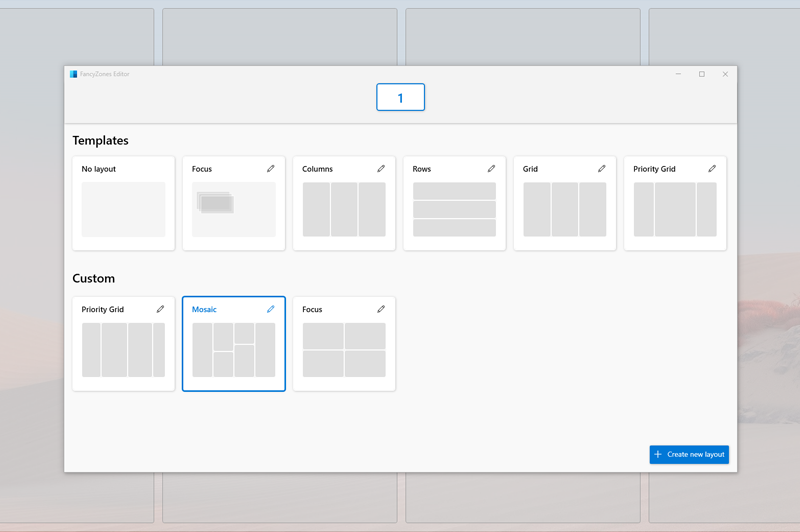
FancyZones lets you create custom window layouts and snap applications into the places you choose. Keep a reference document beside your editor, divide a wide monitor into several working areas, or give each part of a project its own space. Workspaces takes a different approach: it launches a group of applications into saved positions, helping you return to a familiar desktop setup without arranging every window again.
Keep Apps and Commands Within Reach
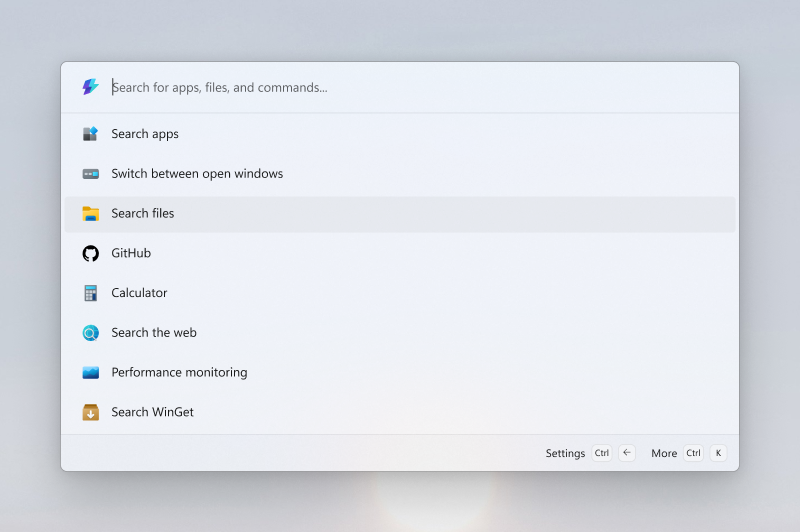
Command Palette brings frequently used apps, commands and tools into a single keyboard-driven interface. PowerToys Run offers another quick launcher with plugin support, giving users a way to find and open applications without moving through menus. For people who prefer keyboard shortcuts, these tools make switching tasks feel more direct and keep everyday actions close at hand.
Rename and Resize Files in Batches
PowerRename handles groups of files with search-and-replace rules and regular expressions. A preview shows the proposed names before you apply them, and completed renames can be undone. It is useful for bringing order to photos, project assets or documents with inconsistent names. Image Resizer adds batch image resizing to File Explorer, so preparing several pictures does not require opening and editing each one separately.
Make Text and Clipboard Work Easier
Text Extractor uses optical character recognition to copy text from an area of your screen, including content that cannot be selected normally. Advanced Paste offers ways to paste clipboard content as plain text, Markdown or JSON, with optional AI-powered actions available separately. Quick Accent helps you enter accented characters on keyboards that do not make them easy to reach. Together, these utilities reduce the back-and-forth involved in moving information between applications.
Adapt the Keyboard and Mouse to You
Keyboard Manager lets you remap keys and create custom shortcuts, making a keyboard layout better suited to your habits. Mouse utilities help you find the pointer and make its position easier to follow, which can be useful on a large desktop or during a demonstration. Mouse Without Borders goes further by letting one keyboard and mouse control multiple computers.
Handle the Small Interruptions
Always On Top keeps a chosen window above the others, while Awake keeps the computer awake without changing its power and sleep settings. Peek previews file content without opening a separate application, and Color Picker samples colors from anywhere on screen. These are focused tools rather than full applications, but each addresses a task that can otherwise break your concentration.
Free, Open Source and Built for Windows
PowerToys is a Windows utility collection maintained by Microsoft and its contributor community, with source code available on GitHub under the MIT license. Its appeal is the range of useful improvements in one place: you can start with the tool that solves an immediate problem and explore the rest as your workflow develops.
Screenshot note: the images come from the official project documentation; the version shown is not specified.
Key Features
Window layouts
FancyZones lets you define zone layouts and snap windows into them.
Keyboard remapping
Keyboard Manager remaps keys and shortcuts.
Bulk renaming
PowerRename renames many files at once from File Explorer.
Quick launchers
Command Palette and PowerToys Run are listed as launchers in the official repository.
Pros & Cons
Pros
- Free and open source under the MIT licence
- Published and maintained by Microsoft
- Utilities can be enabled one by one
- Public source code and release history on GitHub
Cons
- Windows only
- Large installer compared with single-purpose tools
Frequently Asked Questions
Is PowerToys free?
Yes. It is free and released under the MIT licence.
Which operating system does PowerToys run on?
Windows. The official releases provide x64 and ARM64 installers.
Where do I download PowerToys?
From the official GitHub releases page: https://github.com/microsoft/PowerToys/releases
Screenshots