
SpaceSniffer
Visual disk space analyzer for Windows that uses an interactive treemap to reveal large files and folders, with filters, tagging and real-time updates for faster cleanup.
Download Now
Free for Windows. No registration required.
One of over 130 tools we've selected. No paid listings.
How we review software →Screenshots
About SpaceSniffer
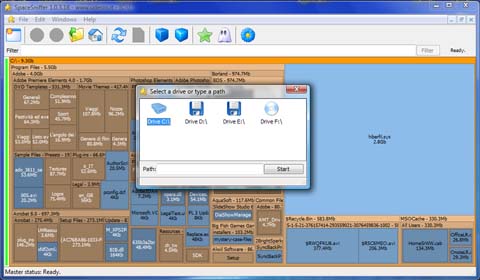
SpaceSniffer is a Windows disk space analyzer that turns your drives into an interactive treemap, making it much easier to see where space is actually going. Instead of browsing long folder trees, you get a zoomable map where every block represents a file or folder and its size is proportional to the space it occupies.
The program runs as a single executable and does not require installation, which makes it convenient for technicians or power users who work from a toolkit on USB media. Once you point SpaceSniffer at a drive or directory, it starts scanning and progressively fills the view, so you can begin exploring results even before the scan finishes.
Navigation is straightforward. Double-clicking a block zooms into that folder, while the breadcrumb and back/forward controls let you move around the structure much like a web browser. Animated updates make structural changes visible as you delete or move files in Explorer, and the layout reacts in near real time. This feedback loop is useful when cleaning up old backups, forgotten video files or large archives scattered across multiple folders.
A key strength of SpaceSniffer is its filtering system. You can limit the view by file masks, size thresholds, age and attributes, and combine these criteria when you need to isolate a specific kind of data set, such as recent large files or old temporary data. Tagging lets you mark items for later processing, which helps when planning a cleanup across several locations without losing track of what needs attention.
SpaceSniffer focuses narrowly on visualization and exploration and leaves actual file operations to Windows Explorer via the context menu. This design keeps the interface lean while still giving quick access to common actions like delete or open folder. For users who prefer a lightweight, portable tool that surfaces disk usage problems quickly without additional background services, SpaceSniffer remains a practical option despite its age.
Key Features
Treemap visualization of files and folders with zoomable layout
Double-click to zoom into folders and use breadcrumb navigation to move around the structure like a web browser.
Pros & Cons
Pros
- Clear visual overview of disk usage that is quick to interpret
Cons
- Windows-only, interface feels dated compared to newer tools
- No built-in scheduler or automatic cleanup; all actions are manual
Frequently Asked Questions
Is SpaceSniffer free to use?
Yes, SpaceSniffer is distributed as freeware and can be used without a license fee.
Screenshots