
WinDirStat
Free disk space analyzer tool to visualize folder sizes and storage usage on Windows
Download Now
Free for Windows. No registration required.
One of over 130 tools we've selected. No paid listings.
How we review software →Screenshots
About WinDirStat
Overview
WinDirStat is a free, open-source disk usage analyzer for Windows that provides a visual representation of folder and file sizes on your hard drives. If you've ever wondered where your storage space has gone, WinDirStat quickly pinpoints large files and folders consuming disk space through its intuitive interface and colorful visualization.
Key Functionality
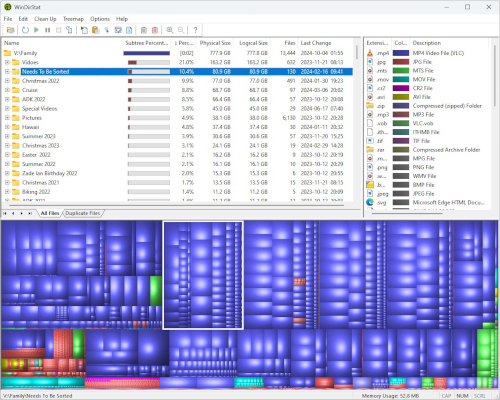
The application uses a treemap visualization to display storage allocation across your filesystem. Each rectangle represents a file or folder, with size proportional to disk usage. This makes it straightforward to identify space hogs without navigating through countless directories. The file list shows detailed information including file extension, size, percentage of total usage, and creation date.
Features
WinDirStat scans your entire drive structure, categorizes files by type, and generates statistics for informed cleanup decisions. The extension filter helps focus on specific file types. Users can select files and folders directly within the application and open them in Windows Explorer for management. The program supports multiple drives and volume analysis simultaneously.
Performance
The software runs efficiently on modern systems, handling large drive scans without excessive resource consumption. Initial scans may take time depending on drive size, but subsequent operations remain responsive. The lightweight footprint makes it suitable for systems with limited resources.
Use Cases
Whether managing storage on personal machines, identifying obsolete backup files, or monitoring drive usage trends, WinDirStat serves both casual users and system administrators. IT professionals appreciate its ability to generate detailed reports for capacity planning and cleanup procedures across Windows workstations.
Key Features
Treemap Visualization
Visual representation of disk space usage through a colorful treemap interface where file and folder sizes are proportional to their storage consumption
File Type Categorization
Automatically groups files by extension and displays statistics for each file type, helping identify which categories consume the most storage space
Pros & Cons
Pros
- Free and open-source with no registration required
- Lightweight and minimal resource usage during scans
Cons
- Windows-only application with no Mac or Linux support
- Limited interface customization options compared to some alternatives
Frequently Asked Questions
Does WinDirStat work on Windows 11?
Yes, WinDirStat is fully compatible with Windows 11. The application runs efficiently on Windows 11 and continues to provide reliable disk space analysis and visualization for modern Windows systems.
Can I delete files directly from WinDirStat?
WinDirStat primarily serves as an analysis tool. While it doesn't support direct file deletion from within the application, you can select files and open them in Windows Explorer where you can manage and delete them as needed.
Quick Info
Screenshots