I Replaced All My Adobe Subscriptions with Free Software
In 2022 I was paying Adobe €60 a month. Photoshop, Lightroom, Premiere, Illustrator, the whole Creative Cloud bundle. I'd been on it since 2014. Eight years times €720 a year is over €5,000 spent on rented software.
I cancelled in the summer of 2023 after Adobe announced another price hike. I was angry, I was curious, and I had two weeks of vacation to figure out if I could actually live without them.
I'm writing this in early 2026. I still haven't gone back. Not because I'm stubborn but because, honestly, I haven't needed to. The free alternatives have gotten genuinely good. Adobe's strategy of jacking up prices while pushing AI features nobody asked for has made the switch easier than it should have been.
This article walks through every Adobe product I used, what I replaced it with, what works perfectly, and what compromises I actually had to make. No marketing fluff. No "free alternatives that are just as good as Adobe!" lies. Real talk about what's better, what's worse, and what's a wash.
If you're paying Adobe and wondering whether you could escape, this is the article I wish I'd had.
The Math First
Let me put real numbers on this because they're shocking.
Adobe Creative Cloud All Apps in 2026: €70/month for individuals. €840 a year. For software you'll never own.
Over 10 years, assuming no price hikes: €8,400.
Adobe has raised prices roughly every two years. The real 10-year cost is probably closer to €10,000.
The free replacements in this article cost €0. Even if you donate generously to each open-source project you use, you're looking at maybe €100 a year out of gratitude. That's a 99% reduction in cost.
I'm not saying everyone should switch. I'm saying everyone should at least know what they're choosing when they keep paying.
What I Replaced and What I Use Now
Here's the entire stack swap, then I'll go deep on each one.
Adobe product | What it does | Free replacement |
|---|---|---|
Photoshop | Photo editing, compositing | GIMP + Krita |
Lightroom | Photo organization and RAW editing | darktable |
Illustrator | Vector graphics | Inkscape |
Premiere Pro | Video editing | DaVinci Resolve |
After Effects | Motion graphics | Blender + DaVinci Fusion |
InDesign | Page layout, publishing | Scribus |
Acrobat Pro | PDF editing | PDF-XChange Editor |
Audition | Audio editing | Audacity or Ocenaudio |
XD | UI/UX design | Penpot or Figma free |
Bridge | Asset management | digiKam |
Fresco | Digital drawing | Krita |
Eleven Adobe apps. Eleven free replacements. Zero monthly fee.
Photoshop to GIMP (with help from Krita)
Photoshop was the hardest to give up. Twenty-plus years of muscle memory don't disappear in a week.
GIMP handles probably 85% of what I used Photoshop for. Photo retouching, basic compositing, color correction, removing backgrounds, resizing for web. All fine.
What I lost in the switch:
Content-Aware Fill quality. GIMP's equivalent (via the Resynthesizer plugin) is rougher on complex backgrounds.
The Generative Fill AI feature. Genuinely magical when it works in Photoshop. GIMP doesn't have an equivalent yet.
Some Photoshop muscle memory. The first month with GIMP, I kept reaching for shortcuts that didn't exist.
What I gained:
Faster startup. GIMP opens in 3 seconds. Photoshop took 30.
No subscription anxiety.
Files I can still open in 20 years without paying a license.
G'MIC plugin, which adds hundreds of effects Photoshop charges for or doesn't have.
For digital painting specifically, Krita has actually replaced Photoshop better than GIMP. If you draw or paint, Krita is genuinely excellent and arguably better than Photoshop for that specific use case.
The honest verdict: if you're a photo retoucher at a magazine working with print files in CMYK and using cutting-edge AI features, you still need Photoshop. For everyone else, including most professional graphic designers, GIMP is fine. After a month you stop noticing.
I wrote a whole article on this specifically that goes deeper into the comparison.
Lightroom to darktable

This was the easiest swap and the biggest surprise. darktable is genuinely better than Lightroom in several ways.
What darktable does well:
Non-destructive RAW editing with a more powerful module system than Lightroom
Better color management out of the box
Faster on large libraries once configured
Modern interface (yes, really)
Full keyboard shortcut customization
Works on Windows, Mac, and Linux
Reads all major camera RAW formats
What you give up versus Lightroom:
The "feel" of the develop module. Lightroom's sliders are smoother. darktable's are more powerful but less intuitive at first.
Cloud sync between devices. darktable expects you to manage your own files and library.
Adobe's superior face detection and AI auto-tagging.
The mobile app. There's no darktable mobile.
The learning curve is real. darktable assumes you understand color science and exposure in ways Lightroom hides from you. The first week is humbling. By month three you'll be doing things Lightroom couldn't.
Honest take: for any photographer who actually cares about output quality and is willing to learn, darktable is a genuine upgrade over Lightroom. For casual phone photographers who just want a "make my photo look better" slider, stick with Lightroom or use your phone's built-in tools.
Alternative worth knowing: RawTherapee is similar to darktable, slightly different philosophy. Try both, pick whichever clicks for your brain.
Illustrator to Inkscape

Inkscape is the free vector graphics editor. It does what Illustrator does. Lines, curves, shapes, text on paths, gradients, exports to SVG natively.
For most vector work, Inkscape is fine. Logo design, icon creation, simple illustrations, technical diagrams: all handled.
Where it falls short:
Adobe's pen tool feels smoother to professional illustrators
Some advanced typography features in Illustrator are missing or implemented differently
Performance on huge documents with thousands of objects can lag
The interface has improved but still looks dated next to Illustrator
Where it shines:
SVG is its native format, which matters for web work. Illustrator treats SVG as an export format. Inkscape thinks in SVG.
The Extensions system lets you add Python scripts that do things Illustrator can't.
Free forever. Your files open in 2030 without a subscription.
Honest take: if you're a professional illustrator doing complex commercial work, you might miss Illustrator. For 90% of vector design needs (logos, icons, web graphics, technical drawing), Inkscape is the right tool. The fact that it's free is a bonus to its capability, not a compromise.
Premiere Pro to DaVinci Resolve
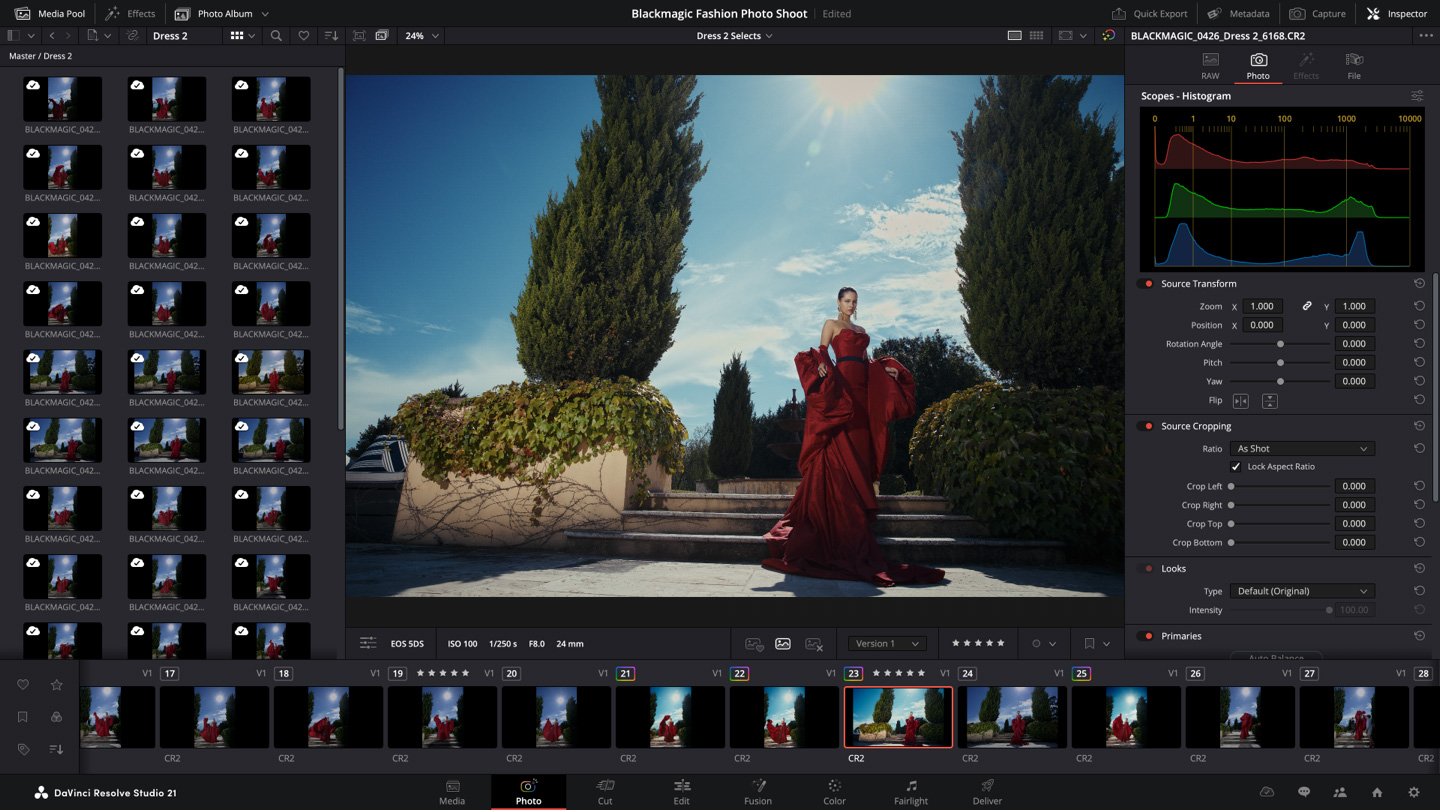
This is the funniest swap because DaVinci Resolve is not just "as good as Premiere Pro." For most purposes it's better. And the free version is the actual professional software, not a watered-down trial.
DaVinci Resolve free includes:
Full editing on a multi-track timeline
Color grading that's genuinely the industry gold standard
Fusion for visual effects (replaces a lot of After Effects)
Fairlight for audio mixing
Cut page for fast turnaround edits
Industry-standard codec support
No watermarks, no time limits, no asterisks
What's locked behind paid Studio version (€295 one-time, not subscription):
Some specific codecs (HEVC encoding, RED RAW)
4K+ output (free version caps at 4K UHD, which is fine for most)
Some neural engine AI features
Multi-GPU support
HDR grading at the highest end
For 95% of video editors, the free version is everything they need.
What you actually lose moving from Premiere:
Some plugin ecosystem. Premiere has more third-party effects available.
Lumetri color presets you might be used to. Resolve has its own color tools that are more powerful but different.
Easy roundtrip to After Effects. Resolve's Fusion replaces a lot of AE but the workflow is different.
What you gain:
Color grading that genuinely outclasses Premiere
Better stability (Premiere crashes more, ask any editor)
One application that does what used to need Premiere + After Effects + Audition
No subscription
Software that won't change unexpectedly with quarterly updates
Honest take: for any new editor learning today, DaVinci Resolve is the obvious choice. For Premiere veterans, the transition takes a few weeks. For Hollywood productions, this is what they actually use for color grading anyway. Adobe has nothing comparable.
After Effects to Blender (and Fusion)
This is the harder swap. After Effects has decades of motion graphics templates, plugins, and tutorial content that no free tool fully replicates.
Two replacements working together:
DaVinci Fusion (included free in DaVinci Resolve) handles compositing and VFX work. Node-based instead of layer-based, which is a different mental model. Powerful, professional, and the same tool used by major film productions.
Blender handles 3D motion graphics, complex animations, and any work that touches 3D. Free, open source, and frankly extraordinary.
The honest truth: there's no single free tool that's a one-for-one replacement for After Effects. The Adobe template ecosystem (Motion Bro presets, Envato templates, etc.) doesn't exist in the same form for the alternatives.
For complex motion graphics work, this is the swap that costs you the most. You can still do everything, but you'll spend more time building things from scratch instead of using templates.
Honest take: if motion graphics is your main job, you might want to stay on After Effects or accept a learning curve. For occasional motion work, Blender plus Fusion covers it.
InDesign to Scribus
Scribus the free page layout tool. Books, magazines, newsletters, brochures, anything print or PDF-output focused.
It's fine. That's the most honest summary. Scribus is fine.
Compared to InDesign:
Interface is dated
Master pages and styles work, but less elegantly
Color management is solid for print
CMYK support is proper, which matters for commercial printing
Smaller plugin and template ecosystem
Importing complex InDesign files is unreliable
For occasional layout work (annual report, a small book, a newsletter), Scribus does the job. For professional publishers running complex catalogs daily, InDesign is still the right tool, but those people probably aren't reading "free software" articles.
Honest take: Scribus is the weakest of all the Adobe replacements I've listed. It works, but it's the one I'd most consider paying for an alternative to. Affinity Publisher (€80 one-time, not subscription) is the obvious paid alternative if Scribus annoys you.
Acrobat Pro to PDF-XChange Editor
Adobe Acrobat Pro is overkill for what most people do with PDFs. PDF-XChange Editor free version handles 90% of those needs.
Free features include:
Reading and annotating
Filling forms
Combining PDFs
Adding signatures
OCR (limited in free)
Basic editing
Paid features that aren't in the free version:
Some advanced OCR features
Some specific export formats
No watermark on edited pages
For most personal and small business use, you'll never hit the paid features. For heavy PDF editing workflows, the paid version of PDF-XChange is €43 one-time, not a subscription.
Honest take: the free version of PDF-XChange Editor has replaced Acrobat Pro for me with zero compromises in my actual workflow.
Audition to Audacity or Ocenaudio
I covered this in detail in a previous article. Short version:
For multitrack audio editing: Audacity, free, open source, mature.
For fast single-file editing and audio cleanup: ocenaudio, lighter and more modern.
For podcast production at scale: honestly, Reaper at €60 one-time is the value play, but Audacity does the job for free.
Adobe Audition's main advantages are integration with Premiere (irrelevant if you're using DaVinci Resolve) and a few specific audio restoration tools. For everything else, the free alternatives work.
What I Actually Lost in the Switch
I'll be honest about the trade-offs because pretending there are none would be dishonest.
Time spent learning new tools. The first month was frustrating. Two evenings a week relearning workflows that used to be automatic. After six weeks, mostly fine. After three months, no thoughts of going back.
Some AI features. Adobe has poured money into AI features in the last two years. Generative Fill in Photoshop, neural filters, voice enhancement in Premiere. The free alternatives are catching up but are behind. If these features are central to your work, the calculation is different.
Plugin ecosystem. Adobe has 20 years of third-party plugins built on its tools. The free alternatives have less. For most users this doesn't matter. For specialists it might.
Industry compatibility. When a client asks for an InDesign file or sends you a PSD with effects layers, the conversion can be imperfect. Most modern teams accept PDF deliverables, which makes this less of an issue than it used to be.
That's the entire list of real downsides. None of them cost me €60 a month in value.
What I Actually Gained
€60 a month back. That's €720 a year. Real money.
Software that won't change unexpectedly. Adobe updates can move buttons, deprecate features, and force workflow changes. The free tools I use are stable. The version of Inkscape I learned in 2023 still works the same way today.
No account dependency. If Adobe decides to lock my account, all my work becomes inaccessible. With free software, my files open without anyone's permission.
Files that will open in 20 years. Open source software persists. Companies don't always.
Better skills. Forcing myself to learn new tools made me a more flexible designer. Tool-locked specialists are increasingly vulnerable as software shifts.
Less mental load. Adobe's pricing pages, plan comparisons, and constant upsells took up brain space. Free software just works.
Who Should Actually Stay on Adobe
I'm not going to pretend everyone should switch. Some people should keep paying:
Professional photo retouchers working on high-end commercial work with CMYK output and current AI features
Motion graphics artists whose workflow depends on the After Effects template ecosystem
Print publishers running daily production with complex InDesign documents
Agency teams where Adobe file exchange is part of every workflow
Anyone whose income directly depends on a specific Adobe feature that doesn't have an equivalent
If your job is to make professional Photoshop or InDesign files for other professional Photoshop or InDesign users, the cost of the subscription is rounding error against your income.
If your work is "I make stuff for myself, my blog, my YouTube channel, my freelance clients who get PDFs," you don't need Adobe. You haven't needed it for a while.
How to Actually Make the Switch
If you're considering this, here's what I'd actually do:
Step 1: Don't cancel Adobe yet. Install the free alternatives alongside it.
Step 2: For two weeks, force yourself to do new projects in the free tools. Keep Adobe open for emergencies but don't reach for it first.
Step 3: At the end of two weeks, look at what you actually used Adobe for. Probably less than you expected.
Step 4: Try a third week doing 100% free tools. If anything is genuinely impossible, note it. Usually there's one specific feature you miss, not the whole suite.
Step 5: Make the cancel decision based on actual evidence, not anxiety.
Most people who try this end up cancelling. The fear of switching is bigger than the reality of switching.
The Honest Final Calculation
Three years off Adobe. Money saved: roughly €2,160. Quality of work output: the same or better, depending on the discipline. Stress about Adobe price hikes: zero.
The free creative software ecosystem in 2026 is in the best state it's ever been. DaVinci Resolve dominates color grading. Krita rivals Photoshop for painting. darktable beats Lightroom for serious photographers. Blender is the industry-standard 3D tool for film production now. These aren't compromises. These are real professional tools that happen to cost nothing.
Adobe has bet on subscription lock-in. They're hoping you won't notice the price hikes if they're spread out. They're hoping you've forgotten what owning software feels like.
You don't have to play this game. The exit door has been open for years. You just have to walk through it.
Install one alternative this weekend. Try it on a real project. See how it goes. Worst case, you go back. Best case, you save €700 a year for the rest of your career.
The math is the math.