Olumino: A Free Flashcard and Notes App That Works Without Signing Up
- Web Apps
Olumino is a browser-based app that mixes Markdown notes with flashcards. Its author, who posts as Wiyseful, shared it on Hacker News on November 26, 2026. The pitch is simple: write cards yourself or let the app suggest some from your notes, then review them on a schedule that adapts to how well you remember each one.
What we tried
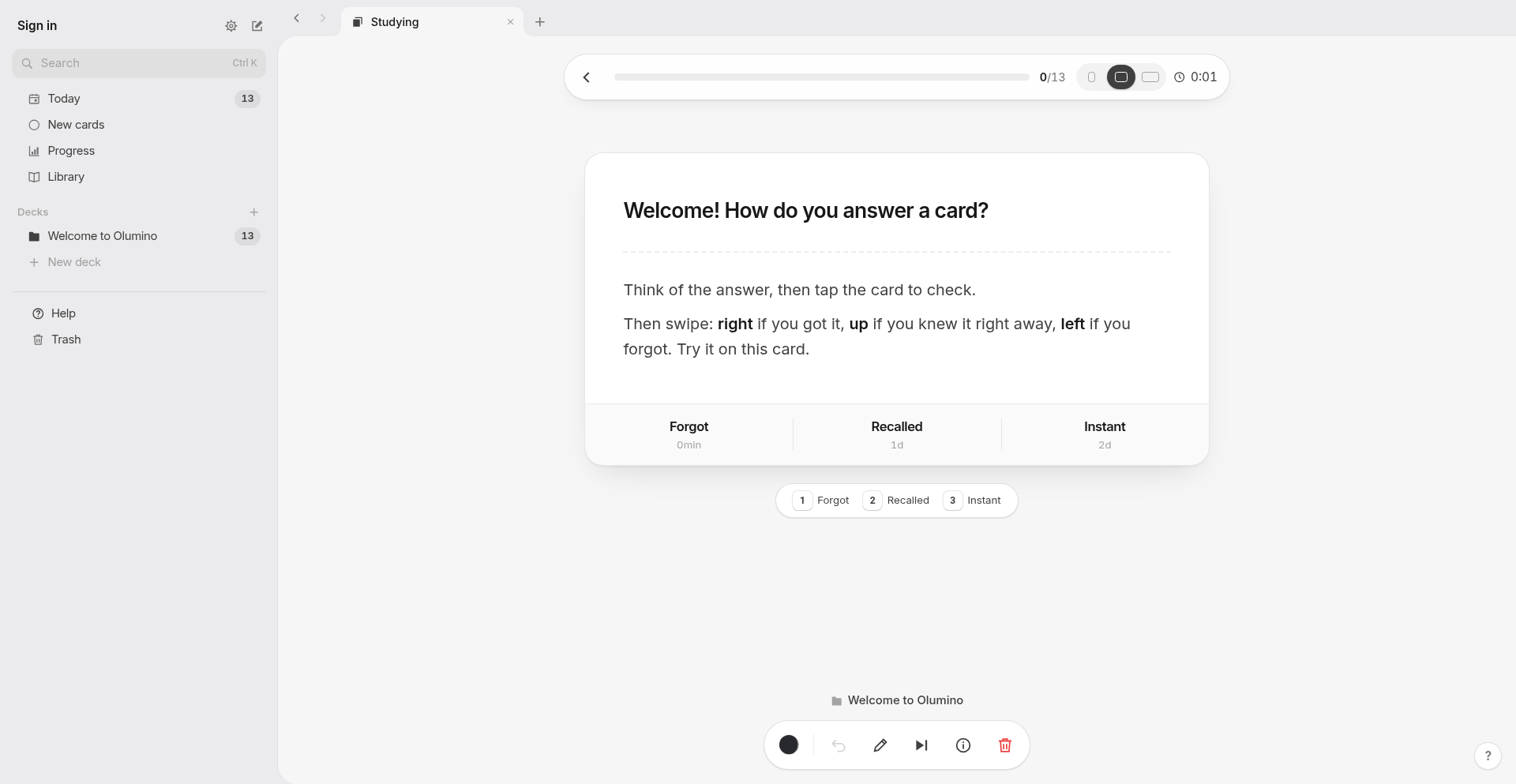
We opened the app at olumino.app/home on November 27, in a normal browser with no account. It went straight to a "Today" screen with a starter deck called "Welcome to Olumino" and 12 new cards, and the top of the sidebar showed a "Sign in" link that we never needed.
We pressed "Start studying". The first card asks "Welcome! How do you answer a card?". You think of the answer, click the card to reveal it, and then pick one of three buttons: Forgot, Recalled or Instant. Each button shows when the card would come back. On that first card, Recalled showed 1 day and Forgot showed 0 minutes. We answered Forgot on that card, and the app said it would be "back in a few cards". The keyboard shortcuts are shown on the page too: Space to reveal, then 1, 2 or 3.
Then we made a card of our own with the "New card" button in the sidebar. A small panel opens with a Question box and an Answer box. We typed "What is the capital of Canada?" and "Ottawa" and pressed Enter, and the panel said "1 added". The card did not go straight into the deck, though. It showed up on a "New cards" screen with two buttons, "Add" and "Not now". After we pressed Add, the deck grew from 12 to 13 cards. It is one extra step, but it means a card you wrote in a hurry is not scheduled until you say so.
What the project says
According to the site's questions page, decks, cards, notes and studying are free. Syncing between devices is part of Olumino Plus, which costs $8 a month. The scheduling uses FSRS-7, which the project describes as an open method for deciding when each card comes back. Cards show a moon that fills from "new" to "full" as you remember them after time away. The project says you can import Anki decks with their review history, and export any deck to Anki, a spreadsheet, Quizlet, Markdown or a printable sheet. It also says Settings has a button that saves all your decks, cards, notes and pictures to one file.
On privacy, the site says your data stays on your device first and that signing in keeps a copy in your account for your other devices. It also says that when card suggestions are on, the paragraph you are writing is sent so suggestions can be made, and that you can turn them off in Settings. The starter deck says the same thing in a card: cards are saved on the device first, so the app works offline. We did not sign in, did not turn suggestions on or off, and did not look at what the page sends over the network, so these are the project's statements, not our findings.
What we did not test
We did not try the note-to-card suggestions, importing an Anki deck, any of the exports, the backup file, the teacher classes, the free deck library, the read-aloud feature or the Japanese study tools that the project lists. We also did not try the app on a phone, where the project says you can swipe a card to answer it. We only studied the starter deck for a few cards and made one card, so we cannot say how well the schedule works over weeks.
Who it suits
If you want flashcards without creating an account, Olumino is easy to try, because the whole first session needed nothing but a browser. Students and language learners who already use Anki will find a familiar idea, and the import option is the part to check first. The Anki importer and the exports are what decide whether it is easy to leave later. If you want your cards on several devices, the project says that needs the paid plan.
Sources: the Olumino site and its questions section, tested by Freewares on November 27, 2026, and the Hacker News post.
Cover: screenshot of the Olumino study screen taken by Freewares on November 27, 2026, showing the starter deck.