Side by Side: A Free Cross-Browser Check That Runs Real Browsers in Your Tab, Tested
- Developer Tools
Side by Side is a free web page that opens one address in several real desktop browsers at once, so you can see how each one draws it. Nothing is installed. The project says each browser runs inside its own Linux virtual machine, compiled to WebAssembly, inside your tab. Its author, who goes by michidk on GitHub, created the repository on November 25, 2026, and a Hacker News post about it reached 152 points the next day.
What we tried
We opened the page on November 27 in a normal browser, with no account. It shows a single address bar, pre-filled with example.com, and buttons for Browsers (3), Mobile, Settings, Console, Reset and Open. By default it starts Firefox, Chromium and Epiphany, three panes side by side.
We pressed Open with the default three browsers. Each pane first printed a long list of packages it was downloading, with sizes and timings. That matches what the project says: the first visit takes one to three minutes while the browsers download. About a minute in, all three panes were still downloading. When we came back a few minutes later, our test browser session had been replaced by a fresh one, so we never saw the three browsers finish. We do not know why. The project asks for a desktop computer with 8 GiB of RAM or more, and we did not check how much our test session had.
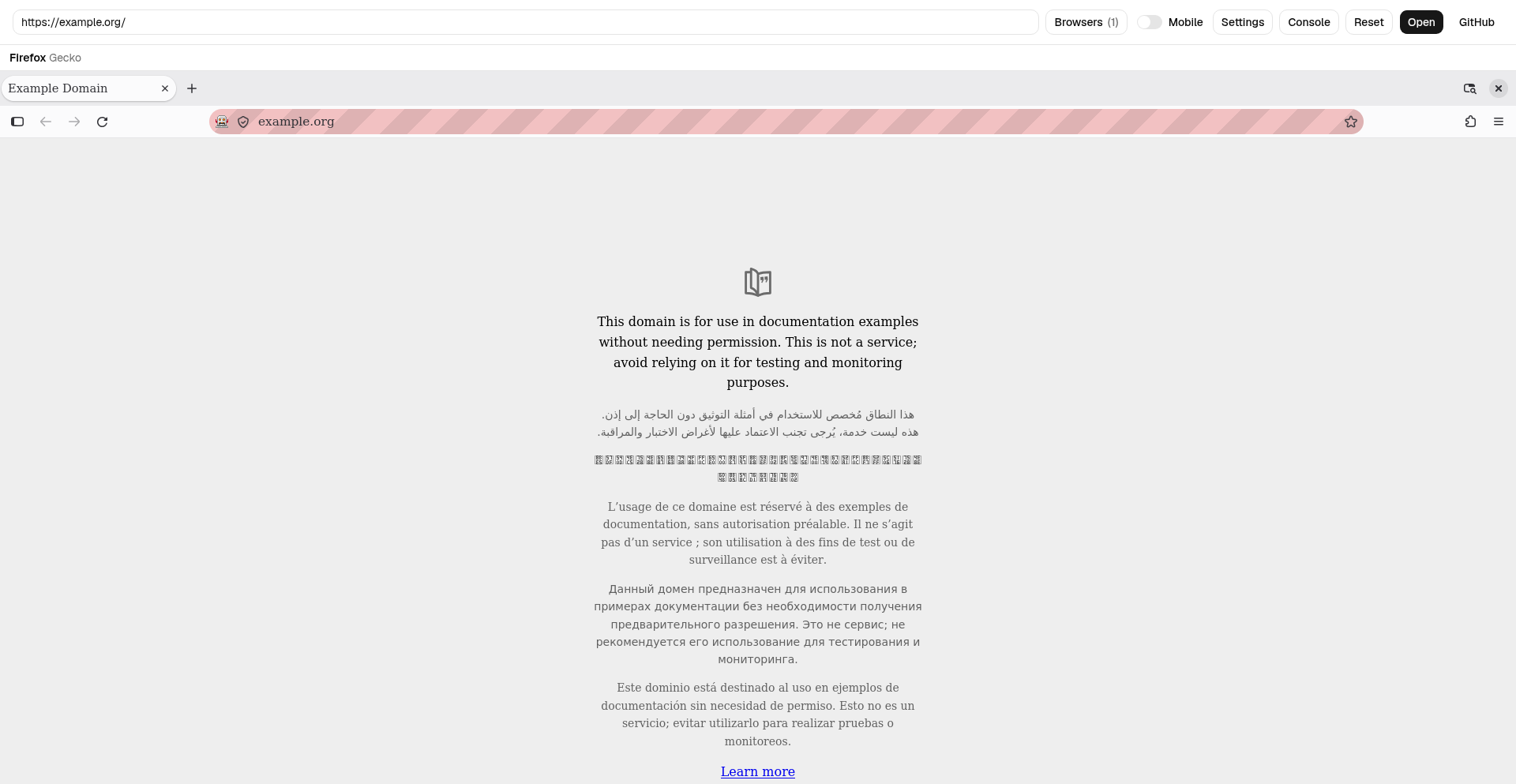
So we tried the browsers one at a time, which the Browsers button and the link options allow. With NetSurf alone, a small browser with its own engine, example.com loaded within the 45 seconds we waited, and the pane showed the page with NetSurf's own window and address bar. With Firefox alone, example.org loaded within the 100 seconds we waited. The page looked like Firefox running inside the pane, and its address bar had pink stripes, which is how the project says Firefox looks when it is under remote control. The page text showed in Arabic, French, Russian and Spanish, but one line in another script appeared as empty boxes, so some fonts seem to be missing in that virtual machine. We did not look into it.
What the project says
The README says the toolbar can switch the browsers to a phone-sized window, with a mobile user agent for all but NetSurf, collect the web-console messages of Firefox and Chromium in one list, and add Firefox ESR and NetSurf. It says a comparison can be shared as a link, for example with the address and the list of browsers in it. It also says that once a browser is running, its virtual machine is saved in the site's private storage so the next visit resumes it, and that Reset deletes the saved machines.
On privacy, the README is direct about one thing. Browsers cannot open raw network connections, so the virtual machines send their traffic through a public relay over WebSocket, and those relays can see which hosts the machines connect to. It also says websites see the relay's IP address, and it explains how to run the relay on your own computer instead. Browser files are downloaded from the NixOS cache. GitHub lists the licence as Apache 2.0, and the README badge says MIT or Apache-2.0.
What we did not test
We did not see Chromium or Epiphany run, and we did not see all three side by side. We did not try the Mobile switch, the Console list, Firefox ESR, saved machines, a shared link, the local relay, or any real website other than the two example pages. We did not measure memory or speed. Our test machine may be weaker than the project expects, so treat our crash as one data point.
Who it suits
If you build web pages and want a quick look at how WebKit (through Epiphany), Firefox and Chromium draw them without installing anything, this is an interesting idea and the part we saw worked. Plan for a long first load and a computer with plenty of memory, and do not open pages you would not want a public relay to see the address of. Because the test pages are examples, we cannot say how well it handles a complex site.
Sources: the Side by Side page, tested by Freewares on November 27, 2026, the GitHub repository and README and the Hacker News post.
Cover: screenshot of Side by Side with Firefox running example.org, taken by Freewares on November 27, 2026.