TextScope: Handy AI Text Cleanup, With One Privacy Caveat
- TextScope
- text tools
- AI writing
- SEO tools
- privacy
- browser tools
- free tools
TextScope is a free browser toolbox for the annoying text jobs that sit around writing: counting words, checking readability, removing AI Markdown, estimating prompt tokens, and previewing an SEO title in the site's simulated Google snippet.
The useful part is that it is not one bloated writing app. It is six small tools you can open without an account: a text analyzer, an AI text cleaner, a token counter, a headline checker, a reading-time calculator, and a case or URL-slug converter. The site says its tools calculate in the browser and are free, supported by ads.
What we tried
The analyzer matched the basic counts of our sample. We pasted a 12-word, 65-character sample split into three sentences. TextScope reported 12 words, 65 characters, 54 characters without spaces, three sentences, one paragraph, a 4-second reading time, a Flesch score of 97, and a US grade level of 1.0. The keyword panel correctly treated each word as one of twelve unique words.
The AI cleaner is the tool most likely to earn a bookmark. We pasted a small mess: a Markdown heading, bold and italic markers, an em dash, curly quotes, a bullet, a zero-width character, and a non-breaking space. With the default options, TextScope removed three Markdown tags, replaced the em dash, removed the U+200B zero-width character, normalized the U+00A0 non-breaking space into a standard space, and reported 14 total edits or trimmed characters. The bullet stayed because that option is off by default, which is the right call when list structure matters.
The token counter needs the right expectations. For Hello world, it returned three estimated tokens, two words, eleven characters, and tiny usage percentages for 8K through 1M context windows. Treat this as a quick estimator, not as the exact tokenizer your AI provider uses for billing or hard context limits.
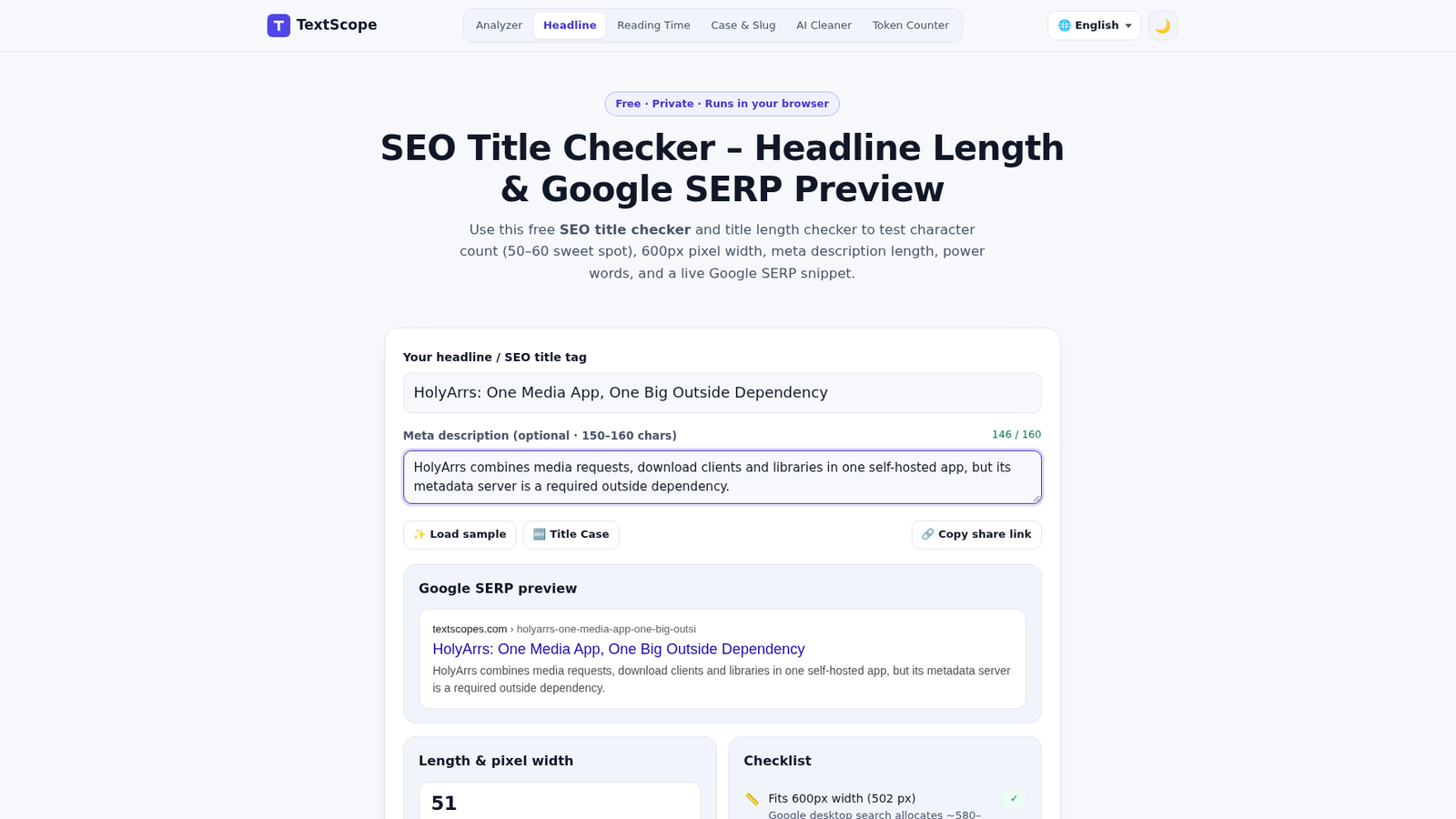
The headline checker was more convincing. We tested the title from our HolyArrs article: 51 characters, 8 words, a site-estimated 502 of 600 pixels, and an "Ideal" result for the 50-to-60-character range. The 146-character meta description appeared in the site's simulated Google-style snippet preview. It is a site-side pre-publication check, not a rank predictor or a guarantee of Google's real display.
The privacy caveat
TextScope's privacy page says calculations run entirely in local JavaScript and that text typed into tools is not transmitted to or stored on its servers. It also says drafts can be kept in browser localStorage so they survive a refresh, and the Clear button or browser site-data controls can remove them.
That is narrower than "nothing leaves the page". The same privacy policy discloses Cloudflare Web Analytics, Microsoft Clarity and Google AdSense. In our browser run, we saw Google ad frames and Microsoft Clarity collection requests after using the tools. We did not see our readable sample text in the fetch or XHR bodies we inspected, but this was not a packet-level audit, and analytics payloads can be encoded.
The policy says text typed into editor areas remains masked in Clarity. That is a useful disclosure, but it is still a third-party analytics and advertising page around local calculators. For ordinary drafts, headlines and AI output, the risk may be acceptable. For passwords, unpublished business plans, legal text or anything you would not want near an analytics pipeline, use an offline text editor instead.
Verdict
TextScope is worth keeping for two jobs: cleaning visible and invisible junk from AI output, and checking a title in the site's length and simulated-snippet estimate. The analyzer matched our sample's basic counts, and the token counter is fine when you only need a rough size estimate.
Just separate the product's local-processing claim from the page around it. TextScope says its tools calculate in the browser, but the site is not tracker-free. If that trade-off fits the text you are checking, it is a practical free bookmark.
Image credit: Freewares test capture of TextScope's headline checker.