chrome-capture: A Moving Square, a Real MP4, and No Encoding Detour
- chrome-capture
- Chrome
- open source
- screen recording
- developer tools
Recording a browser tab should not require assembling a small television studio. For a short demo, I want the page, the movement and a file I can actually open. chrome-capture takes that request rather literally: give its command line a URL, an output name and a duration, and Chrome does the recording.
The free, open-source tool wraps Chrome's native recording API. Its headline is AV1 video in an MP4 container, with optional tab audio and no external FFmpeg encoding step. That is the project's design. We tried the quieter version of the promise: one local page, one moving square and four seconds of recording.
What our four-second trial produced
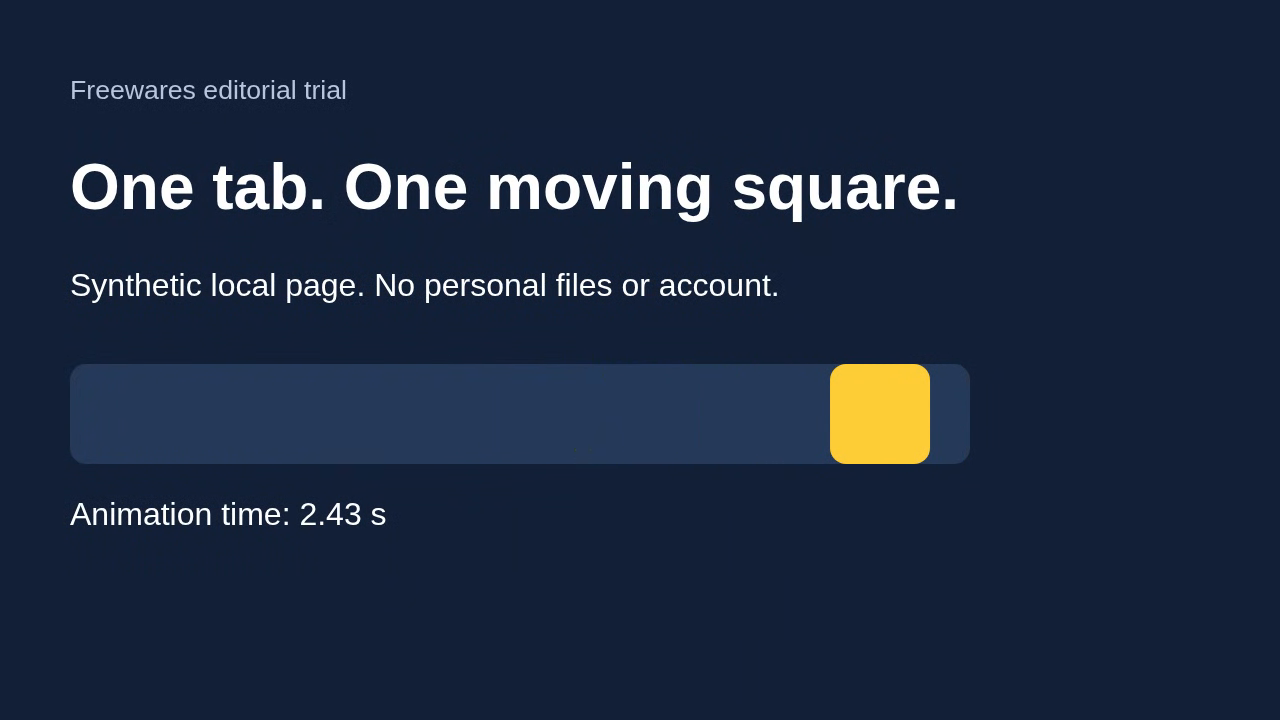
We used chrome-capture 0.1.2 on Linux, with Chrome 156 and Node.js 24.11.1. The page was made for this trial. It contained a heading, a yellow square moving across a track and an animation timer. No personal files, signed-in account or borrowed website content was involved.
Our command requested a 1,280 by 720 capture at the default target of 60 frames per second, with audio disabled. It completed and wrote a 277,838-byte MP4. We then decoded and inspected the result: AV1 video, 240 decoded frames and a reported duration of 3.9619 seconds. The sampled images showed the square in different positions and the timer advancing. Text remained readable in the inspected frames.
That is a working short capture, not a benchmark trophy. The reported average rate was about 60.6 frames per second, but dividing frame count by duration does not establish unique-frame delivery or perfect pacing. We did not run the project's frame-counter benchmark. We also did not test tab audio, 120 fps, 4K, interactions across navigation or another operating system.
FFmpeg was available for inspecting the finished file and extracting an image. It was not used by our recording command to encode the capture. Those are different jobs.
The part Chrome now handles
Older browser automation recording often takes a longer route: Chrome sends screenshots through its debugging connection, and another program turns those images into a video. chrome-capture uses the newer Page.startScreenRecording API instead. Chromium's own change record describes capturing the page and loopback audio, sending the media to an encoding service and returning the output through a stream.
The practical attraction is a shorter recording pipeline. It does not mean every machine will reproduce the author's performance figures. The repository publishes comparisons and high-frame-rate tests, but those remain its measurements on its stated hardware, not ours.
The command line runs headless by default at 60 fps or below. The documented 120 fps route needs an appropriate display and headed Chrome. A 60 Hz machine does not become a 120 Hz recorder because someone changes a flag.
What you need before copying the command
There are two version checks worth doing first. The project requires Chrome or Chromium 153 or newer for the recording API. The published package also requires Node.js 24.11.0 or newer. An older Node installation can be the stumbling block even when Chrome is current.
The README's basic command is:
npx chrome-capture https://paulirish.github.io/chrome-capture/ demo.mp4 4s
The CLI records tab audio by default. Add --no-audio when you only want the picture, as we did. Width, height, duration and target frame rate have their own options. A --chrome path can select the browser executable.
There is no desktop editor here: no timeline, trimming interface or annotation panel. Developers can also use the library with Playwright, Puppeteer or a raw debugging session, including starting a recording after setup rather than capturing every preparatory step.
Where I would use it
For a reproducible web demo, a UI bug report or a short automated walkthrough, this is a useful small tool. Its Apache 2.0 license and published source make it more inspectable than a mystery recording service. Neither fact guarantees that a recording contains no sensitive information. Whatever appears in the selected tab, and any tab audio you enable, deserves a check before sharing.
Our moving square is hardly cinema. That is why it was a good first test: the output was easy to inspect, the limits were clear, and an MP4 arrived without a separate encoding process. Start there before planning the 4K premiere.
Image credit: a frame from our actual chrome-capture output, showing a synthetic local test page. It is not a desktop interface screenshot or a benchmark chart. The page and capture were made for this editorial trial.
Sources
- https://github.com/paulirish/chrome-capture
- https://raw.githubusercontent.com/paulirish/chrome-capture/main/package.json
- https://raw.githubusercontent.com/paulirish/chrome-capture/main/LICENSE
- https://registry.npmjs.org/chrome-capture/latest
- https://github.com/paulirish/chrome-capture/blob/main/benchmarks/README.md
- https://chromium.googlesource.com/chromium/src/+/cc610ab5f797526e71a0a787823e019cc15dea89