CVPebble: Free CV Builder With No Account, Right in Your Browser
- Web Apps
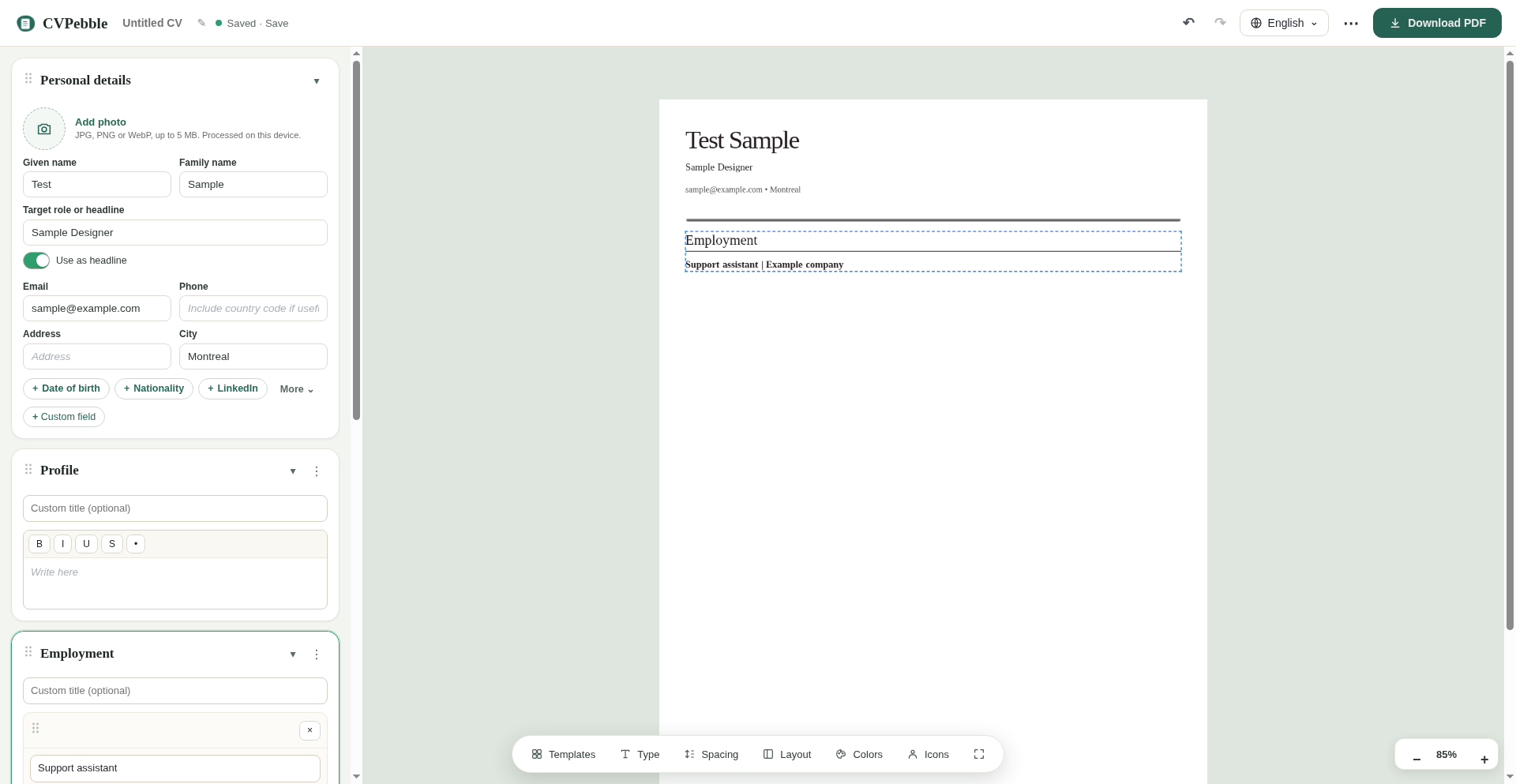
CVPebble is a free CV and resume builder that opens straight into an editor. There is no account, and the site says what you type stays in your browser. It appeared as a Show HN post on November 21, 2026, and I tried it on November 26.
What we tried
I opened the builder page, filled in a made-up name, a job title, an email address and a city, and added one employment entry with a job title and a company name. The page on the right updated as I typed, so I could see the CV take shape without pressing anything. The page is sized like a sheet of paper, with a zoom control at 85% and a small bar for Templates, Type, Spacing, Layout, Colors and Icons.
The Templates panel shows at least eight layouts, including Modern, Slate, Editorial and Executive. I switched from Modern to Editorial, and the preview changed at once while my text stayed in place. The editor has sections for Personal details, Profile, Employment, Education, Skills and Projects and volunteering, plus an "Add a section" option. A section can be dragged to a new place, and there are undo and redo buttons. The photo is optional and the site says photos are processed on your device. I did not add one. The language menu is set to English, and the site says it also offers Arabic, French, Spanish and Brazilian Portuguese.
Where your draft goes
The top bar shows "Not saved" until you press Save, and then it shows "Saved". After I saved, the browser held one stored item for the CV on the page's own site, which matches the site's statement that a draft is kept on your device. The privacy page says a draft is saved only if you choose to, and that anyone using the same browser profile may be able to see it. That matters on a shared or library computer, where you should clear the CV before you leave.
A cookie banner asks about Google Analytics. I pressed Reject. Afterward, the page's resource list showed requests only to the site's own domain. This is a limited check, because it does not cover everything a browser can do, but it fits the site's statement that your CV text is not sent anywhere. The About page also says the site shows no ads and has no accounts.
What I did not test
I pressed Download PDF, but my test browser does not let me open the file, so I cannot tell you how the PDF looks, whether the text can be selected, or how it handles long CVs. Check that yourself before you send it to an employer. I also did not test the photo upload, the JSON backup, the other languages, or the guides and scoring tools listed on the site. The site is run by an independent project and does not say how it pays for itself, a question that came up in the Show HN thread, so do not put anything private in it that you would not keep in a file on your own computer.
Who it suits
It suits anyone who wants a clean first draft of a CV without creating an account or handing over an email address, and who is fine with saving the final PDF on their own computer. If you need to keep your CV across several devices, there is no account to sync it, so you would have to use the JSON backup the site mentions and move the file yourself.
Sources: CVPebble, its privacy page and About page, and the Show HN thread, tested by Freewares on November 26, 2026.
Cover: screenshot of the CVPebble builder with sample details, taken by Freewares on November 26, 2026.