HapiPixel: Turn a Picture Into a Fuse Bead Pattern, Free in Your Browser
- Web Apps
HapiPixel is a website that turns a picture into a pattern for fuse beads, the small plastic beads sold as Perler or Hama. You upload an image, pick a bead palette and a grid size, and it gives you a bead-by-bead map with a colour count. The author posted it on DEV Community on November 25, 2026, and I tried it on November 26.
What we tried
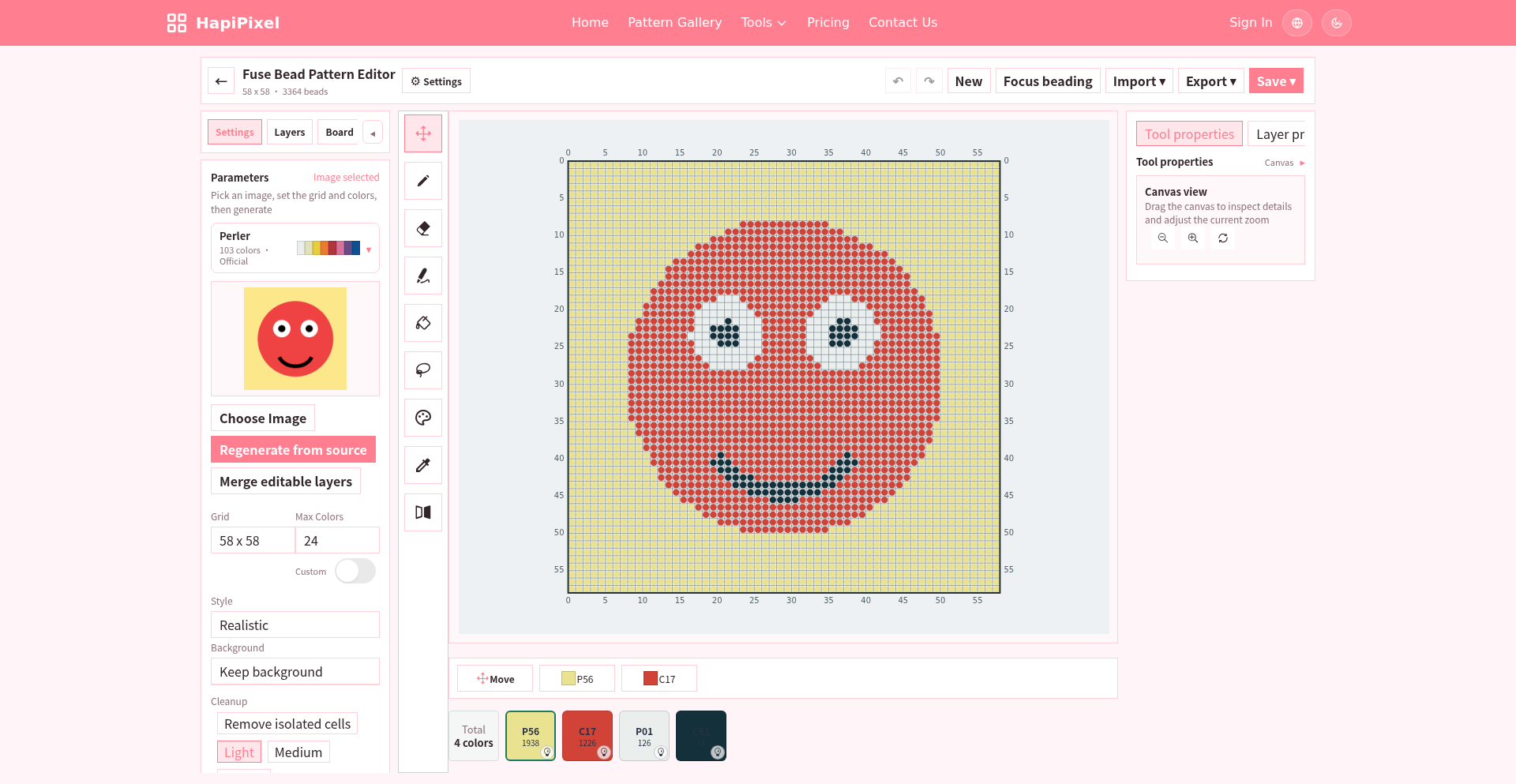
I opened the pattern generator and uploaded a simple test picture I drew myself: a red smiley face on a yellow background, 300 by 300 pixels. The site first shows a crop screen, where you can trim the picture, flip it or rotate it, and choose a ratio such as 1:1 or 3:4. After I confirmed the crop, the main screen offered a palette (Perler, with 103 colours, listed as official), a grid size (58 by 58 by default, 3,364 cells) and an Advanced section with a colour limit of 24 and a Realistic style. I pressed Generate Pattern without changing anything.
The editor opened with the finished pattern within a few seconds. The smiley was easy to recognise: the red face, the white eyes with dark pupils and the dark smile all came through, and the yellow background was kept as beads, because the default setting is "Keep background". The pattern used four colours, and the list at the bottom counted the beads for each, for example 1,938 for the yellow and 1,226 for the red, out of 3,364 in total. That count is what you need to know how many beads to buy. The editor also has drawing tools, layers, a board view, a "Focus beading" mode and undo and redo.
What is free and what is not
The pricing page says the core pattern tools stay free and that the photo-to-pattern converter, the editor and the pattern library are free. A paid membership, $4.99 a month or $39.90 a year according to that page, adds saved drafts, custom palettes, publishing to the gallery, PDF export and export without a watermark, and it is also where the AI image conversion lives. The free plan says exports carry a watermark. The Export menu offers a bead pattern, a PDF, a reference image and a custom export. I did not run an export, so I cannot tell you what the watermark looks like or which of those options the free plan allows.
Privacy and ads
The About page says the whole workflow happens on your own device, so your photos stay private. The privacy policy is more precise: it says generating and editing a pattern happens in your browser without sending the source photo to its servers, but that saving a draft to an account or publishing to the gallery uploads the preview image, the layers and the project data. It also says published patterns are public and that drafts are private to your account. I did not test the paid AI conversion, so I cannot say where that runs. In my test, the editor itself only contacted the site's own address, for what looked like export quota and logging calls. I cannot see what those calls contain, so I cannot confirm what is sent. The page around the editor also loaded Google advertising and analytics requests, and an ad frame was part of the page, so this is an ad-supported site. If you plan to use a photo of your child or your home, keep that in mind.
Who it suits
It suits a parent, a teacher or a hobbyist who wants to check how a picture looks in beads before buying them, and who is happy to use the free tools. A detailed photo will need a bigger grid and more colours than my smiley, and I did not test one, so expect to experiment with the settings.
Sources: HapiPixel, its pricing, About and privacy pages, and the author's DEV Community post, tested by Freewares on November 26, 2026.
Cover: screenshot of the HapiPixel editor showing a pattern made from our test picture, taken by Freewares on November 26, 2026.