DeskBox: Native Widgets for an Organized Windows Desktop
- DeskBox
- Windows
A Windows desktop tends to fill up one "I will sort it later" at a time: screenshots, downloads, half-finished projects. Paid organizers such as Stardock Fences have long promised to fix that, for a price. DeskBox takes the same idea and makes it free and open source: resizable boxes and widgets that sit on the desktop, built with WinUI 3 so they look like part of Windows 11 rather than something bolted on top.
Boxes backed by real folders
The core of DeskBox is the file widget. One kind collects files into a managed box backed by an ordinary Windows folder; the other maps a folder you already have, so a project directory or your Downloads folder can appear on the desktop without anything being moved. Inside a box you get the actions you would expect from Explorer: drag in and out, copy, cut, paste, rename, delete, reveal in Explorer, icon or list views. Because every box is backed by a real folder, your files stay normal files. Uninstalling the app does not swallow them into a private database, and the project's README says user files in managed storage are always preserved on removal.
Similar files can be stacked, manually or through an opt-in automatic grouping, and boxes can merge into tabbed groups you switch between with the mouse wheel. A separate Organize Desktop flow previews a cleanup by category before anything moves, with per-file selection and a resumable transfer. That preview-first approach is reassuring: you see the plan before the app touches a single file.
DeskBox widgets with the Mica material. Image: DeskBox project, GPL-3.0.
Widgets that feel native
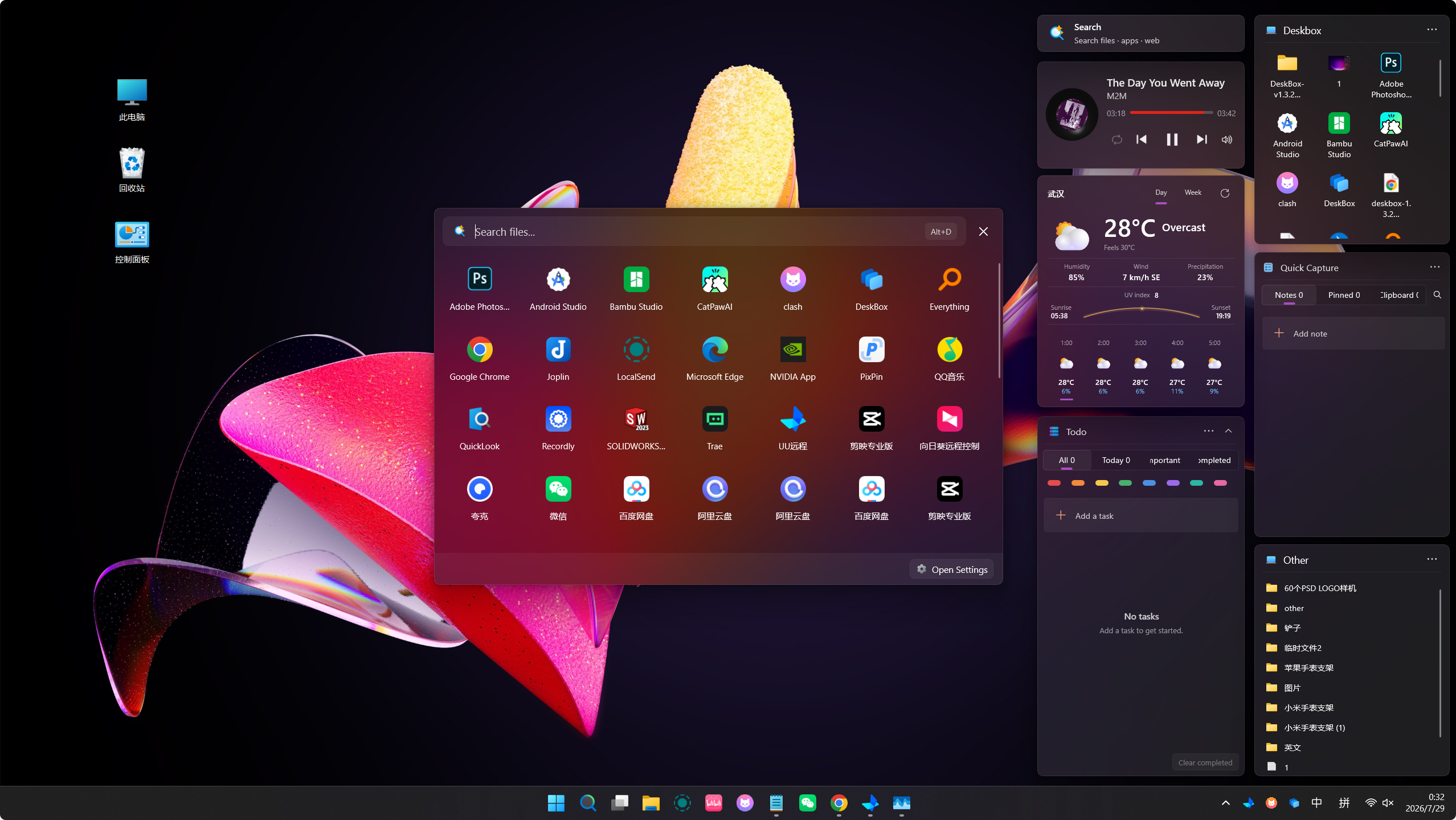
DeskBox is built on WinUI 3, and the official screenshots lean into that: widgets with Mica and Acrylic materials, rounded corners, and light and dark themes that follow the system. Any widget can collapse into a small capsule showing an icon, a title or a short summary, and expand on hover or click; several capsules can join a movable bar. Pressing F7 hides every widget, and pressing it again brings them back above whatever window is open, so a clean desktop and a well-stocked one are one keypress apart.
Around the file boxes sit extras: a todo list with due dates, reminders and recurrence, quick notes with Markdown, a search popup that can query files through a separately installed copy of Everything, weather with hourly and multi-day forecasts, music controls for the active Windows media session, and a Glance widget for the date and calendar. The project itself describes these as useful extras rather than the core promise, which is a healthy set of priorities for a desktop tool.
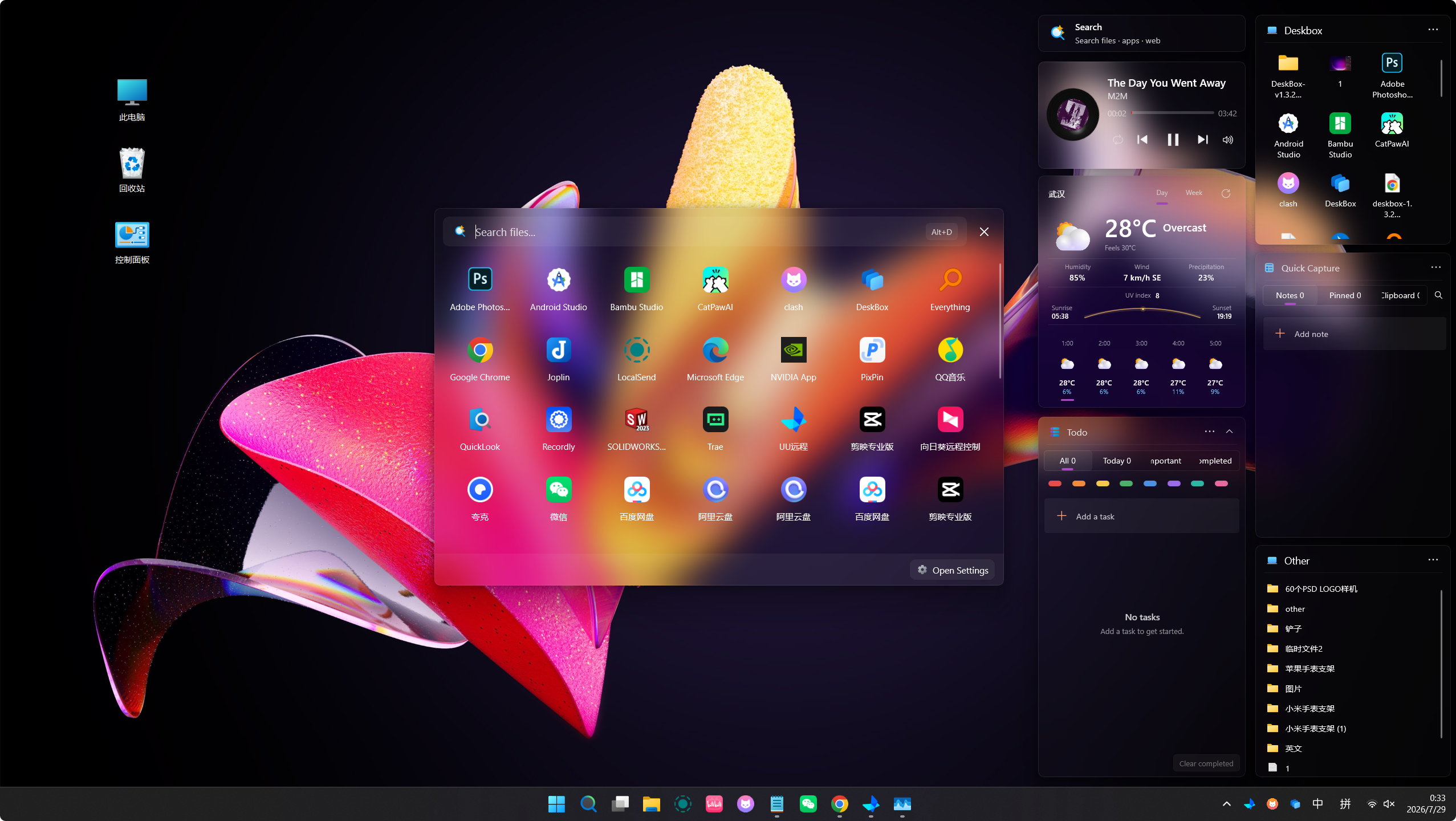
The Acrylic material gives the widgets a frosted look. Image: DeskBox project, GPL-3.0.
Local-first, and honest about limits
DeskBox needs no account and syncs nothing by default; settings, notes, todos and layouts stay on the PC. The only optional cloud feature is a backup to your own WebDAV server. Documented network use is limited: weather providers, update checks, and files you deliberately import from a URL.
The caveats are worth knowing. It is Windows-only (Windows 10 version 2004 or later, with Windows 11 22H2 recommended for the full visual treatment), on x64 or ARM64. The direct installer is currently unsigned, so SmartScreen will warn; the project publishes SHA-256 checksums for each release and says code signing via SignPath is coming. Desktop file search relies on Everything's index, which you install separately. And DeskBox is maintained by a single developer, Tianyu Zhu, which means fast progress but also a bus factor of one.
This article is a discovery based on the project's official README, release notes and website. We have not installed or run DeskBox on our own machines, so performance impressions belong to the project and third-party reviewers, not to us. What we can confirm from the sources: version 1.5.9 was released on October 23, 2026, the code is published under the GPL-3.0 license, and the direct download is free.
If your desktop is a pile of icons and you want Fences-style organization without a license fee, DeskBox is one of the more convincing free options we have seen documented this year. See our DeskBox software entry for the download details, checksum guidance and quick facts.
Sources: DeskBox repository, version 1.5.9 release notes. Screenshots: DeskBox project / Tianyu Zhu, GPL-3.0, unmodified.