Fretbot: See Chords and Scales on the Neck
- web tools
- guitar
- music
Guitar theory gets much easier when you can see it. Fretbot puts chords, scales and melody ideas directly on a 24-fret neck, then lets you play over the progression it maps for you. It is a free browser app, with no account asked in our test.
The opening view is already useful. Standard tuning and C are selected by default, but changing the root redraws the neck immediately. Red dots mark roots, amber dots mark chord tones, and blue dots mark scale tones. You can drag across the neck, narrow the view to frets 2-14, and leave strings out of Loop mode. It feels closer to a thinking fretboard than another page of diagrams.
What we tried
We started with the welcome tour's Explore route. In the Jam view, Fretbot loaded its featured "Spectrum" progression: Amaj7, G#m7, C#m7 and C#m11. The page showed the Roman numerals, suggested A Lydian for the first chord, and listed alternate scales for each chord. Pressing Play changed the transport to "Playing" at 120 BPM; Stop returned it to rest. We verified the playback state, but did not assess audio quality.
The progression generator is the part we would come back for. We entered "dreamy indie pop with a wistful lift" and clicked Generate. Fretbot warned that writing usually takes 5-10 seconds, then returned three progressions.
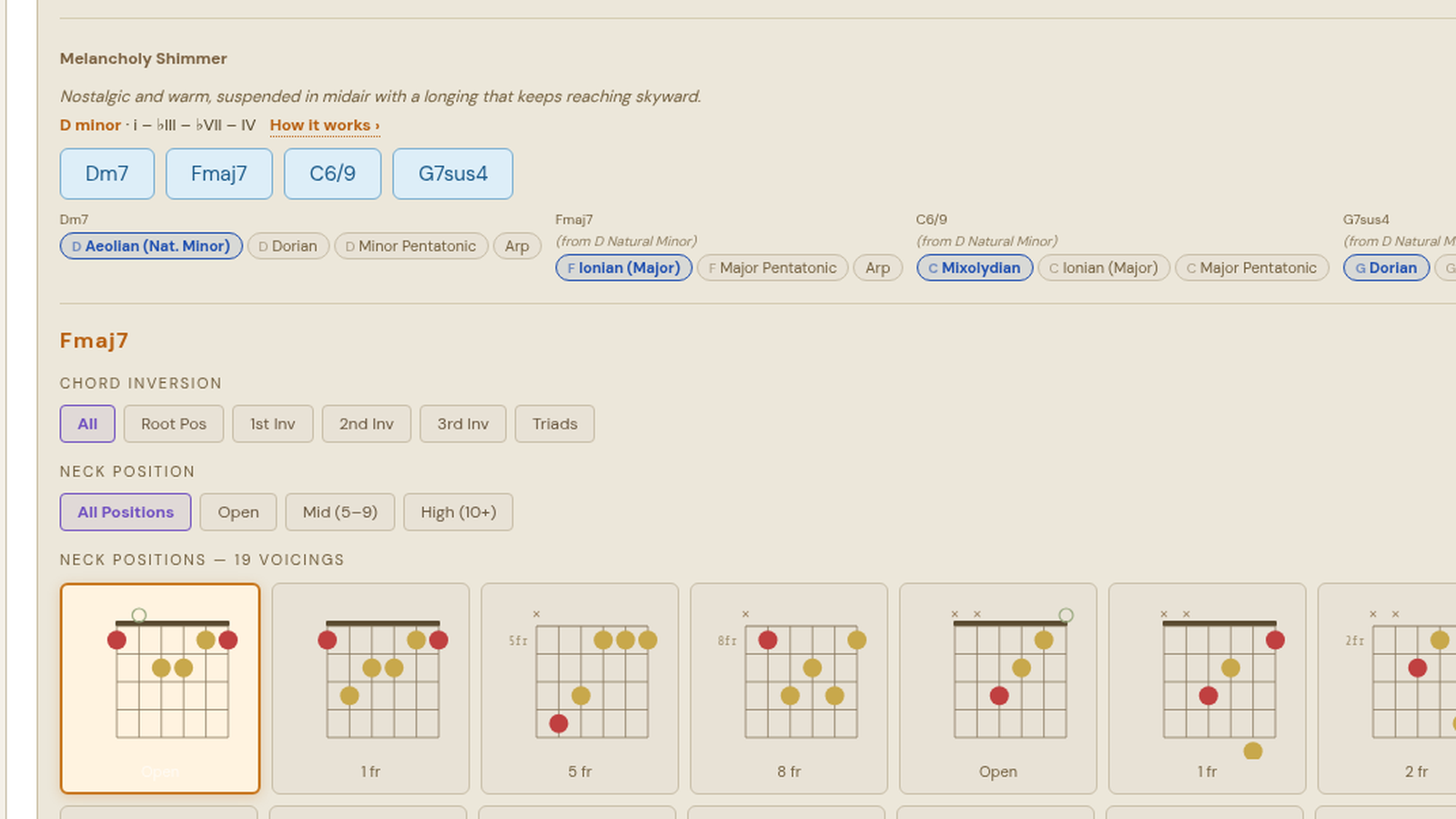
The first, "Wistful Indie Pop," used Fmaj7, Am7, Cmaj7 and G6 in G Mixolydian. The second, "Dreamy Lift," moved through Cmaj9, Em7, Fmaj7 and Am7 in C major. The third, "Melancholy Shimmer," chose Dm7, Fmaj7, C6/9 and G7sus4 in D minor. Each card included a short mood note, Roman numerals, chord buttons, and scale choices under the individual chords. The Fmaj7 card in the third progression offered F Ionian, F Lydian and F Major Pentatonic, while the G7sus4 card offered G Dorian, G Mixolydian and G Egyptian Pentatonic.
That is the useful trick: Fretbot does not stop at naming a scale for the whole song. It shows how the note choices shift as each chord comes around. If you have ever learned a pentatonic box and then wondered why it sounds wrong over one chord in the loop, this view makes the problem visible.
Melody ideas on top
The Melody tab writes short lines over the selected progression. You can pick Simple or Busy, choose a low, middle or high range, set a feel such as Flowing or Driving, and choose four or eight bars. With the featured Spectrum progression selected, we clicked Write 3 at 100 BPM and received three tab-style options: "Syncopated hook," "Syncopated moving line" and "Pushed long tones."
Each melody showed its note sequence, a question-and-answer phrase layout, the range, and how many strong beats landed on chord tones. In our run, the first line put 5 of 9 strong beats on chord tones and ended on C#, the root of C#m11. The second put 8 of 11 on chord tones, and the third put 10 of 13. Pressing Play over the band changed that card's control to Stop. Again, we verified the interaction, not the audio mix.
There are also Save PNG, Share link and Export MIDI controls. Share link showed "Link copied" in our test; we did not verify where the copied link points. We did not verify the downloaded PNG or MIDI files, so treat those as available controls rather than tested output from this run.
Where it fits
Fretbot is best for a player who already knows basic chord names but wants the connection between progression, scale and melody to stop feeling abstract. It is not a full recording setup, a tuner, or a structured course. It is also a hosted web app, so it lives as a bookmark rather than an offline install.
The generated progressions still need your ears and judgment. A generator can suggest G Mixolydian or a suspended chord, but it cannot know whether that sound belongs in your song. What it can do is give you three starting points quickly and show the note logic on the neck.
For that job, Fretbot is an easy bookmark. Open it, describe a mood, tap through the chords, and let the fretboard show you which notes it suggests next.
Cover: Freewares test capture of a Fretbot-generated chord progression.