Mockreel: Put Your Screen in a 3D Device
- Design
- Video
- Web Apps
A screen recording shows what an app does. Sometimes you also want to show where it belongs: on a phone, a laptop or a browser window. Mockreel wraps an image or recording in a 3D device, adds a camera move and lets you build a short product demo in the browser.
There is no account gate in the editor we used. The official site describes it as free, without a watermark, with optional support payments. That makes it an inviting place to try an idea before opening a more involved animation tool.
From a screenshot to a scene
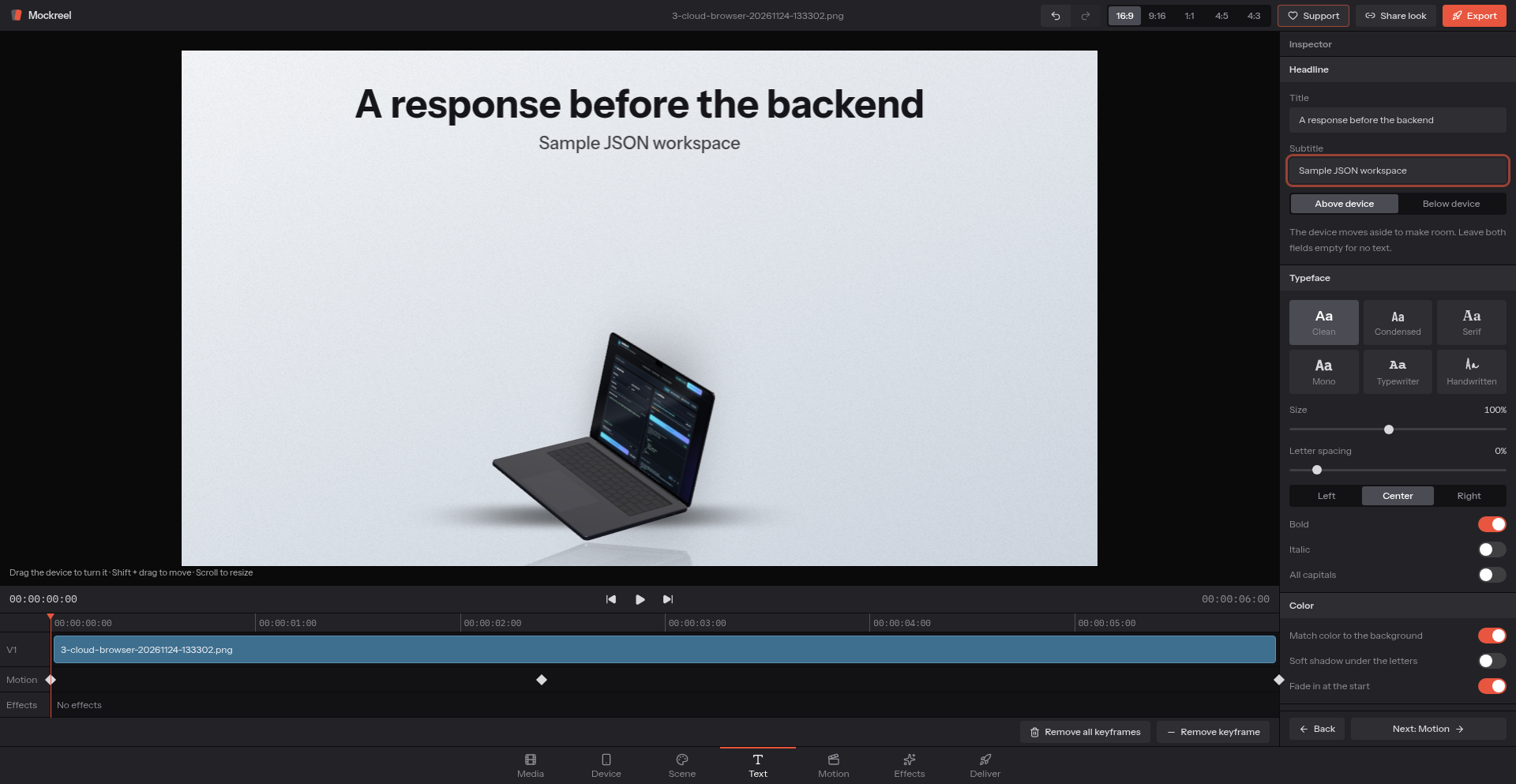
We imported a screenshot of a synthetic JSON workspace, not a private product recording. Mockreel placed it inside the default phone model. We then switched to a MacBook Pro frame and added a headline and subtitle. The preview updated to show the screenshot on the laptop screen, with the text above it.
It is a presentation tool rather than a way to make a screenshot more readable. Our source image was wide and detailed; inside a tilted device, much of that detail became small. For a real demo, a close crop of the part you want to explain will often make more sense than an entire desktop.
The editor separates Media, Device, Scene, Text, Motion, Effects and Deliver into pages. That keeps the first step manageable, while leaving room to change the result after choosing a preset. We did not have to place the title manually around the laptop: the layout moved the device aside to make space.
Start with a look, then change it
Preset looks combine a background, lighting and camera movement. The available choices include a light studio treatment, a dark slow orbit and warmer or moving-color scenes. If you only want a quick visual, those presets are a faster starting point than a blank timeline.
The device controls expose turn, tilt, roll, size and position. The website lists 17 frames across phones, tablets, laptops, desktops, a watch and a browser window, along with an option to load your own GLB model. Use only models and media you have the rights to reuse.
For more deliberate motion, the timeline supports keyframes. The developer also documents zoom, spotlight, blur-around and tap-marker effects for directing attention at a particular moment. These are useful capabilities to explore after the basic framing works, rather than reasons to add movement to every shot.
Know what the export controls promise
The Deliver page offers MP4 with H.264 video and AAC audio, resolutions from 720p to 4K, and 30 or 60 frames per second. Shape presets cover a wide video, a vertical clip, an Instagram feed and a square post. There is also a still-frame PNG action.
We inspected the edited scene and reached the still-frame save action; we have not checked an exported MP4 here. The visible preview confirms the device and text layout, rather than a checked exported video.
Local media, optional analytics
Mockreel says media processing and rendering happen in the browser and files are not uploaded. Its consent prompt separately asks about optional anonymous usage statistics, which we declined. Keeping those two statements separate is more useful than calling the whole site completely offline.
For a short product visual, Mockreel gets you to something recognizable quickly: your screen, inside a device, with a headline and a camera move ready to adjust. The best first test is a throwaway image. Get its crop and viewing angle right before spending time on effects.
Screenshot of our Mockreel editing session using a synthetic JSON workspace, November 24, 2026. Interface credit: Mockreel. Preview, not an inspected video export.