SolveKit: Make an Image Fit a File-Size Limit
- Images
- Web Apps
A form that wants an image under 200 KB rarely explains what you should sacrifice to get there. Dimensions? Sharpness? The file format? SolveKit's Image Converter puts those choices beside a live comparison, including the one that matters when an upload form is being stubborn: a target file size.
It is a free browser tool, with no account needed in our session. Add an image, choose an output format, then adjust quality, size or both. JPG, PNG, WebP, AVIF and ICO are offered as outputs. That list is useful, but the comparison is the reason to stay: you can see what a smaller result is doing to the picture rather than trusting a promising percentage.
A smaller format can make a bigger file
We started with a synthetic 1600 by 1000 PNG: colored grid lines, a pale background and a strip of black text. Nothing private, and deliberately closer to a screenshot than a photograph. The source weighed 22,479 bytes, shown as 22 KB in the interface.
The first WebP preview, at quality 80 and the original dimensions, was about 69 KB. Yes, the supposedly compact format made this particular image roughly three times larger. That is not a broken converter. A simple grid can already compress very well as PNG. The useful part is that SolveKit showed the increase instead of hiding it behind a generic claim about WebP savings.
Next we selected Exact resize and entered 800 by 500, keeping the same shape. The WebP estimate fell to about 33 KB, still above the original PNG despite having fewer pixels. This is a good little antidote to format superstition: changing the extension is not a guarantee of a smaller file.
Give it a budget instead
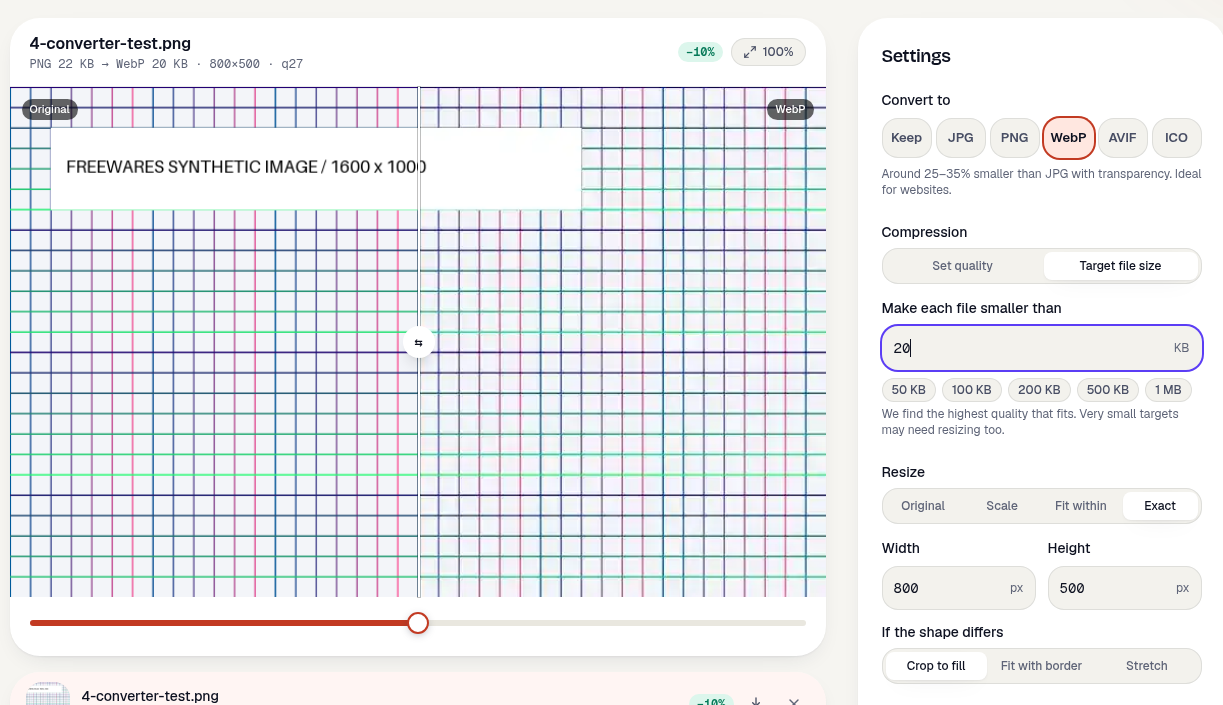
Switching Compression from Set quality to Target file size replaces the quality slider with a size field and several presets. We entered 20 KB. With the 800 by 500 dimensions still selected, the interface reported a 20 KB WebP at quality 27 and roughly a 10% saving against the source.
The before-and-after divider made the tradeoff visible. The fine grid and text were less clean on the compressed side. The page also provided a 100% view control, which is more useful for judging small details than a comfortably scaled preview. We checked the rendered preview and its 800 by 500 canvas; the Download WebP control was available, but these figures describe the live result, not a separately inspected exported file.
For a photograph destined for a small upload box, that compromise may be fine. For a diagram or a screenshot containing tiny text, keeping PNG or using a less aggressive target may be the better answer. Check the result you actually need to send.
Resize without guessing the shape
Alongside Original and Exact, the tool offers Scale and Fit within. Exact includes choices to crop, fit with a border or stretch when the requested shape differs. Those are different decisions: cropping can lose content, a border keeps it with unused space, and stretching changes proportions. Pick deliberately rather than treating all three as another compression setting.
The official page also describes batch conversion with a ZIP download and multi-size ICO output. HEIC and TIFF input depend on browser support; its guidance points HEIC users toward Safari. Do not assume that a format listed on the page will decode in every browser.
Local processing is not the same as an ad-free site
SolveKit says image conversion runs on your device and converted files have camera and GPS metadata removed. Those are the publisher's processing claims. Its privacy policy separately allows hosting logs and advertising. Even the Only necessary choice can request non-personalized ads that use cookies for limited purposes. Keeping an image out of an upload pipeline does not mean the website has no outside connections.
The practical verdict is simple: this is a useful workbench for a file-size deadline, especially when you want dimensions, format and visible quality in one place. Our small grid also supplied the best reminder: sometimes the original is already the efficient version. A good converter should help you notice that, too.
Screenshot of SolveKit during our synthetic-image preview test, November 24, 2026. Interface credit: SolveKit. The test image was made for this article.