ProofPack: Turn a Small Evidence Folder Into One PDF
- Productivity
A dispute can leave you with a folder full of screenshots, photos and PDFs that make sense only to you. ProofPack gives those files a cover, an exhibit order and a timeline. The useful promise is organization, not a better legal argument.
The browser-based tool offers presets for security deposits, small claims, chargebacks and insurance, plus a custom case. You add the names and reference details, describe each exhibit and export a packet. The free preview accepts up to three exhibits; several useful extras belong to the $19 Pro edition.
What came out of the sample
We used ProofPack's built-in sample deposit case, which contains fictional details and two generated example images. Its export produced a four-page, US Letter PDF. We opened all four pages rather than judging the result from the live cover preview alone.
The first page contained the case details, a $2,450 example total and a table of contents pointing to exhibits on pages three and four. Page two held the chronological timeline and an itemized claim summary. Each exhibit then received its own page, an A or B stamp, a date and a caption.
The layout was easy to follow. The timeline shortened long descriptions with an ellipsis, while the exhibit pages carried the longer captions. The free output also displayed Free Preview labels. A little text inside one of the supplied sample images crowded its box, a reminder to inspect the actual pictures as well as the surrounding page layout.
Order is the real feature
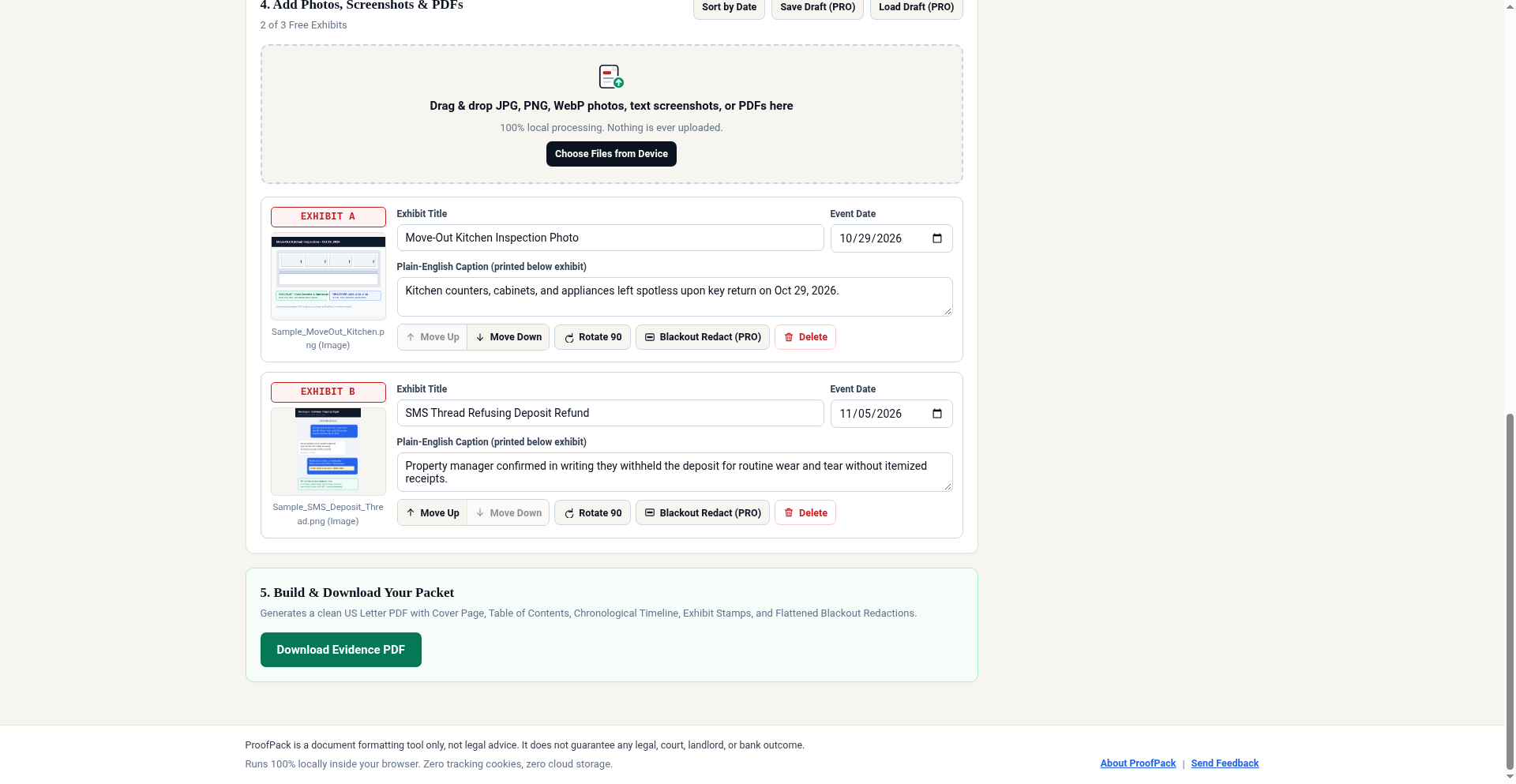
ProofPack lets you give an exhibit a useful title instead of leaving a filename to explain it. You can add an event date and a plain-English caption, reorder entries, sort by date and rotate an image. That is the difference between a stack of attachments and a packet someone else can read in sequence.
The damages calculator is another organizing aid. It totals the amounts you enter and places them in the packet. It does not decide whether a charge is valid, recoverable or supported by the documents. The example total in our test was only sample data.
The site accepts JPG, PNG and WebP images, screenshots and PDFs. Its interface says processing happens locally in the browser with no cloud upload. We used only its fictional sample; a privacy statement should not be treated as a reason to skip your own rules for handling sensitive documents.
Know which controls are paid
Three free exhibits can be enough to see whether the packet format works for a small set of records. It is not the same as the full product. Save Draft, Load Draft, a Bates-number prefix and blackout redaction are marked Pro in the live interface.
That redaction limit matters. Do not assume the free export removes account numbers just because the page advertises flattened blackouts among its capabilities. Our sample export retained the deliberately fake account line because we did not apply a redaction. Removing private details is a separate step to check before sharing a real packet.
Formatting is not acceptance
ProofPack calls the export court-ready in its workflow, but also states that it is a formatting tool, not legal advice, and guarantees no court, landlord or bank outcome. Treat the stronger label as marketing. A clear PDF can still fail a recipient's filing rules, exhibit limits or required format.
For a handful of records, ProofPack is a practical way to test a more readable order without building the pages yourself. Start with the sample, check the free limits and inspect the exported PDF. If the packet is heading to a court or another formal process, verify that recipient's requirements before relying on the result.
Screenshot of ProofPack's fictional sample case, November 24, 2026. Interface and sample credit: ProofPack.