Open WebUI: One Home for Your AI Chats
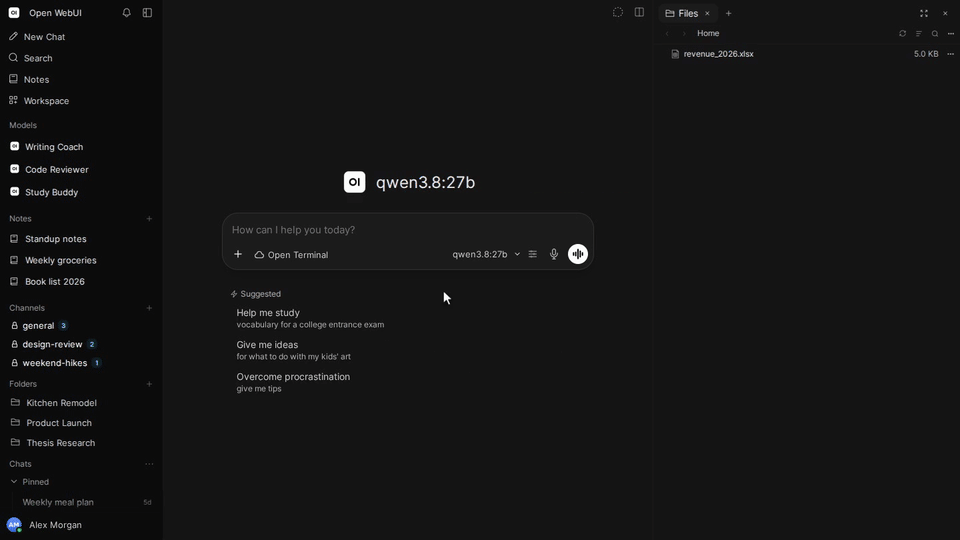
Imagine keeping one chat window for a local model, another for a paid API, and a small archaeological site of browser tabs for everything in between. Open WebUI puts those conversations behind one interface. The appeal, for me, is not another chatbot. It is having a front end you can host yourself and connect to the models you choose.
Bring your own model
Open WebUI is a self-hosted AI interface. It connects to local models through Ollama and to local or cloud services through OpenAI-compatible APIs. The interface is one part of the setup; you still need an inference server or a provider to produce answers. Installing a chat window does not conjure a model out of spare disk space, sadly.
There are Docker and Python installation paths, plus a separately versioned Desktop app for Windows, macOS and Linux. The Desktop app helps set up and run Open WebUI on your computer, with optional llama.cpp local models. The main application was at version 0.13.0 when checked; Desktop was at 0.1.4. Those are two different version numbers, not a typo having a difficult morning.
A chat can become a workspace
The 0.13.0 release goes beyond a conversation list. Side chats let you explore a detour without adding it to the main conversation, and disappear when you close the tab. Administrators or users with the appropriate permission can use them; that permission is off by default.
With a compatible Open Terminal connection, a Desktop tab can expose a computer workspace, and Chrome mode can share a browser session with a model. These are optional integrations, not capabilities every basic installation automatically has. I would set up ordinary chat first and only then decide whether a model needs access to a terminal or browser. A helpful assistant with a shell is still something with a shell.
Offline is a configuration, not a slogan
You can run a local setup without sending prompts to a cloud model, but only if the chosen inference server, models and features are local too. Downloads need a connection, and cloud APIs remain cloud APIs even when the chat window lives on your machine. Optional web, search and tool integrations also have their own destinations and permissions.
That distinction matters for documents as much as chat. Before adding sensitive material, check where the model, document processing and any connected tools run. Self-hosting gives you choices; it does not choose every privacy setting for you.
Free to use, with a branding condition
The current license is the Open WebUI License, not simply MIT or BSD. Use, modification and redistribution are permitted under its terms, but branding must generally stay intact. The license has exceptions, including deployments with no more than 50 end users in a rolling 30-day period, specific written permission, or an enterprise license permitting branding changes. Earlier contributions retain their original terms. Read the actual license before repackaging it.
For a personal setup using the normal branding, the practical attraction is straightforward: a self-hosted interface without a required software subscription. Model providers, hosting and hardware may still cost money.
I would shortlist Open WebUI if I wanted to switch between local and remote models without switching my entire workflow. If I only needed an occasional hosted chatbot, running another service would be more work than benefit. See our Open WebUI fiche for setup links and the version split.
Documentation-based discovery, not a hands-on deployment review. Cover: a real frame from the official Open WebUI demo. Sources: repository, 0.13.0 release notes, Desktop 0.1.4 and license.