QuickMock API: Check a JSON Response Before the Backend Exists
- JSON
- Developer Tools
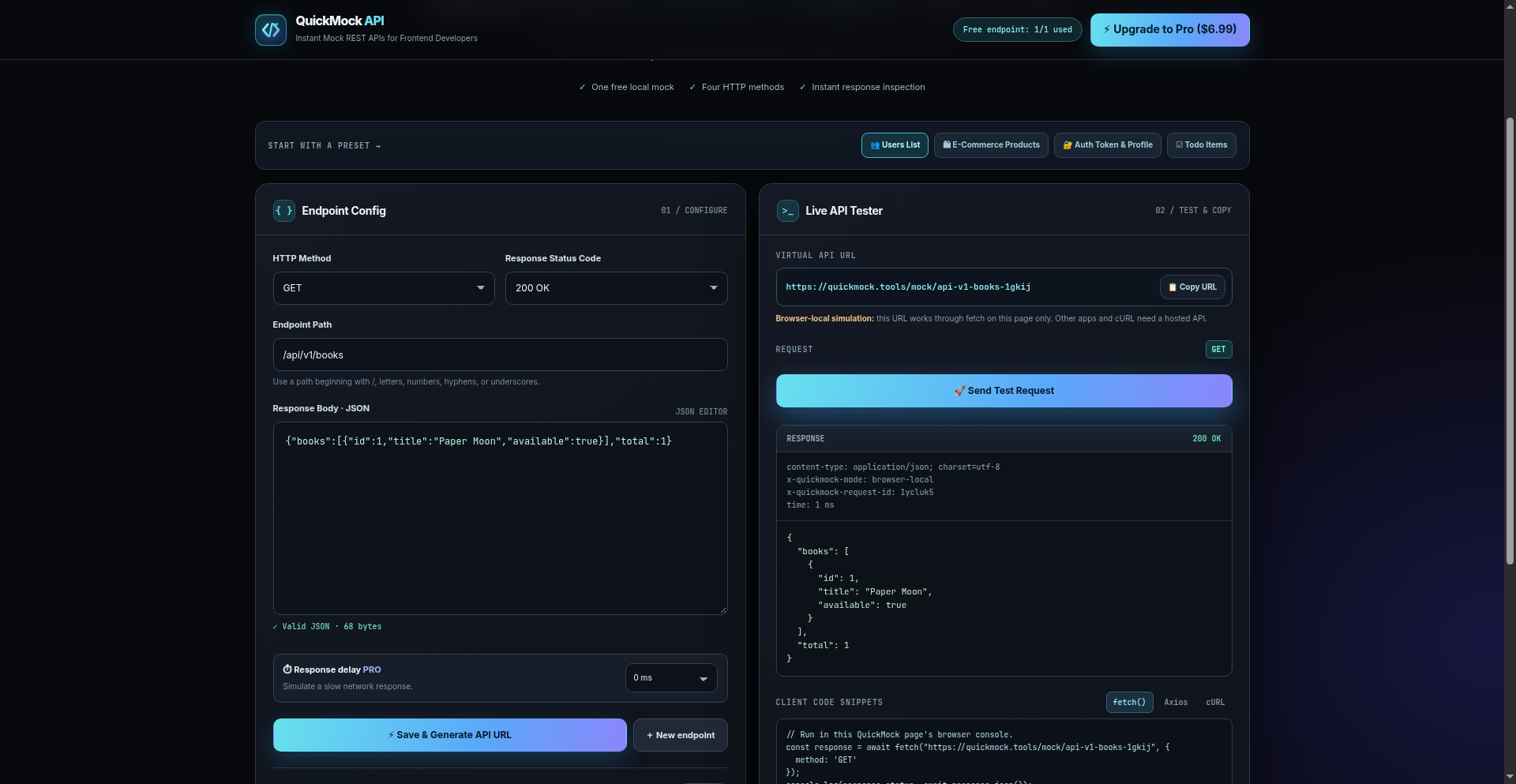
Sometimes the frontend is waiting for a response shape, not a whole server. QuickMock API gives that small job a tidy workspace: choose a method, enter a path, paste some JSON and inspect the response beside it. There is a catch worth knowing immediately. This edition is a browser-local simulator, not a service that publishes an endpoint for your app.
That distinction changes who should use it. If you want a quick place to sketch an API contract or demonstrate what a successful response should look like, it is approachable. If you need a URL that another developer can call from a different computer, you need a hosted mock API instead.
A small response, from scratch
We tried the live workspace with a synthetic books response. We replaced the default path with /api/v1/books, added a JSON object containing one fictional title, an availability flag and a total, then saved it.
The page created a virtual URL and showed a saved local mock. Sending its built-in test request returned 200 OK, our JSON body, response headers and an entry in the recent-request history. Seeing configuration and result together is the useful part. You can check whether the structure says what you meant without setting up a separate request client.
We also entered deliberately broken JSON. The editor identified the syntax problem and the save action stopped with a request to fix it. That is more helpful than discovering later that a sample payload copied into a ticket never parsed in the first place.
The URL is virtual
The generated address looks like an API URL, but the interface explicitly says it works through fetch on this page only. It does not turn the browser tab into a server that cURL, a mobile app or a separately running frontend can reach.
There are fetch, Axios and cURL snippet tabs. Treat them as previews of a request shape, not proof that an external request will work. The workspace repeats that outside clients need a hosted API. This is the main limitation to understand before spending time configuring a mock.
In practice, QuickMock fits an earlier stage: deciding which keys belong in the response, what a list looks like, or how an error object should be arranged. Once another application needs to consume it, move the agreed contract to a real backend or a mock service that actually serves requests.
What is free?
The page offers one free local mock. Its configuration includes four HTTP methods, a response status, an endpoint path and the JSON body. Starter presets cover users, products, authentication and todo items, which can save a little typing when you only need an example.
Response delay is marked as a Pro feature. The interface also displays an upgrade button, but its footer says this edition does not verify external payments. We would not treat that button as a reason to pay for capabilities the live tool has not established. The free workspace is the part assessed here.
A useful scratchpad, within its boundaries
There is no account step in the basic flow we used. The tool labels its saved configuration and request history as local. That keeps the demonstration light, but it is still sensible to use fictional data rather than real access tokens or customer records when sketching examples.
QuickMock is easy to misread because its name and virtual URL suggest a broader service. Read it instead as a JSON-response scratchpad with a built-in simulator, and its value becomes clearer. It gives you a visible contract to discuss, catches malformed JSON and puts a sample response next to its settings. Just do not hand the generated URL to a teammate expecting a working shared endpoint.
Screenshot of QuickMock API during our synthetic JSON test, November 24, 2026. Interface credit: QuickMock API.