stegano.graphics: Turn a Phrase Into Fingerprint-Like Art
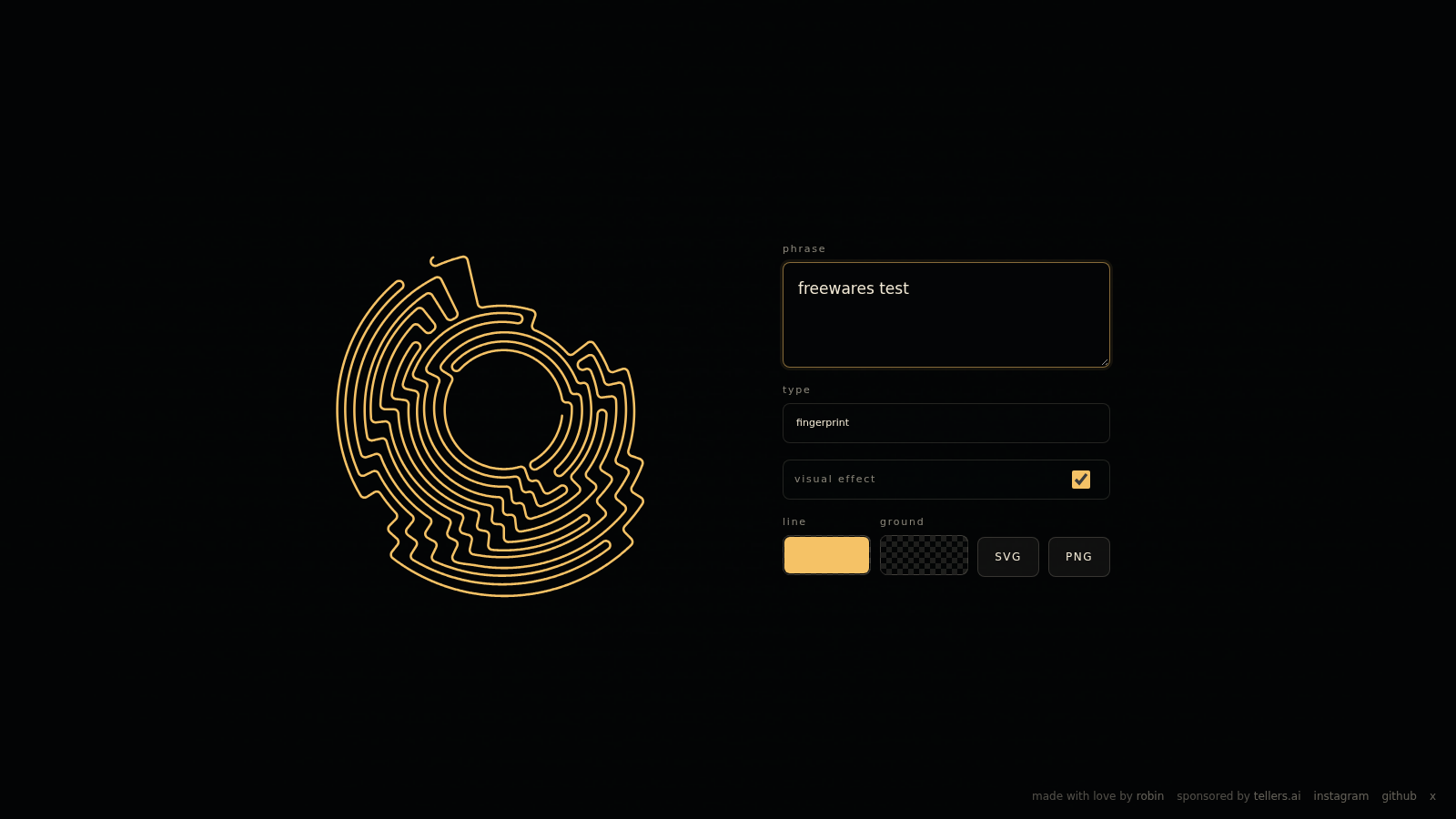
"Freewares test" makes a surprisingly good fingerprint. Not a real fingerprint, of course: stegano.graphics turns the phrase into looping gold lines around a dark center. Switch the type to spiral and the same words produce a different circular drawing, with curves opening and folding back on themselves.
That is the useful way to approach this small browser tool: as a phrase-driven art generator. The project's officially linked repository describes its output as a visual cipher, with text encoded into a radial path. During our November 16, 2026 check, we could type, change the drawing type and use the controls without an account or payment.
One phrase, two styles
We entered the harmless test phrase freewares test and tried both options in the type menu. Fingerprint produced the denser, more irregular-looking pattern. Spiral made a simpler arrangement of circular arcs. The preview changed when we switched between them, and inspection of the page's generated SVG confirmed different path data for the two results.
The interface is small enough to understand without a tutorial. There is a phrase field, the two drawing types, a visual-effect checkbox, line and ground controls, and SVG and PNG buttons. The PNG control opened an extra panel with antialiasing and download controls. The export buttons were available; downloaded-file quality remains unverified.
The alphabet matters
The repository documents a compact alphabet: lowercase Latin letters, a space and ó. That is worth checking before you build a design around a name, a date or a sentence with punctuation.
For a second input, we used HELLO 123!. The text field still showed exactly that, but the generated SVG's title contained hello: lowercase letters and a trailing space, without the numbers or exclamation mark. The repository's normalization code also lowercases text and filters out unsupported characters.
Check that the symbols you need are supported before using the drawing. A birthday date or a name with unsupported characters needs more care than a short phrase using the documented alphabet.
A visual cipher is not a private message
The "secret message" description needs a practical boundary. In our trial, the page put the phrase into the address as a readable phrase= query parameter. The live SVG also contained the normalized phrase in a plain-text <title> element. Both were easy to read without decoding the line pattern.
That does not stop the drawing from being attractive. It does mean you should not type passwords, confidential messages or private personal details into it. Sharing the page URL can share the phrase directly.
Better as a tiny art experiment
The repository identifies the core library as Rust code with browser use through WebAssembly. Its README and package metadata declare MIT, although the checkout we inspected did not include a separate LICENSE file. That is a reason to check the licensing details before reusing code, rather than casually treating the whole website as a fully documented open-source package.
For a quick visual experiment, though, the appeal is immediate. Try a short, non-sensitive phrase, compare the two styles and see whether the resulting lines suggest a design you like. Think personal graphic or playful pattern, not a secure channel for something you cannot afford to reveal.
Cover: Freewares test capture of stegano.graphics using the phrase "freewares test".