Stetup Capture: Turn a List of URLs Into One Full-Page PDF
- Web Apps
Saving a page as a PDF from the browser works until you need ten of them in one file. Stetup Capture is a free web tool that takes a list of URLs, captures each page top to bottom, and gives you a single PDF. It needs no account.
What I did with it
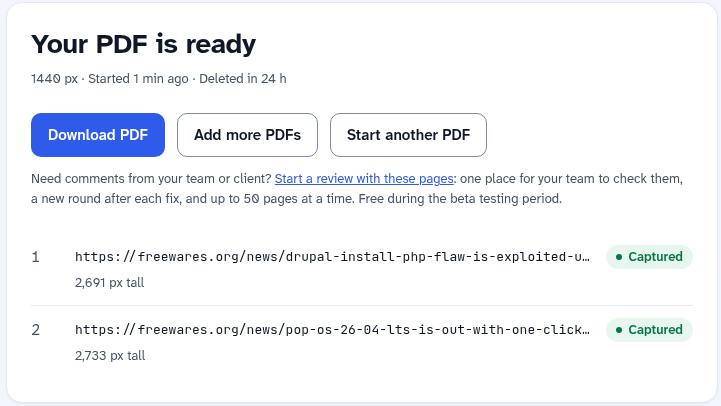
I pasted two pages from this site into the "Page URLs" box, left everything on its defaults (Desktop viewport, 1440 px wide) and pressed Build PDF. The job finished in well under a minute and showed a "Your PDF is ready" page listing both URLs as captured, with their heights: 2,691 px and 2,733 px.
I downloaded the file and opened it. It is a two-page PDF of about 4.1 MB. Each page is one tall page, 1080 by about 2048 points, instead of the page being chopped into A4 sheets, so a long article stays in one piece. A thin band at the top of each page shows the item number, the URL, the width and the capture time in UTC. The layout matched the live site, including the sidebar and the cover image. The picture is sharp: the PDF stores each page as JPEG slices at 288 ppi.
That is also the main limit. The page content is an image, not text. When I extracted the text from the PDF, only the header bands came out (14 words in total), so you cannot search or copy the article text from the file. One smaller flaw: the reCAPTCHA badge that sits at the corner of the screen on freewares.org was captured too.
What the options do
The page lists the options before you build. I only used the defaults, so this is what the tool says about them:
- Viewport: a choice of screen widths, with Desktop (1440 px) as the default.
- Sticky headers and banners are flattened so they appear once, accordions and details sections are opened, and cookie banners are hidden rather than accepted.
- You can find pages from a site's sitemap, add PDFs you already have (up to 25 MB and 100 pages each), and reorder everything.
- For staging sites there is a password field, and a field to click through an age or region notice before capture.
- The page header band can be switched off.
Limits and cost
A job takes up to 10 items, URLs and PDFs combined, and the site lists free limits of 3 jobs per hour and 10 per day. The footer says free captures are deleted after 24 hours, so download the file the same day. An email with the PDF link is optional. The tool is the free entry to Stetup, a review product for teams and their clients that the site says is free during its beta period. The results page promotes it. The company named in the footer is Crossfxn LLC.
Who it suits
It fits anyone who has to hand over a set of pages as they look: a client review of a staging site, a visual record, or proof of how a page looked on a given day. The time stamp helps with the last one. If you need to search or quote the text inside the PDF, it is the wrong tool.
I tested one short capture of two public pages on the default settings. I did not try the sitemap search, a mobile viewport, a password-protected site, the click-before-capture option or merging in my own PDFs, and I did not use the email option or the review product.
Cover: screenshot of the Stetup Capture result page, taken November 25, 2026. Tool: stetup.com/capture.