4Dir: Keep Several Windows Folders Side by Side
- FileManager
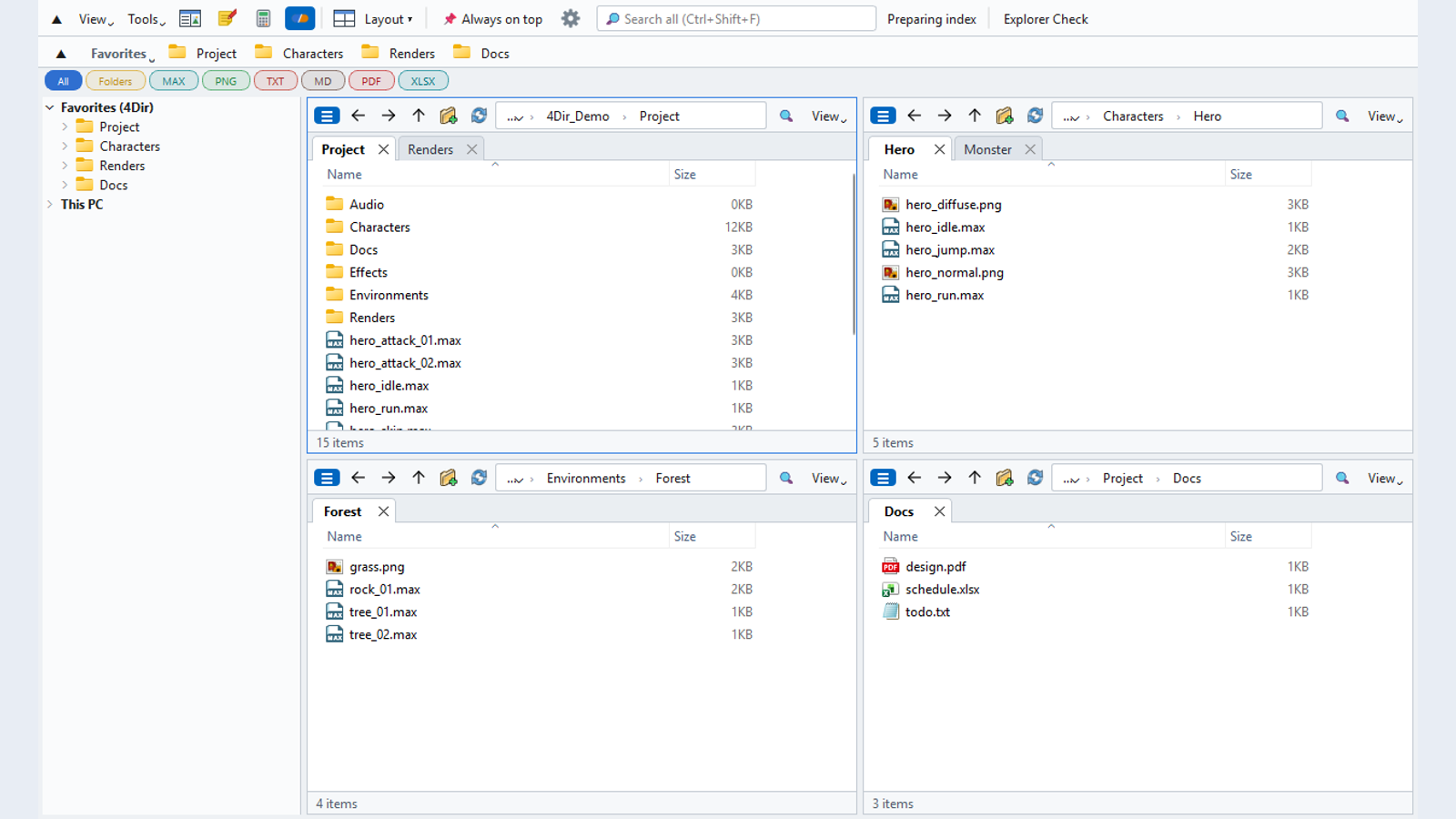
Moving files between a project folder, a downloads folder and an archive can turn into a lot of window arranging. 4Dir offers a different layout: several folders visible side by side, with tabs inside each pane. The free, open source Windows file manager can show anything from one pane to a twenty-pane grid.
The useful distinction is the grid, rather than tabs alone. A pair of panes could keep a source and destination in view. Four could keep several parts of a project open at the same time. Twenty is an option, not a requirement, and probably makes more sense on a large display than on a small laptop.
A workspace for several folders
The official documentation lists one-click layouts with one, two, three, four or six panes, plus custom grids up to five by four. Each pane has its own tabs. That gives the layout two levels: the folders you want to compare now, and other folders you want nearby without filling the screen.
4Dir also documents familiar Windows shortcuts, the Windows context menu and drag and drop between its panes, Explorer and other applications. Around those basics are batch renaming, saved sessions, light and dark themes, and sixteen interface languages. Its filename search uses a separate index, which the developer says updates in real time without administrator rights.
There are some more specialised touches. SVN status badges can identify changed or conflicted files, while Git and Perforce status relies on Windows overlays. The current release notes also describe a docked preview and Windows file-property columns, including tags, authors and comments. Those are useful details if your folders contain project assets rather than just a few documents.
A portable Windows download
4Dir targets 64-bit Windows 10 and Windows 11. The portable package includes its runtime dependencies, so the release archive is the ready-to-run download. The repository's source-code archive is a different thing and is not a substitute for that packaged application.
Version 0.9.147 was the latest release when checked. Its ZIP is 94,671,454 bytes, about 90 MiB, which the website rounds to 90 MB.
Settings are stored in the application folder according to the project. That is convenient for a portable setup, but it does not override workplace rules about downloaded applications. A managed computer still needs its normal approval process.
Read the security notice before deciding
The website prominently reports antivirus detections affecting the portable launcher and describes them as false positives. That is the developer's account, not an independent security verdict from us. Public source code and a published checksum do not, on their own, establish that a downloaded executable is safe.
The site also links to a Microsoft Store edition. Its signing and differences should be checked on the Store listing before choosing that route; the developer notes that optional Win+E linking is not available there. Neither edition should be treated as a way around a company restriction. We would not recommend disabling protection or adding an antivirus exception to make a new file manager run.
Free, with an early-version caveat
The project is GPL-3.0 licensed. Its FAQ says the application has no ads, account requirement or trial limit, with donations available to support development. The same FAQ says its network activity is an optional daily update check. That privacy description is an attributed product claim, not the result of a traffic audit.
4Dir's appeal is straightforward: a flexible multi-pane workspace without a purchase price. Its 0.9 version and the launcher warning are reasons to assess it carefully, rather than reasons to promise a risk-free trial. If side-by-side folders are what you are missing, the layout is worth examining before deciding whether to adopt another file manager.
See the 4Dir software listing for version details and the official download source.
Method: official website, repository and release metadata checked on November 23, 2026. This is a documentation-based discovery, not a hands-on Windows test. Interface image supplied by the 4Dir project at 4dir.net.