Wax Seal Studio: Put Your Initials Into a 3D Wax Seal
- Design
A wax seal is a wonderfully unnecessary detail until you want one on a digital invitation, a bookplate mock-up or a little label. Then drawing convincing wax, lettering and a pressed edge by hand starts to look like rather a lot of work for one small decoration.
Wax Seal Studio takes a different route. It is a free browser-based 3D editor: choose an existing design, change the imprint and material, then inspect the seal as an object rather than a flat sticker. There is no account gate between the gallery and the editor. I opened a template and made a small fictional library seal to see how the controls behaved.
Start with a seal, not an empty settings panel
The gallery is the friendly way in. Designs are grouped into monograms, botanical motifs, heraldry, stationery and other styles. You can also start from scratch, but an existing design gives you a useful answer to the first question: what might look good together?
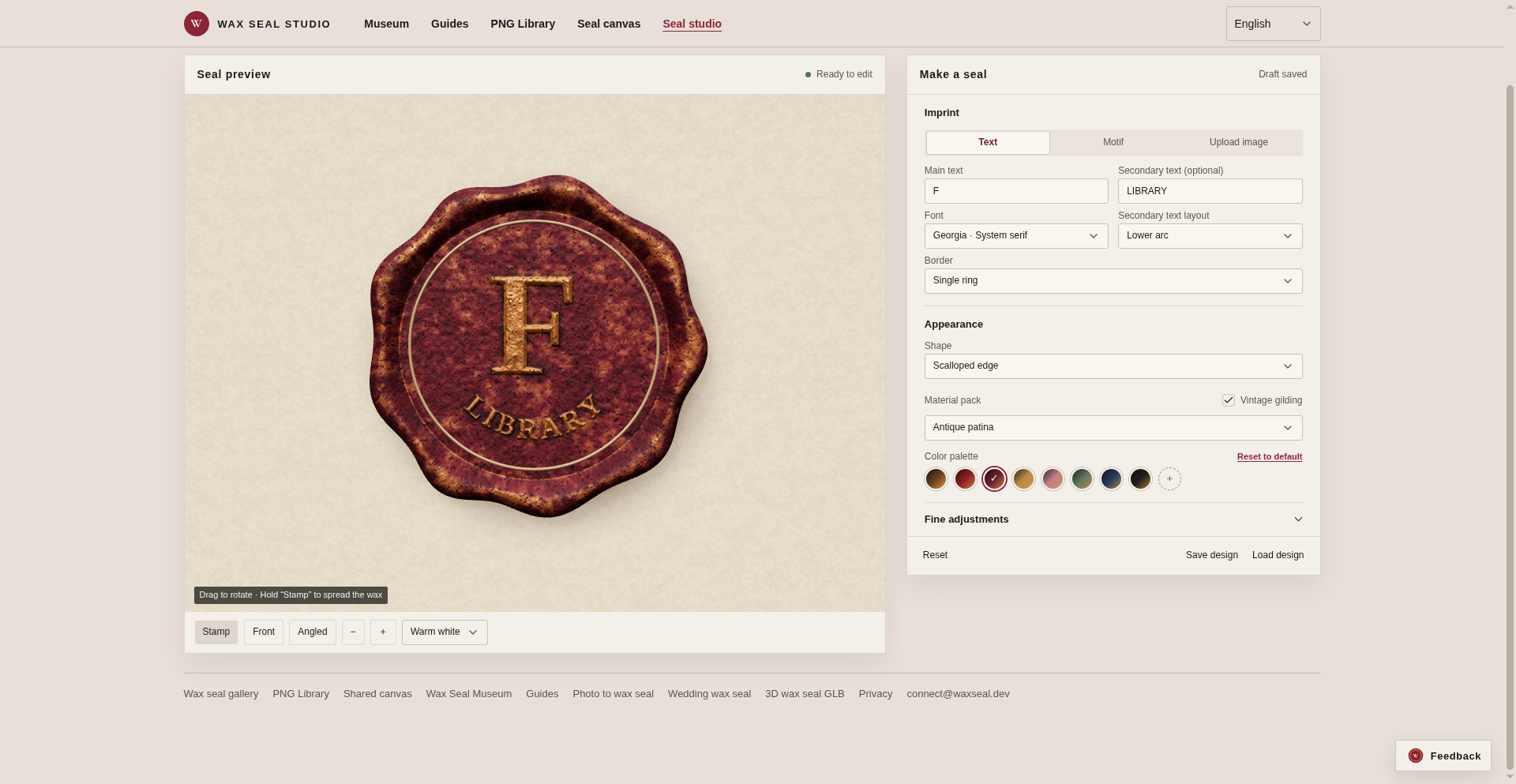
I chose The Archivist, a scalloped seal with a large initial and a curved line of smaller text. The editor put the preview on the left and the controls on the right. I replaced the initial A with F, changed EX LIBRIS to LIBRARY and selected the Burgundy colour. The preview updated to show the new lettering, keeping the existing ring, scalloped outline and antique-patina material.
That is the part I like. You do not need to understand a 3D application's scene tree to make the obvious changes. Main text and secondary text are separate fields. Font, secondary-text layout and border are separate controls too. The material and colour choices do not replace the words you have already entered.
Our capture of the edited template, November 22, 2026.
The angle changes the impression
The Front and Angled buttons make the 3D aspect useful rather than decorative interface theatre. Switching to the angled view let me see the raised F and smaller letters catch the light differently, with the irregular wax edge visible as part of the object. Both views remained readable with the short text I used.
There are also shape and material choices, fine adjustments, and options for motifs or an uploaded image instead of text. The studio offers a stamping preview as well. For a first design, I would keep the imprint simple and get the lettering and colour right before disappearing into every adjustment. The little preview is a much quicker judge than a long list of settings.
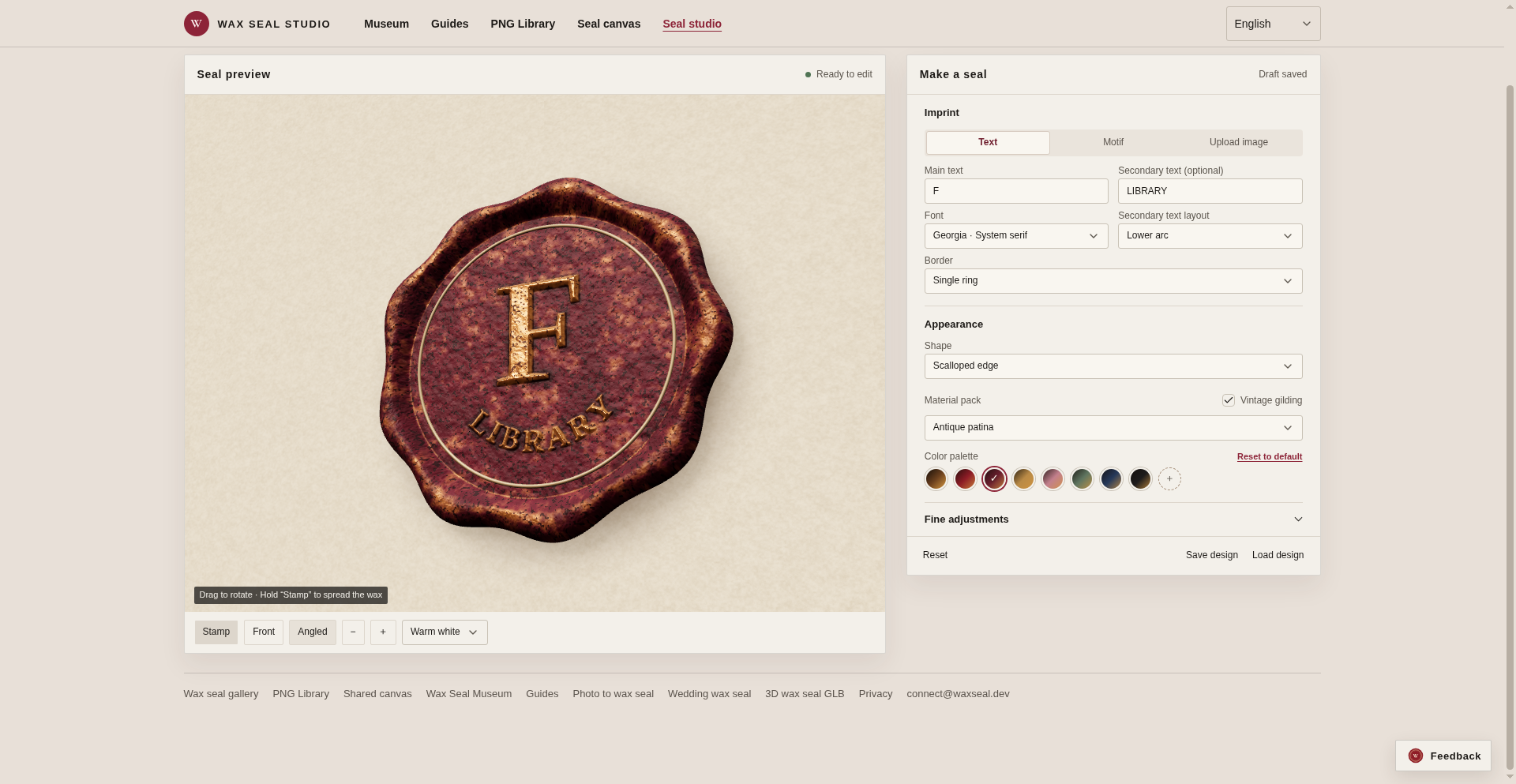
Our capture of the angled preview, November 22, 2026.
Images for layouts, a model for 3D work
The header offers PNG downloads at 1024, 2048 or 3072 pixels, and the additional-export menu includes GLB. The site's FAQ describes the PNGs as transparent and says exported PNG and GLB assets are free for personal and commercial use, without royalties or watermarks.
Those are different destinations. A PNG is the straightforward choice for placing a seal into a layout. A GLB is a 3D asset for a compatible workflow. The project's GLB guide goes further into geometry and fabrication, but a good-looking digital seal should not be mistaken for a physically tested stamping tool. Anyone making a real die still needs to check dimensions, geometry and their fabrication process.
Your draft and the shared canvas are different things
The privacy page says editing, previews and downloads process designs in the browser, with the latest draft saved locally. That is handy when returning to a design, and worth remembering on a shared computer.
The optional shared canvas is separate: stamping there publishes the finished seal image and associated stamp information for other people to see. The same policy also lists Google Analytics, Tag Manager and hosting connection information. Local design processing is not a promise that the website makes no network connections.
I stayed in the editor. For a small decorative job, that is already a pleasant amount of freedom: pick a starting point, put your own short text on it and see how the relief looks before taking it elsewhere.
Hands-on check: November 22, 2026. We edited The Archivist with synthetic F/LIBRARY lettering, changed its colour and inspected front and angled previews. Export formats and usage terms above come from the interface and project documentation, not a file or fabrication test. Screenshots are our own captures of the editor.