Smorza: Give Each Mac App Its Own Volume and Output
- Audio
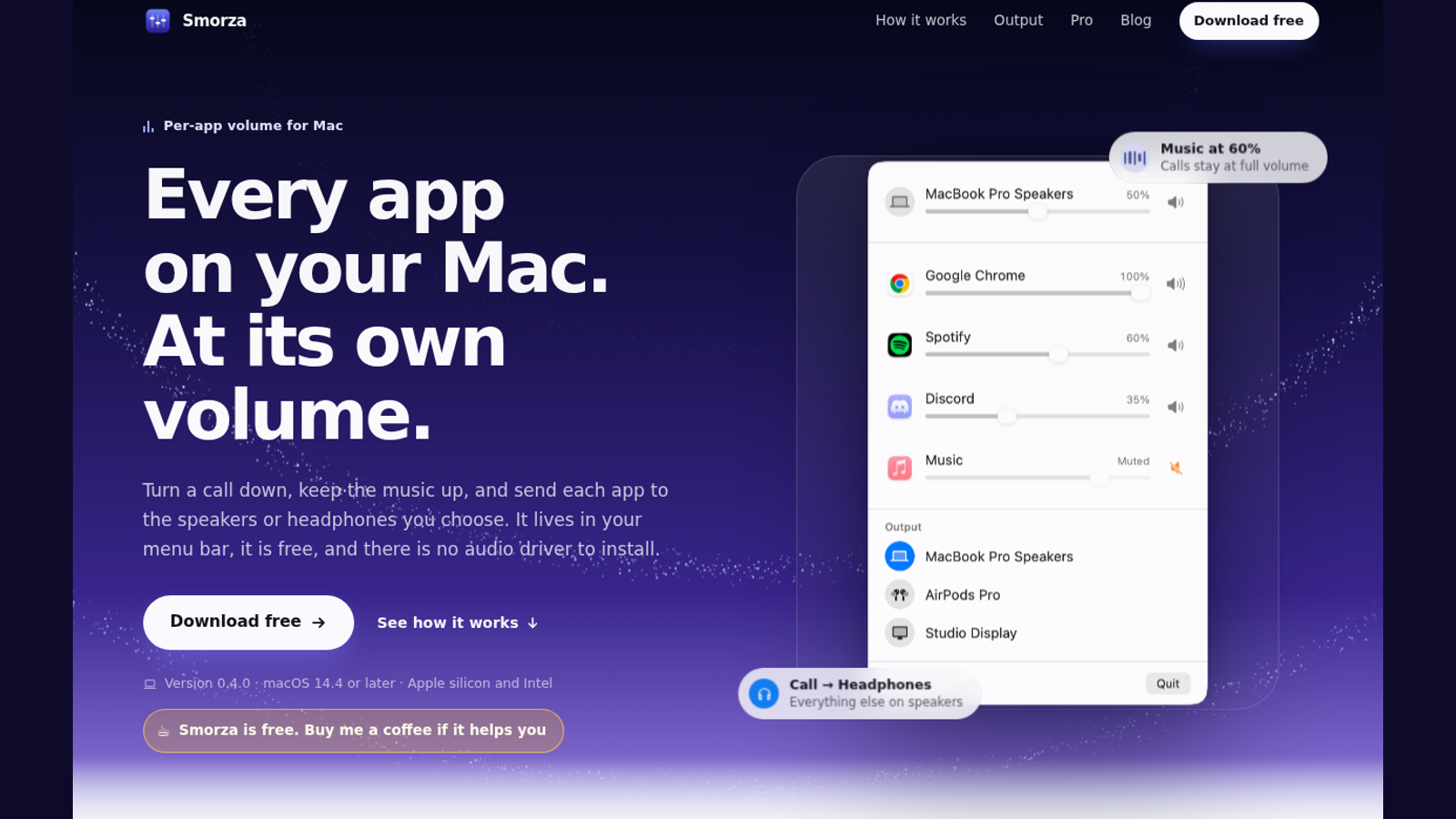
A music app, a video call and a noisy game do not always belong at the same volume. Smorza puts a separate volume slider and mute button for each application in the Mac's menu bar. It also lets each app use a different output device, so a call could go to headphones while music stays on the speakers.
The mixer is free and open source under the MIT licence. Its requirements are fairly specific: macOS 14.4 Sonoma or later, on either Apple silicon or Intel. It uses Core Audio process taps rather than asking you to install a separate audio driver or kernel extension.
Separate levels, separate outputs
The documented panel lists applications that play sound, with their level, mute state and output selection. Settings are remembered per app and per device. That matters if your comfortable headphone level is different from your speaker level, or if you want a call app to keep its own output preference.
According to the project, disconnecting a chosen device moves the app to the default output, and reconnecting it restores the previous route. It also offers an output-priority list for choosing among connected devices. These are documented behaviours, not results from an audio-routing test here.
Small controls add some flexibility. You can pin an app so it remains visible while quiet, ignore one you do not want listed, or Option-click a speaker icon to hear one app on its own. Mute All has a keyboard shortcut and restores each app's previous mute state when switched off. Shortcuts actions and Smorza links provide ways to change levels and outputs from other workflows.
One limit is important for browser users: Smorza groups a browser's helper processes into a single app row. It is not a separate slider for each tab. Turning down a browser can therefore also turn down the other audio coming from that browser.
No driver does not mean no permissions
Smorza needs permission to capture system audio so it can adjust another app's sound before playback. The developer says that processing stays in memory, with nothing recorded to a file or sent away. The site also says there is no account or analytics, and that network activity is limited to checking for updates. Those are the project's privacy claims, not an independent privacy audit.
An optional volume-key feature needs Accessibility permission too. There is a documentation difference worth noting: the website describes keys controlling the app in front, while the 0.4.0 release notes say they now target the playing app. The release notes are the more specific description for that version; do not assume it will always be the foreground window.
The application is not notarized by Apple and the repository describes its signing as ad hoc. That can cause a first-launch warning and renewed permission requests after updates. This discovery does not certify the application as safe or recommend bypassing those protections. People using managed Macs should follow their organisation's software rules.
Check the routing limits
The README lists possible conflicts with other tools that route the same applications, including SoundSource, Background Music and Loopback. It also notes that a quiet app can start a few milliseconds late when it resumes, and that choosing an output in Smorza can take precedence over the app's own choice.
Those details matter more than a blanket promise of better performance. The practical question is whether its per-app controls fit your own audio setup, especially if that setup is used for calls or production work.
The mixer is free; automation is planned
Version 0.4.0 was current when checked, with a roughly 2.5 MiB DMG download. The site lists an optional Pro unlock as coming soon at $2.99 once, without a subscription. Planned additions include profiles, automatic ducking during calls, a boost mode and global microphone mute. They should not be confused with features already available in the free mixer.
For a Mac user who wants different levels and outputs for different apps, Smorza has a useful, focused feature list. Its early version and missing notarization are part of the decision. Its strongest appeal is the simple combination of per-app levels and separate outputs.
For the current requirements and official download, see the Smorza directory entry.
Method: official website, repository, release notes and Homebrew cask checked on November 23, 2026. This is a documentation-based discovery, not a hands-on Mac test. Images are captures of the official Smorza website, including its illustrative panel.