Disc Image Studio: Burn Visible Pictures Onto CDs, DVDs and Blu-rays
- Open Source
- Windows
- Utilities
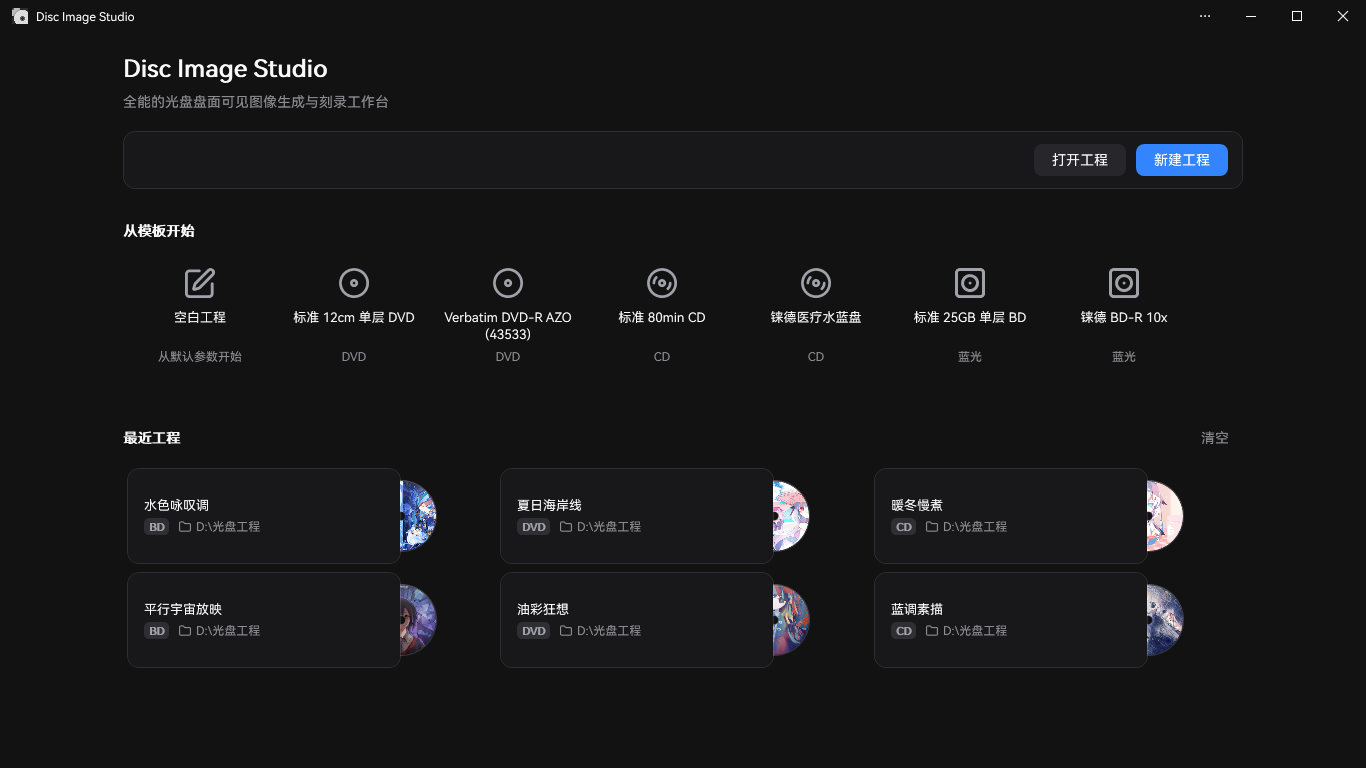
Somewhere in a drawer next to my desk there is a spindle of blank CD-Rs that has been sitting there for years. I keep telling myself I will throw it out, and then something like Disc Image Studio shows up and I think: no, actually, the spindle stays.
Disc Image Studio is a free, open-source Windows application that takes any image file, a photo, a poster, a meme, your cat, and burns it onto a CD, DVD or single-layer Blu-ray disc as a visible picture on the data side of the disc. Not a label printed on top. The actual data surface, so the image is physically etched into the disc and visible when you hold it up to the light. It is part art project, part optical-media nerd tool, and completely earnest about both.
The project is GPL-3.0, developed by JiaFeiMiao-K-Cat, and very actively maintained: version 1.4.1 landed on November 5, 2026, a day after 1.4.0. It has picked up around 6,500 stars on GitHub, which is a lot of people who apparently also refuse to throw out their spindle of blanks.
How it actually works
The trick is clever. An optical disc stores data as a spiral of pits and lands, and if you control exactly which bytes go where, you can make the burned pattern form a picture when you look at the disc. Disc Image Studio gives you a designer view where you place your image, preview how it will look on the disc surface, and tweak the rendering until it is right. Then it builds the image and either burns it straight to your drive or exports it for later.
Export formats cover ISO, RAW, and WAV plus CUE, the last one being the fun option: it turns your picture into an audio CD image, which some older burners handle better. If you have ever flirted with the demoscene or with disc-surface art projects, this is that idea packaged into an actual GUI with a preview.
What you need
On Windows it is simple: a portable x64 executable, no install, .NET runtime included, requiring Windows 10 version 2004 or later or Windows 11. You also need, and this is the part that filters out most of 2026, an optical drive that still burns. External USB DVD burners cost about twenty dollars, and BD-R drives a bit more. The disc itself must be the right type: CD-R, DVD-R or DVD+R, or a single-layer BD-R.
Linux and macOS users get an experimental command-line version. It works, but the polished experience is the Windows GUI, so manage expectations.
The honest fine print
I have not burned a disc with this myself, my last optical drive is in the same drawer as the spindle, so this is based on the documentation, the demo photos and the community's results rather than a weekend of personal testing. A few things to know before you dig out your burner:
- The Windows executable is unsigned, so SmartScreen will complain on first run. Normal for a small open-source project, but verify you downloaded it from the official GitHub releases page.
- Documentation is mostly in Chinese, with an English README (README.en.md) that covers the essentials. The GUI itself is usable in English.
- Burning the visible image uses the disc's data capacity, so these are showpieces, not backups. The disc still works as a disc, but the art is the point.
- Results depend on your burner and media. The project shows great examples, but expect a test disc or two before yours looks like the gallery.
Who this is for
People making physical gifts that feel like artifacts: a wedding photo etched into a Blu-ray, a mixtape CD with the cover burned into the surface. Retro-computing and demoscene folks. Anyone archiving something who wants the medium itself to carry the message. And, honestly, anyone who just thinks it is extremely cool that you can do this, because it is.
Disc Image Studio is free, open-source, and does one delightfully specific thing very well. The full breakdown, versions, formats and links, is on the Disc Image Studio software page. The spindle stays.
Image credit: Disc Image Studio project screenshots (GitHub, GPL-3.0).