Fraktur: Line Up Your Next DJ Mix in the Browser
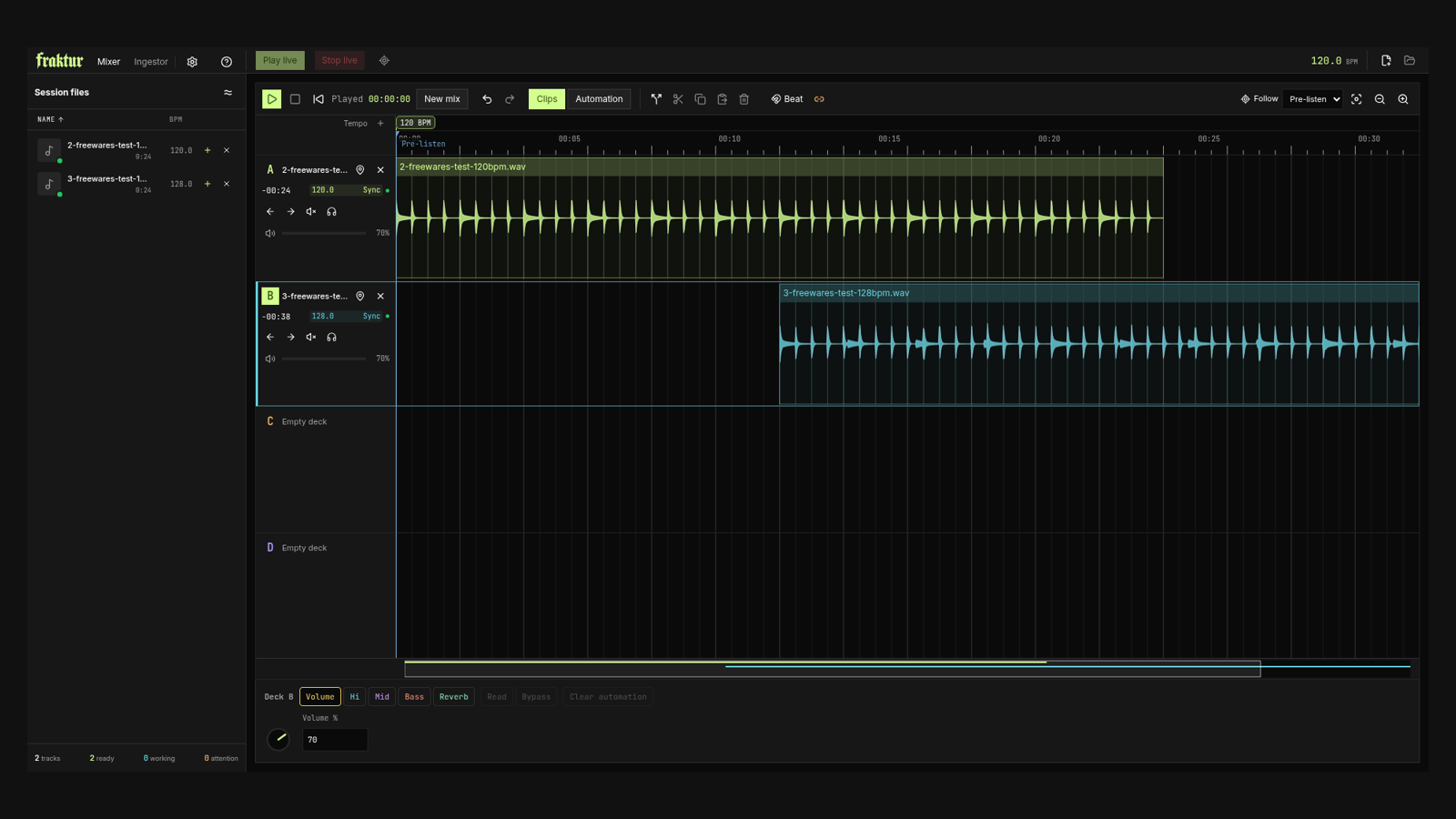
Two waveforms, a shared timeline, and time to see the transition coming. Fraktur approaches DJ mixing less like a pair of virtual turntables and more like a small audio workstation. You position the incoming track against the one already playing, then prepare the overlap before it reaches the audience.
You bring your own audio files and work with their beats, clips and automation in a browser tab.
A timeline instead of a leap of faith
In the creator's introduction, Fraktur starts from a specific preference: line up track B against track A in advance, rather than press Play and match it by ear while it is already live. If you are comfortable looking at tracks in a DAW, the layout makes immediate visual sense.
The Mixer has four decks, A through D. Tracks occupy lanes on a common timeline, with controls for moving a deck one beat earlier or later, muting it, or listening to it on its own. Volume, bass, mids, highs and reverb have automation controls. There are also clip operations for splitting and rearranging pieces of a track.
There is an important difference from a conventional composition project. The creator describes the decks as sequential and reusable: once the live playhead has passed a track's final piece, that deck clears for another track. This is a rolling performance workspace, not an unlimited arrangement you can always rewind to its beginning.
What happened with our two test files
We opened the web app without creating an account and imported two short WAV files made for this test. Each was 24 seconds long, with a regular synthetic beat: one at 120 BPM, the other at 128 BPM.
Fraktur first downloaded its analysis models, then processed the files. The Ingestor showed both tracks as ready, with durations of 0:24 and tempo readings of 120.0 and 128.0 BPM. Those matched the source tempos we had built into the files. The first track's detail view also showed its waveform, beat grid and a reminder that the automatic grid needs review.
Back in the Mixer, the files appeared in decks A and B. Their waveforms and overlap were visible on the timeline. Starting pre-listen moved the playhead and advanced the displayed timer; stopping returned it to the starting position. We also moved deck B one beat later and toggled its mute control, with the changed position and mute state visible.
This was a workflow check, not a listening verdict. Regular synthetic clips do not establish how beat detection handles a drummer or how time-stretching sounds.
Ingestor is where the beat grid earns its keep
The other workspace, Ingestor, is for inspecting the track analysis rather than arranging the mix. The developer explains that Fraktur detects beats, estimates tempo and builds a grid used to synchronize playback. When the analysis gets a passage wrong, the intended workflow is to inspect and correct that grid rather than blindly trust a BPM number.
Fraktur also has an Original mode for tracks that do not fit a useful automatic grid. Our trial focused on importing and arranging regular clips.
The browser version stores analysis information in IndexedDB, according to the developer, rather than keeping copies of the audio tracks there. Treat that as working browser data, not your music archive. Keep your source files somewhere safe and be careful when clearing site storage.
Headphones first, live outputs later
Fraktur lets you continue with pre-listen only, which is how we explored it. A proper live setup is a different step: the creator says it needs two stereo outputs, one for the audience and one for headphone preview.
The output dialog makes that distinction explicit. It also notes that discovering devices may request microphone permission, and warns about a Chromium multi-channel routing issue on Mac. We did not need device discovery for the pre-listen-only route. Hardware routing is something to check on your actual browser and audio interface before relying on it for an event.
Who should try it?
Fraktur is worth a look if you want to experiment with timeline-based DJ transitions using your own files, without an installer or account getting in the way. The live app currently states a limit of 15 minutes and 200 MiB per imported file. We encountered no payment prompt in this browser trial; that is not a promise about future pricing or support.
The creator calls it a personal project and does not promise a supported desktop release. Start with a few copies of tracks and check the output setup before treating it as performance equipment. The appeal is preparing a transition visually, not replacing every DJ setup.
Sources and image
Screenshot by Freewares, November 19, 2026: the real Fraktur interface with our two synthetic test clips. Interface design belongs to its creator.