Kando: The Pie Menu That Actually Works
Every app launcher looks the same. A rectangle pops up, you type three letters, you pick from a list. Start menu, Spotlight, rofi, whatever your distribution ships: same rectangle, same list. Kando looked at forty years of rectangles and decided the correct shape for a launcher is a pie.
Kando is a free, open-source (MIT) pie menu for Windows, macOS and Linux. Press its shortcut and a ring of icons appears around your cursor: launch apps, open files and links, fire keyboard shortcuts, paste clipboard snippets, run commands. It is the third pie menu from German developer Simon Schneegans, after Gnome-Pie and Fly-Pie. The man has spent the better part of a decade trying to make circular menus happen, and with version 3.0, released in September 2026, they might actually stick.
Why a circle beats a list
You do not read a pie menu. You remember that your browser lives at two o'clock and your terminal at seven, and your hand goes there before your eyes do. Each wedge is a fat target radiating from where your cursor already sits, so there is almost no aiming involved. It is the same trick professional tools like Blender have used for years, applied to the whole desktop.
Kando offers four ways to pick an item: plain point-and-click, a marking mode where you draw a quick gesture across the wedge, a turbo mode that chains gestures through submenus, and a hover mode where simply dwelling is enough. A first-run tutorial walks you through each of them. We stayed in point-and-click territory; the other three are clearly built for people willing to invest a week of muscle memory.
What happened when we installed it
We put Kando 3.0.0 on a Linux machine and pressed Control+Space. The example menu popped up with eight wedges: apps, web links, clipboard actions, media keys, window controls, workspace switching, bookmarks. We clicked into the Apps submenu, hit the file manager wedge, and the actual file manager opened. That sounds trivial, but plenty of launcher screenshots are pictures of a promise. This one delivered.
The menu editor is the real surprise. You get a live preview of your pie, a shortcut recorder, tags, themes, sounds, and menu conditions, so the same shortcut can open one menu while you are browsing and a different one while you are in a file manager. There is even an achievements system, because apparently launching your terminal forty times deserves a medal. The whole thing is polished well beyond what "open-source side project" usually means.
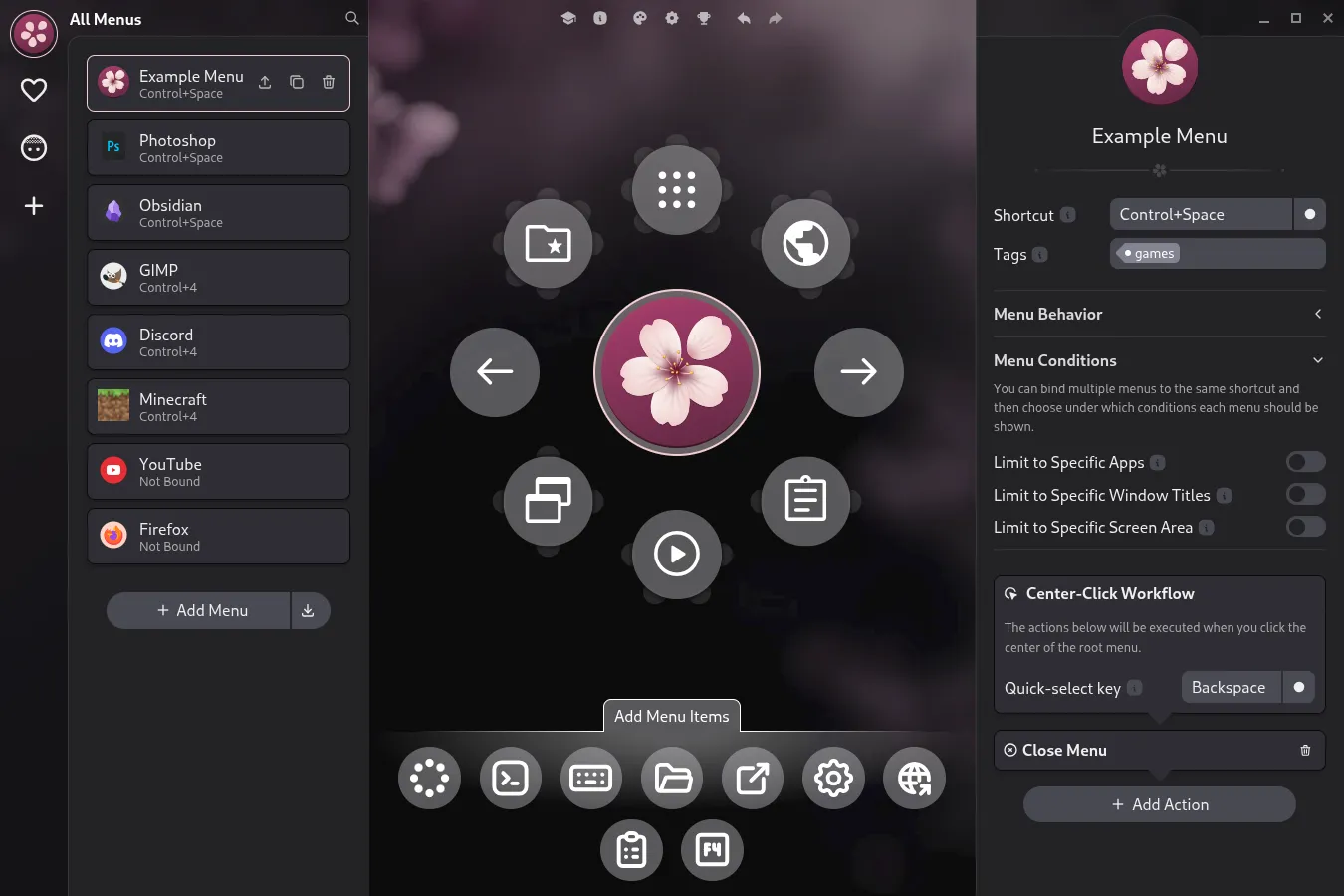
Kando's menu editor, with the live pie preview in the middle. Official screenshot from the project website.
The crumbs
It is not all flaky pastry. Kando only runs on desktops it knows. On a Linux session it did not recognize, it refused to start at all, and the only explanation was a single line in the terminal, complete with a sad emoticon. If you run an unusual window manager, check the compatibility notes in the official documentation before falling in love. Even supported Linux desktops sometimes need extra configuration.
It is also an Electron app, and it shows on the scale: with the editor and a menu open, we measured roughly 580 MB of resident memory across its processes. For a tool whose entire job is to wait quietly for a keypress, that is a lot of pie. And by default, menus open only from a keyboard shortcut. Binding them to a mouse button or a touch gesture requires third-party tools.
Who should grab a slice
Kando makes the most sense if you think with your hand: stylus users, touchscreens, gamepad setups, anyone whose cursor is already hovering near the things they want. The per-app conditions make it genuinely useful for repetitive workflows. If your hands never leave the keyboard, a type-to-launch tool like Flow Launcher will serve you faster, and if you want to script the actions hiding behind the wedges, AutoHotkey remains the reference.
As a free, open-source take on a launcher nobody else dares to ship, though, Kando is a delight. The rectangle has had a good forty-year run. The pie has earned a slice of your attention.