Do You Really Need a Paid Antivirus? Start with What Windows Already Gives You
The dialog always appears at the worst moment. Your trial ran out, your renewal is up, and a red banner the size of a billboard warns that your computer is UNPROTECTED, in a font usually reserved for hurricane alerts. The price shown is a deal, today only, sixty percent off. The small print says it renews at double.
Here is the answer most of those banners do not want you to hear: if you run Windows 10 or Windows 11, you already have a real antivirus, it is already running, and independent testing keeps ranking it with the paid competition. For a lot of people, the correct antivirus budget is zero dollars. Not because security does not matter, but because the bill was already paid with the operating system.
This does not mean "never pay for anything." It means start with what Windows gives you, understand what is actually covered, and only then decide whether a paid suite adds something you genuinely need. Let us walk through it.
What is already running on your PC
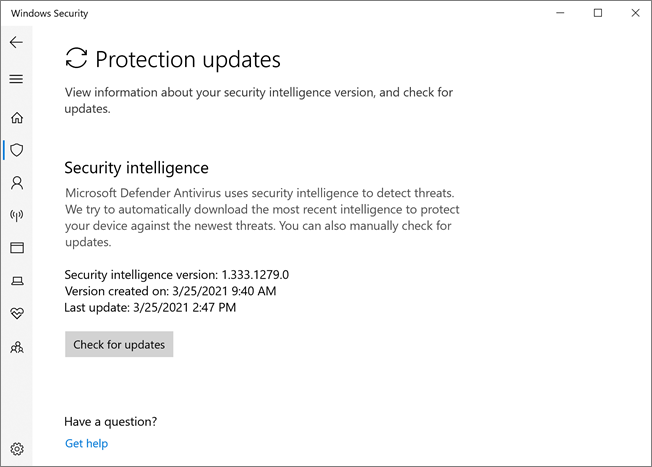
Microsoft Defender Antivirus is built into Windows and switches itself on from the first boot. Real-time scanning watches files as they arrive and run, cloud-delivered protection checks suspicious files against Microsoft's current intelligence in seconds, and tamper protection stops malware (or a careless helper) from simply turning the whole thing off. It updates itself through Windows Update, several times a day, without asking you for anything.
Image: Microsoft documentation screenshot of Windows Security, shown for illustration.
There is no dashboard begging for an upgrade, because there is nothing to upgrade to. That silence is why so many people believe they have no antivirus at all, which is exactly the belief the red banners monetize.
The test labs have weighed in
You do not have to take Microsoft's word for any of this. The independent testing houses throw thousands of real malware samples at every major antivirus and publish the scores, and Defender's report card has been boring in the best way for years. In AV-TEST's Windows home-user evaluations through 2026, Microsoft Defender Antivirus scored the full 6 out of 6 for both protection and usability in every test from February to August, with performance at 5.5 to 6. AV-Comparatives' Real-World Protection Test covering February to May 2026 measured a 99.0 percent protection rate with zero false alarms, inside its highest Advanced+ award group. And in SE Labs' home anti-malware report for January to March 2026, Defender posted 100 percent protection accuracy and 100 percent accuracy on legitimate software, for a AAA rating. Three labs, three methods, same conclusion.
The labs score three things: protection (does it catch the malware), performance (does it slow the machine), and usability (does it cry wolf on clean files). Defender's weak spot used to be performance, and even that has improved to the point of being unremarkable, which is the nicest thing a background tool can be.
Read the reports yourself before trusting any vendor's marketing, including Microsoft's. The pattern is consistent: the protection gap that once made a paid suite an obvious purchase closed years ago. What remains is mostly a features gap, and features are the next question.
The job no antivirus can do
One honest limit before the extras: antivirus protects you from malicious software, it does not repair the operating system itself. The distinction matters right now, because Windows 10 reached the end of support on October 14, 2025 and Microsoft no longer ships security fixes for it. Defender on a Windows 10 PC still receives new detection signatures and keeps catching malware, but a freshly discovered hole in Windows itself stays open, and no antivirus setting closes it.
If you are still on Windows 10 (version 22H2), the real options are upgrading to Windows 11 if the PC meets the requirements, or enrolling in Microsoft's consumer Extended Security Updates program, which keeps critical and important security fixes coming until October 12, 2027. What enrollment costs depends on where you live: in the United States it is free if you sync your PC settings, or a one-time thirty dollar purchase, while in the European Economic Area it is free if you stay signed in with a Microsoft account. The enrollment link lives in Windows Update on the PC itself, and that page shows the options for your region. Either way, treat "my antivirus is running" and "my Windows still gets patches" as two separate checkboxes. This article argues you never needed to pay for the first one. The second one is not optional.
SmartScreen and the firewall: the quiet bodyguards
An antivirus engine is only part of what Windows runs for you. SmartScreen checks downloads and websites against Microsoft's reputation data and interrupts the classic "this free utility is definitely not malware" mistake before it happens. The Windows Firewall has been quietly blocking unsolicited inbound connections since before some of its critics were born. Both are on by default, both are free, and together they cover the two most common ways trouble actually arrives: a bad download and an exposed port.
Worth knowing too: the third arrival route is not technical at all. Phishing, the fake delivery notice, the fake bank email, the fake invoice, does not attack your antivirus, it attacks you, and no engine fully covers it. That is why the habits section at the end matters more than any product on this page.
The ransomware switch worth flipping
One genuinely valuable feature ships turned off. Controlled Folder Access, buried in Windows Security under ransomware protection, blocks untrusted apps from changing files in your Documents, Pictures and other protected folders, the exact behavior that makes ransomware ransomware. Turn it on, let it run for a week, and approve the handful of legitimate programs it challenges.
The honest warning: it will occasionally block a program you trust, usually an older app that saves files in unusual ways, so expect a few approval clicks at the start. That minor friction is the price of making your family photos useless to an encryptor.
While you are in that settings page, one more free trick lives there: Microsoft Defender Offline. It restarts the PC into a minimal environment and scans before Windows itself loads, which is how you evict the stubborn rootkits that hide from a running system. You will hopefully never need it. It costs nothing to know it exists.
What the paid suites are actually selling
Open a paid antivirus page and count the features. The antivirus engine is one line. The rest of the grid is a bundle: a VPN, a password manager, dark web monitoring, parental controls, cloud backup, a file shredder, and the inevitable "PC optimizer" that mostly frees disk space by deleting things you did not know you had.
Some of those extras are genuinely useful if you would otherwise pay for them separately. Most are mediocre versions of tools that exist for free, bundled to justify the subscription. And check the renewal price before the introductory one: the discounted first year is the hook, the quiet auto-renewal at full price is the business model.
The hidden costs on both sides
Free is not automatically clean either, and this is where a little skepticism pays. Some free antivirus products earn their keep through upsell pop-ups, bundled browser extensions, or worse. The cautionary tale is Avast, whose subsidiary Jumpshot sold detailed browsing data collected from antivirus users, a scandal that ended with Jumpshot shut down and, in 2024, a $16.5 million fine from the US Federal Trade Commission. A security product that sells your browsing history is not a security product.
The paid suites have their own tax: system drag. A heavyweight suite scanning everything, injecting itself into your browser and popping up weekly offers can make a fast computer feel old. Defender's quietness turns out to be a feature.
Free extras that actually earn their place
If you want to strengthen the free setup, add tools that do specific jobs instead of a second engine.
AdwCleaner, from Malwarebytes, is the on-demand broom: run it when the browser grows toolbars, the homepage changes itself, or pop-ups appear from nowhere. It scans, removes adware and potentially unwanted programs, and asks for nothing. It is not a real-time guard, and that is fine, because you should never run two real-time antivirus engines at once. On-demand plus Defender is the right combination.
simplewall gives you control over the other direction of traffic: which programs are allowed to talk to the internet at all. It sits on top of the Windows filtering platform and asks you about each application that tries to connect. Quietly satisfying, and occasionally revealing.
Fair warning, and it comes from the developer's own description: simplewall is "definitely for advanced users." A filter that watches every connection will also block things you wanted, an app update, a sync service, a game launcher, until you approve them, so expect a first week of pop-up homework and the occasional head-scratcher. If that sounds like fun, it is a great tool. If it sounds like a chore, skip it without guilt: the GlassWire option below gives you most of the awareness with none of the gatekeeping, and nobody needs simplewall to stay safe.
GlassWire takes the gentler route and simply shows you what your PC is doing on the network, per app, over time. The free tier covers the monitoring graph, which is often all you need to spot a program phoning somewhere it should not.
The habits that beat any antivirus
Ask anyone who cleans up infections for a living what actually compromises machines, and the answer is rarely a missing security product. It is an unpatched system, a reused password, and an email that looked urgent. The boring habits win: let Windows and your browser update themselves, use a password manager like Bitwarden or KeePassXC so every account gets its own password, turn on two-factor authentication for email and banking, keep a backup that ransomware cannot reach, and treat unexpected attachments and login links as guilty until proven innocent. No subscription on earth outperforms that list.
When paying does make sense
Fairness requires the other side. A paid suite earns its money when it covers the whole family's mix of Windows PCs, Macs and phones under one license and one dashboard. It earns its money when you want identity-theft monitoring and insurance bundled in, which is a real product in some countries, or when the person using the computer needs a support phone number more than they need optimal settings. One place to skip the upsell entirely: your Android phone. Google Play Protect is already built in and scans apps continuously, and the security case for a paid antivirus on Android is far weaker than on a PC, because apps are sandboxed by design. Keep the phone updated and install apps from the Play Store, and you have done most of the job.
Paying for that is not being scammed. It is buying convenience and coverage you will actually use, with your eyes open and the renewal price written on a calendar.
The two-minute version
Already included and free: a top-scoring antivirus engine, SmartScreen, a firewall, and ransomware folder protection once you switch it on. Worth adding for free: AdwCleaner for occasional cleanups, simplewall or GlassWire for network awareness, and a password manager for the attacks no antivirus can stop. Worth paying for: a family license across many devices, identity monitoring you will use, or support you will call.
The next time a red banner tells you that you are unprotected, open Windows Security and look at the green checkmarks. You were protected all along. It just never asked for your credit card to say so.