Krita: Start Painting Without a Subscription
- Digital painting
- Art
- Open source
A blank canvas is intimidating enough without a subscription screen standing beside it. If you want to sketch, paint or build an illustration, the useful question is whether the tools help you make the next mark, not whether you have chosen the correct monthly plan.
Krita is a free, open-source painting application built for digital artists. Its focus is artwork created from scratch: illustration, concept art, comics and related painting work. It can overlap with other image editors, but judging it purely as a photo-retouching replacement misses what it is trying to do.
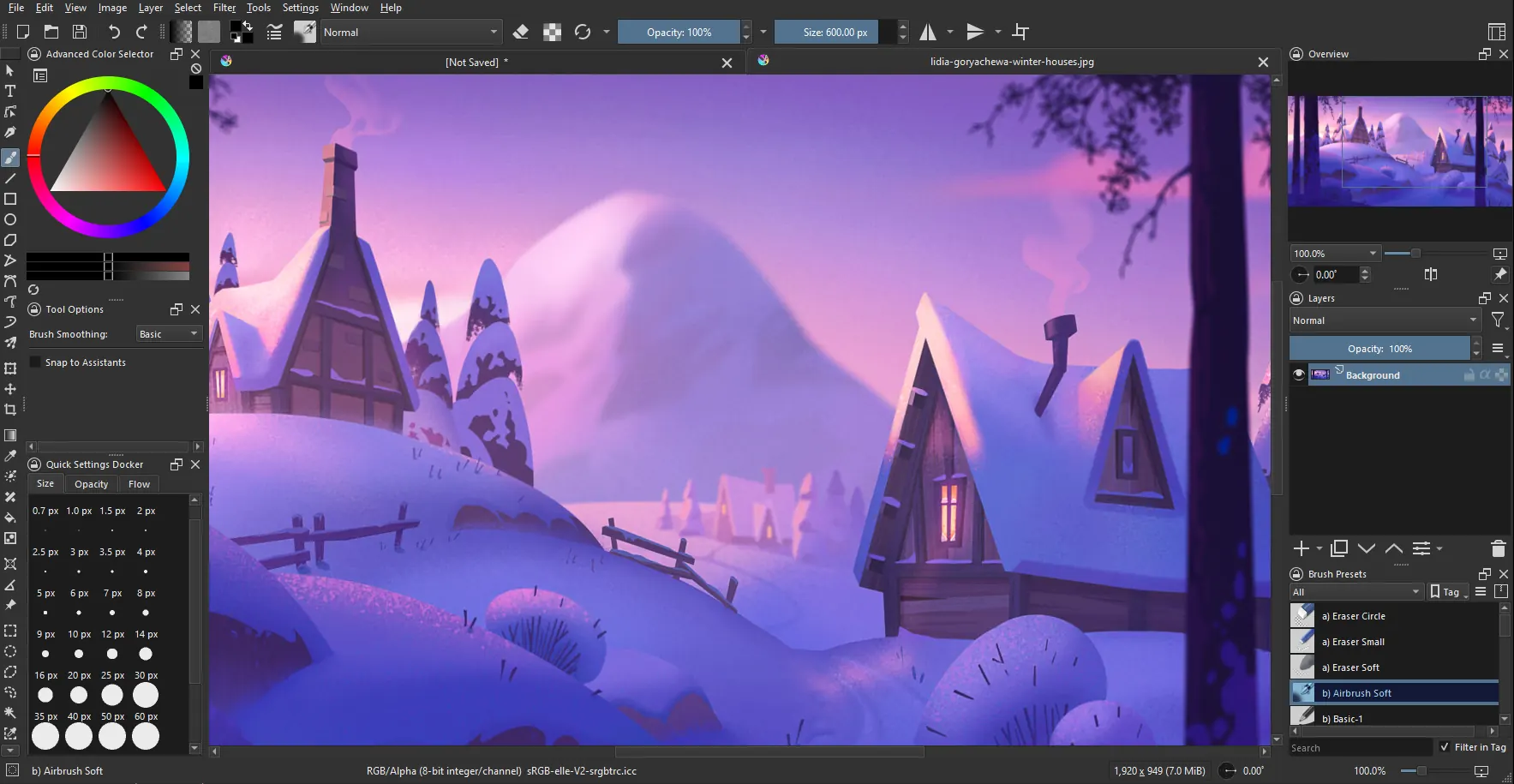
Krita in action: brush presets up top, layers on the right, and a painting in progress. Source: krita.org.
Give the first canvas a modest job
Start with something small and specific: a simple object, a character sketch or a colour study. An empty document with unlimited possibilities is less helpful than one task you can finish while learning the interface.
Krita is primarily raster-based, so the canvas dimensions matter. Painting larger gives you more pixels to work with, but also means larger files and more work for the computer. Enlarging a tiny raster painting later does not create the missing original detail.
Pick dimensions that suit the intended use and your hardware rather than automatically making the biggest canvas available. You can learn brush behaviour on a small exercise without making your first experiment a machine-performance test.
Learn a few brushes, not the entire catalogue
A large brush collection is exciting and an excellent way to avoid drawing anything. Choose a small set you understand and spend a little time seeing how they respond. Change one property at a time so the result teaches you something.
If you use a drawing tablet, test its behaviour with a few strokes before beginning the real piece. Check that the marks respond as expected on your own setup. Hardware, drivers and preferences matter more than someone else's perfect brush demonstration.
Keep the early exercise simple enough that technique remains visible. A basic brush can teach line weight, shape and colour relationships without an elaborate texture disguising every decision.
Layers give you room to change your mind
Krita's layer system lets you separate parts of the image. A sketch, a colour layer and later details can remain independent instead of becoming one irreversible pile of pixels. You can change visibility and order while deciding how the picture should develop.
Name the layers you will need to find again. “Sketch” and “Colour” become much more useful than “Paint Layer 17” once a document grows. Group related parts when that makes the stack easier to understand.
Before a major experiment, make a copy or save an incremental version. Layers are useful flexibility, but they are not a guarantee against every destructive action. A separate saved stage is often the easiest way to try a different direction without becoming precious about the current one.
The editable file and the shared image differ
Krita's native KRA format preserves the features the application can handle. Keep that file if you want to return to the layers and continue painting. It is the working source, not usually the picture you attach to a message or upload as a normal web image.
Make a separate export in a suitable image format for sharing. The basic-concepts guide notes that the canvas defines what appears in that output. Check the edges so useful content has not ended up outside the area you intend to deliver.
Open the exported image outside Krita and inspect it at its actual viewing size. Confirm that it shows the right version, with the expected background and no unwanted sketch layer. Then keep both the source and the delivery copy somewhere you can identify later.
A painting tool, not a talent subscription
Krita offers enough depth for substantial artwork, but the first success can be a simple finished drawing. You do not need to learn animation, every mask type and every brush setting before making something worth keeping.
I would begin with one canvas, a few familiar brushes and a small layer stack. Learn the next feature when the picture presents a reason to need it. That keeps the software in its proper role: helping you paint rather than becoming a very elaborate way to postpone painting.
See the manual overview, basic concepts and KRA format guide for current details.