Nocto: a Dynamic Island for Your MacBook's Notch
- Mac Apps
- Productivity
- Utilities
- Music
- Calendar
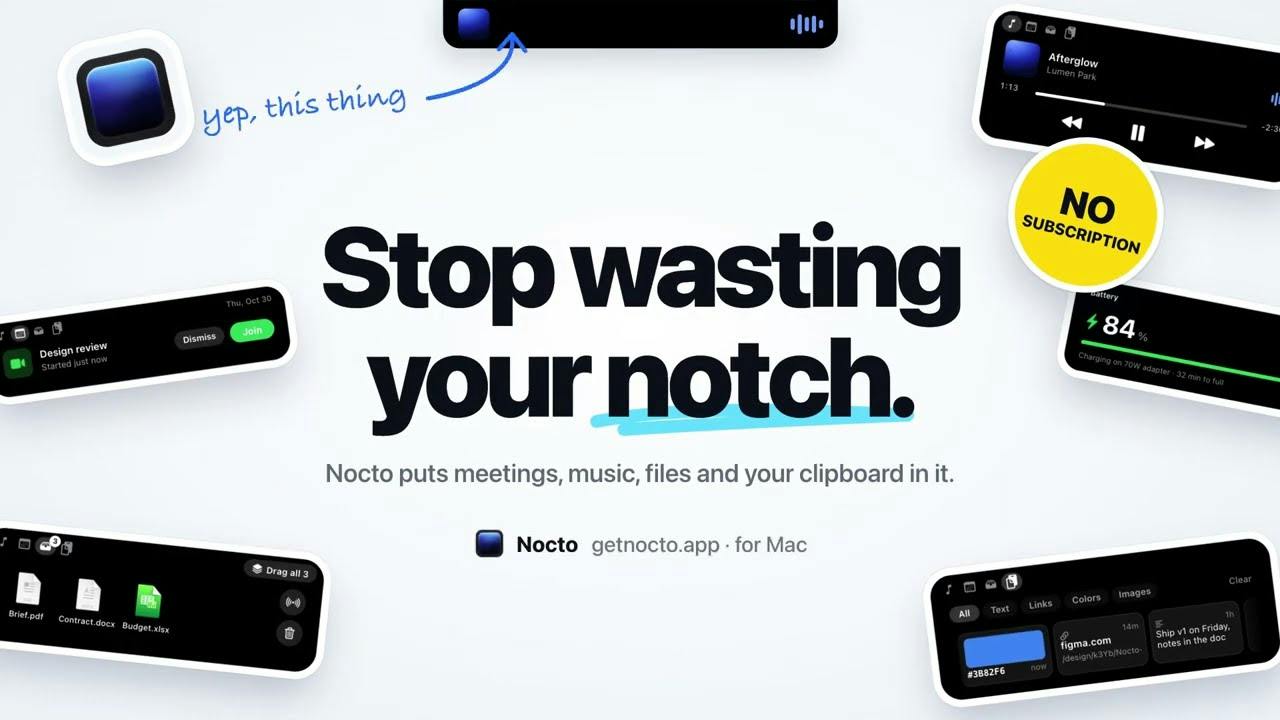
Every MacBook since the notch has carried a little black rectangle at the top of the screen that does exactly nothing. Apple put a camera in it and called it a day. On the iPhone, the same idea became the Dynamic Island, which at least earns its pixels. Nocto, spotted in a recent batch of Product Hunt launches, is a Mac app that turns that dead space into something closer to the iPhone version: music, meetings, a file shelf, a clipboard and battery updates, all living in and around the notch.
Nocto's notch widgets: music, meetings, a file shelf, a clipboard and battery readouts. Source: Nocto on Product Hunt.
What Nocto actually does
Five things, according to the makers. Music comes first: point at the notch while Apple Music, Spotify, YouTube or a browser player is running and you get artwork, playback controls and a scrubber, with a sideways swipe to skip tracks. Then meetings: your day's events appear in their calendar colours, a countdown sits beside the notch ten minutes before each one, and when the meeting starts the notch opens on its own with a Join button. There is a shelf, which is the one I did not know I wanted: drag files, images or links onto the notch, switch apps, drag them back out, or drop them on AirDrop to send them to your iPhone. The clipboard shows what you copied in a useful way - a hex code displays as the actual colour, a screenshot as the picture, a link as a preview of the site. Finally, battery: plug in and see how long until full, connect AirPods and see each one plus the case, shown once and then tucked away.
The details that make it feel finished
Small utilities live or die on polish, and the feature list suggests the author knows that. Copied links get cleaned before you paste them: utm tags, fbclid and the other tracking barnacles are stripped, so you stop being the person who shares a URL that is four lines long. You can set the width and corner radius of the open notch to match your screen, rest the pointer on it to peek inside, and pull files, text, links and images back out into any app. The battery alerts are deliberately discreet - they appear for a moment and get out of the way, which is exactly how a notch widget should behave.
Privacy and
pricing, said plainly
The privacy pitch is refreshingly short: your music, calendar, clipboard and files are read on your Mac and stay there. No account, no analytics, no tracking. The makers say the app only goes online to check your license and look for updates. For an app that reads your calendar and clipboard, that architecture is the whole ballgame, and it is good to see it stated in plain words on the homepage.
The pricing needs equal plainness, because this one is not fully free. There is a seven-day trial. After it ends, the music player keeps working for free forever, while meetings, the shelf, AirDrop, the clipboard and the battery updates need a license. The license is one payment, not a subscription, with a discounted launch price listed on the vendor's site. Their FAQ also covers moving a license to another Mac.
The honest caveats
This is a Mac app, full stop, and specifically one built around the notch, so owners of older notch-free MacBooks are looking at a solution to a problem their screen does not have. It is also a young app from a small maker, and utilities that hook into music players, calendars and the clipboard have many edges to catch on, so expect a rough one here and there. The free-forever part is the music player alone; if the meeting countdown and the shelf are what tempt you, budget for the license. And as with any tool that reads private data locally, the privacy promise is the vendor's own statement - a good sign, not an audit.
For the price of a couple of coffees, though, the notch finally has a job. If you try nothing else, wave your pointer at it during a song and swipe to skip. It is the kind of tiny delight that makes a Mac feel like yours again.
Full software listing: https://freewares.org/software/nocto