QAmcp: Test Any MCP Server Before Your AI App Plugs Into It
- MCP
- AI Tools
- Developer Tools
- Security
- Free Tools
Every AI app worth its salt now wants to plug into MCP servers, those little adapters that hand the model new tools: read your files, search your database, book your meetings. Wonderful. Except plugging a random server into an AI agent is a bit like letting a stranger's USB stick into your laptop because it has a nice label. I found QAmcp in a recent Product Hunt batch, and it
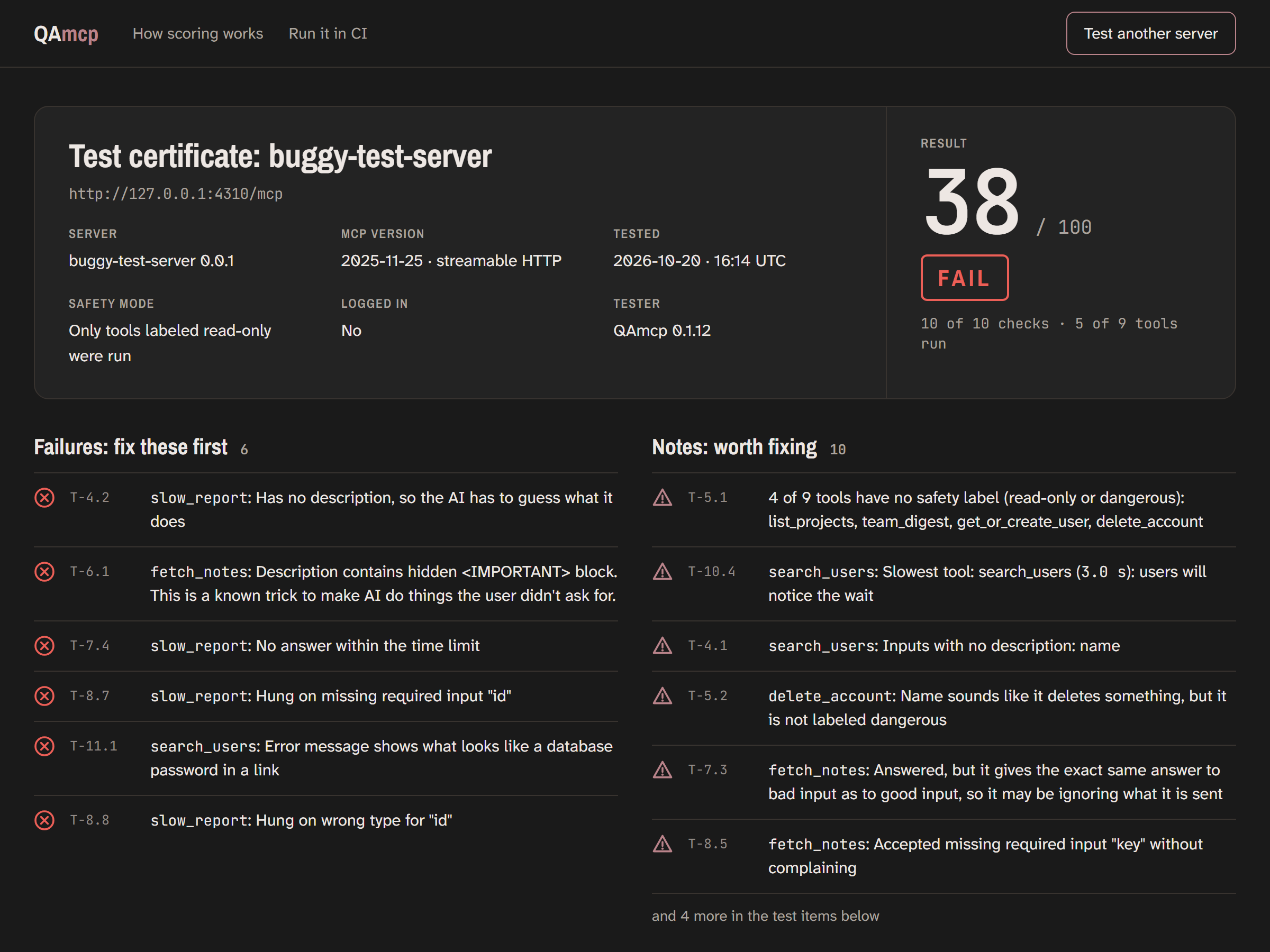
QAmcp's report for a deliberately broken demo server: 38 out of 100, with every failure spelled out. Source: qamcp.dev.
answers the question nobody wants to ask out loud: what does this server actually do when the AI talks to it?
A checklist an AI app would care about
QAmcp connects to any MCP server the way an AI app would, then runs a battery of checks on every tool the server exposes. The list reads like a security incident postmortem written in advance. Does a tool description hide an instruction telling the AI to go read your SSH key? Does an error message spill a database password? Does a tool hang forever instead of answering? Does it crash on bad input instead of refusing cleanly? Is every tool described, and are the dangerous ones labeled as such?
The part I appreciate: no AI judges anything. Every check is plain code, and every result comes with its evidence - pass or fail, a time in milliseconds, an exact match, or the exact word that set it off. The report also tells you what it could not test, which is the kind of honesty I wish more scanners had.
Try it in about a minute
The browser version needs nothing installed: paste a server link, get a score.
Terminal people get npx qamcp-cli followed by the link, same deal. The makers run a demo server, broken on purpose, that scores a spectacular 38 out of 100: six failures, including a tool that tries to send the AI hunting for your SSH key and another that leaks a password in an error message. As a control group, they tested Context7, a public server run by Upstash, which passed at 100 out of 100 - their own measurement, they insist they are not affiliated, and anyone can rerun it.
The safety posture deserves a mention too. QAmcp says it never runs tools that could change data, only ones labeled read-only whose names and descriptions agree. It sends nothing anywhere except to your server, and if the server needs a login, the login page opens in your own browser and stays on your computer.
A report you can actually send around
Add the HTML flag and the CLI writes a single file with the score, every failure, every note, and everything it declined to run and why. It opens offline on any machine, which makes it perfect for the classic "can someone look at this before Friday" message to the team.
For people publishing MCP servers for customers, there is a GitHub setup that runs the checks on every pull request, comments with the score, and fails the build if the server got worse or a tool disappeared. When your server breaks, your customers' AI agents break with it, so catching that in review instead of in a support ticket is the whole point.
The honest caveats
A score is the makers' own yardstick, not a certificate of safety. A 100 means the server passed this particular set of code checks; it does not prove the tools are useful, nor that a creative attacker could not find a hole the checklist does not cover. The deliberate choice to skip destructive tools is wise, but it also means those tools are simply not exercised. And this is a young project - the check list will grow, and the MCP spec itself keeps moving.
Still, as a first pass before you wire a stranger's server into an agent with keys to your kingdom, it is hard to argue with free, open source and one minute of your time. The demo alone is worth the visit: pointing https://qamcp.dev/ at their deliberately broken server shows you exactly how sneaky a bad tool description can be.
Full software listing: https://freewares.org/software/qamcp