qBittorrent: Download Torrents Without the Ad Clutter
- Downloads
- BitTorrent
- Open source
A download manager should not resemble a busy shopping street. If you want a BitTorrent client without advertisements competing for attention, qBittorrent is an appealingly direct option: a list of transfers, useful controls and no sales pitch occupying the best seat.
qBittorrent is free, open-source software for downloading and sharing files through BitTorrent. The project lists no ads among its features. It is a tool for a transfer method, not a catalogue of content, and it makes sense to understand that method before adding your first torrent.
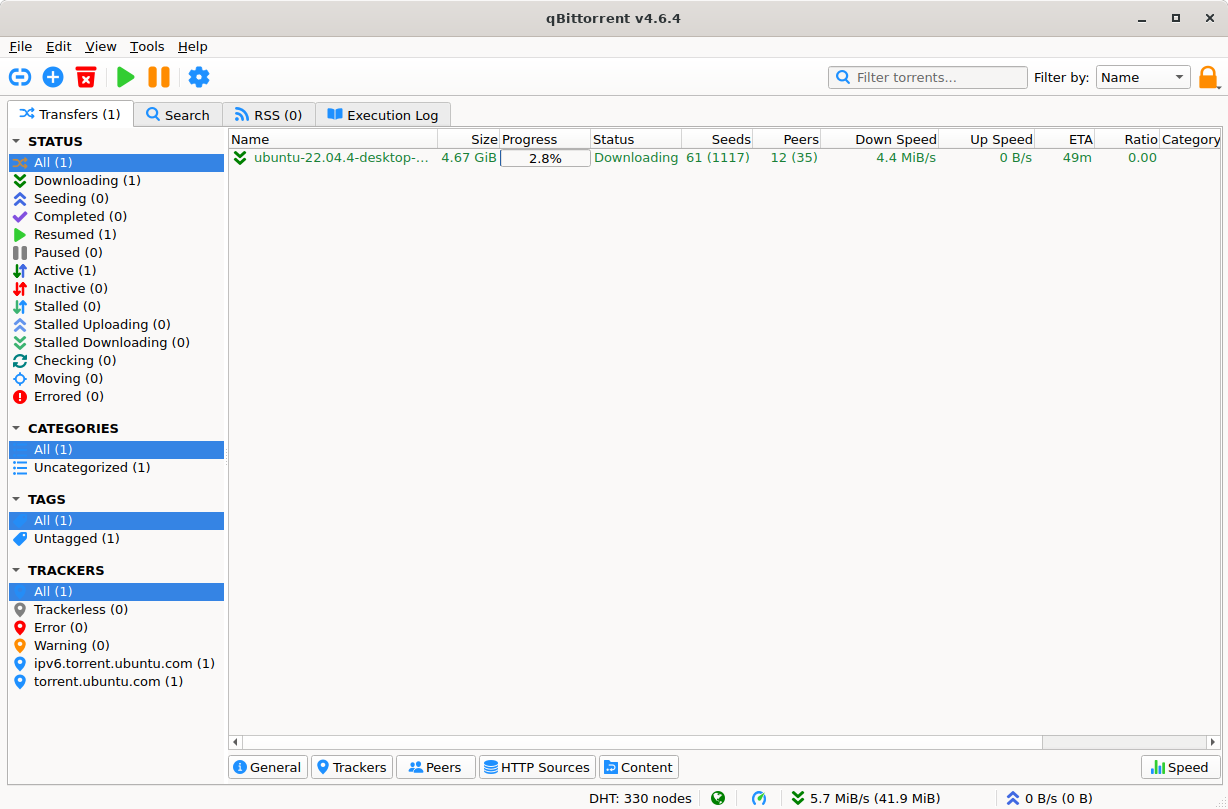
qBittorrent’s main window: transfers, speeds and states, without a single ad in sight. Source: qbittorrent.org.
A torrent is a sharing arrangement
BitTorrent transfers pieces of data between participating peers. You may receive pieces from other people and send pieces back. That is different from simply fetching a file from one publisher's web server.
There are legitimate uses, including software distributions and openly licensed material. The important question is whether you have the right to download and share the particular content. Installing a legitimate application does not make every file offered through it legitimate.
Start with a torrent supplied by a publisher you trust for material it is entitled to distribute. A familiar filename alone is not a reliable source check. Neither is a comment saying that everything is safe.
Check the files before starting
qBittorrent supports torrent content selection and prioritisation, so a multi-file transfer does not have to mean accepting every item without inspection. Review what is included, where it will be saved and how much disk space the selection needs.
Keep downloads in a location you can identify later. A dedicated folder is easier to review than scattering unfamiliar files among documents you already trust. Be particularly cautious about executables, scripts and unexpected extras.
A completed transfer does not certify the contents as safe. If a publisher provides a trustworthy checksum or signature for a legitimate download, use that verification route. Do not treat a successful download as proof of authorship.
Set limits that suit the connection
The client includes queues, priorities and a bandwidth scheduler. Those controls are useful when a large transfer would otherwise compete with calls, streaming or everyone else sharing the connection.
Start with a small number of active transfers and observe the effect. There is no universal speed setting that is correct for every network, storage device and internet plan. A laptop on a metered connection needs different judgement from a desktop on an unmetered home line.
Read upload and download limits separately. Upload traffic matters too, particularly where data allowances or a busy upstream connection are involved. Check the actual plan and network rules rather than assuming only downloaded bytes count.
Finished downloading does not mean finished sharing
Seeding is the continued sharing of data after the download completes. Understand the client's seeding controls and the rules of the community or publisher supplying the torrent before walking away from a running transfer.
That does not mean you should blindly leave every file sharing forever. Storage, bandwidth and permission to distribute all matter. Know what remains active, and avoid making your laptop an accidental long-term distribution server.
BitTorrent is not anonymous by default. Peers need network addresses to communicate, and the protocol's publisher explains that peers can see your IP address. Encrypted peer connections do not turn the activity into invisible or anonymous traffic. Do not share sensitive private files through a public torrent as though it were a private attachment.
Keep advanced features optional
qBittorrent also offers RSS filtering, search extensions and a remote web interface. Those can be useful, but they are not prerequisites for an ordinary download. Each extra integration adds something else to understand and maintain.
I would leave remote control out of a first setup. A web interface is an account-security and network-exposure decision, not merely a convenient checkbox. Begin with the local client and a trusted, legitimate source.
qBittorrent suits people who need BitTorrent transfers and want clear controls without ad clutter. The sensible workflow is simple: verify the source, choose the files, check the destination and understand what stays shared. See the official features, project FAQ and BitTorrent explanation of peer addresses.