River Writer: Write Stories with Your Kids
I found River Writer yesterday, and within a day it was sitting in front of the toughest critics in the house: my kids. It is a brand-new, free and open source Mac app for writing screenplays, stage plays and novels, and it turned our evening into something better than another movie night.
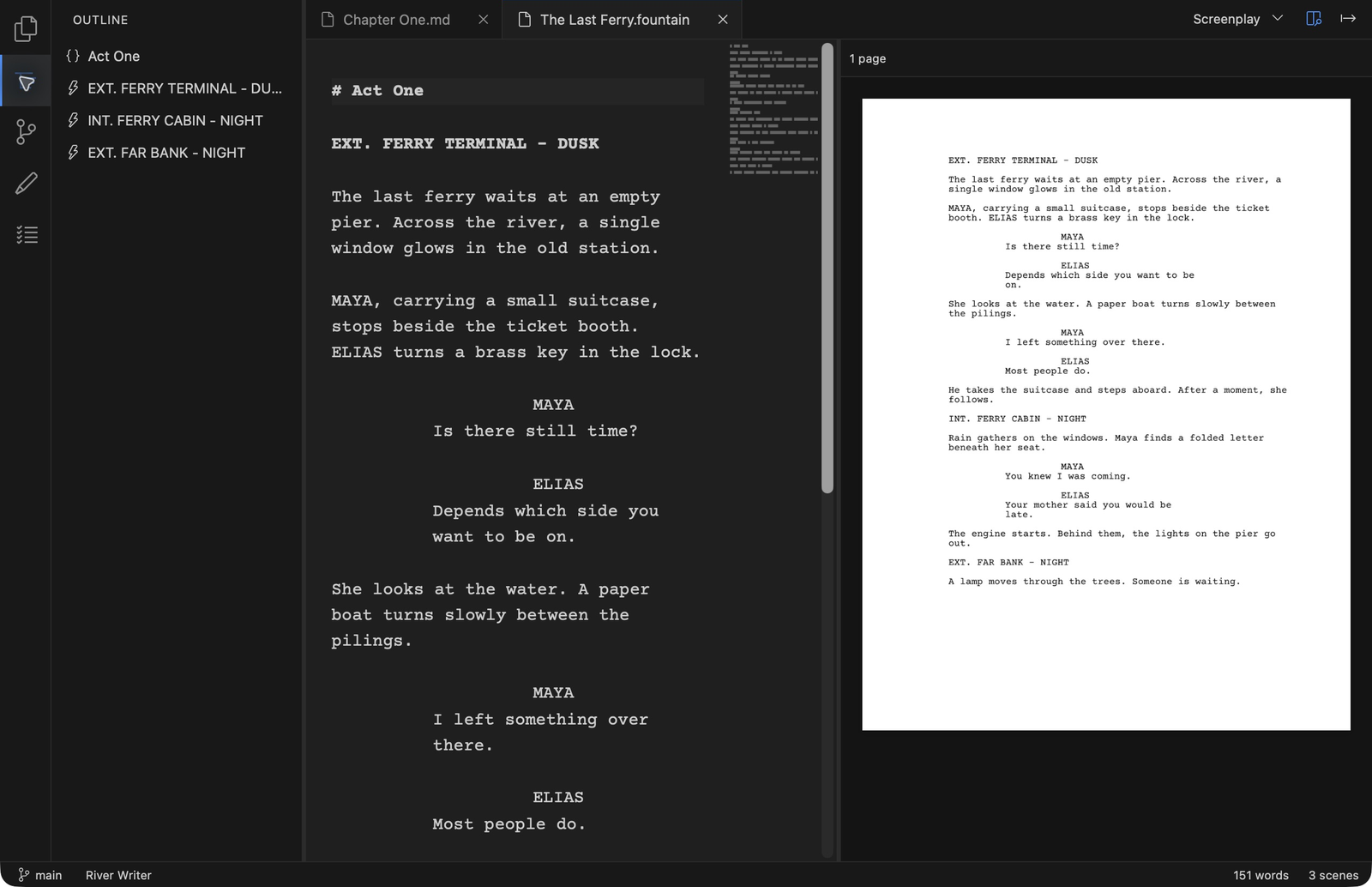
The premise is lovely. You write plain text on the left, and River typesets a properly formatted page on the right, live. Type a scene heading and it snaps into place. A character name gets its capital-letter pedestal. Dialogue indents itself. For a kid, watching plain words turn into a real movie page is basically magic. For an adult who once wrestled Word into pretending it was Final Draft, it is closer to relief.
Plain text you actually own
Screenplays and stage plays are saved as .fountain files, novels as plain Markdown, and a project is just a folder on your Mac. No proprietary format, no export ritual, no hostage situation. The same files open in any editor, on any machine, twenty years from now. And there is a practical side I like as a parent: the story your kid writes tonight is a text file you can email to grandma, not a blob locked inside an app.
Built for the form, not against it
River knows what a screenplay is. Scene headings, character names and dialogue land where they belong as you type, with suggestions for the characters and locations you have already used. An outline, a scratchpad and a to-do list live in the sidebar, all kept as plain files in the project. It handles Screenplay, Multi-cam, Stage Play and Manuscript formats, and exports to PDF when the masterpiece is ready for its premiere.
The killer feature: alternate endings
Under the hood, River has Git version control built in. Commit a draft, browse earlier versions, restore a file, and all of it in plain writer language instead of programmer jargon. The headline act is branches: spin off a version of the story, try a different ending, and keep both.
Anyone who has ever told a bedtime story knows the negotiation. The hero must win, but the dragon must also win, and someone always demands a sequel. Branches are the first bit of software I have seen that takes that negotiation seriously. Everybody's ending survives.
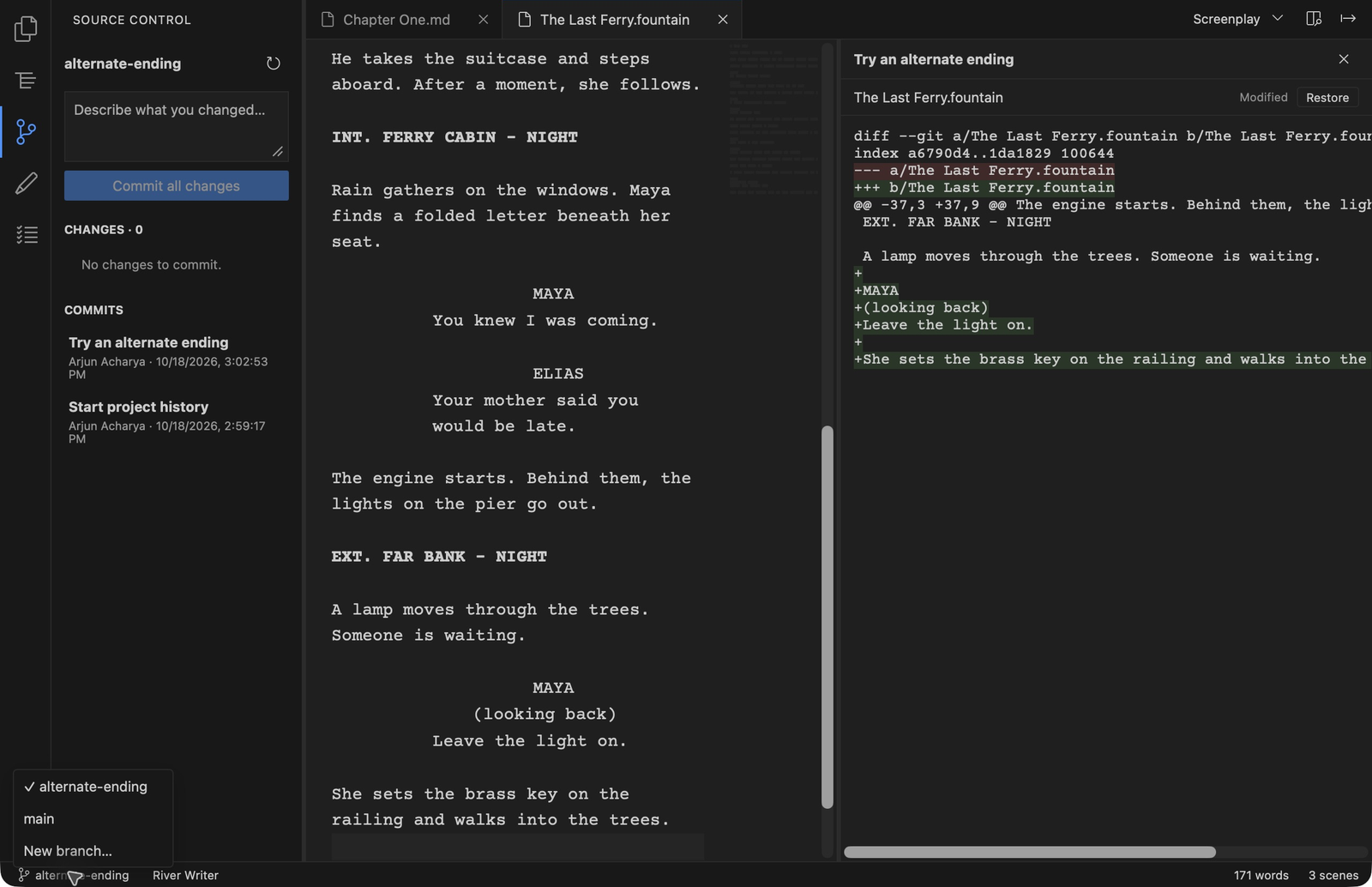
Autosave kicks in a second after you stop typing, with crash recovery on top. A small hand reaching for the power button mid-climax is no longer a plot twist.
What it doesn't do
The list is refreshing: no accounts, no cloud sync, no subscriptions, no telemetry, no AI features. According to the project, the app makes no network connections at all, and the source is right there to check. Your children's first screenplay about a dinosaur detective stays exactly where it belongs: on your machine.
The catch: you build it yourself
Here is the honest part. River Writer is distributed as source code. There is no download button: you clone the repository and build the app yourself, which takes a few free tools (Xcode Command Line Tools, Rust, Node.js, pnpm) and some patience, how much depends on your machine and your comfort with a terminal. The README walks you through every step, but if the command line sounds like a horror genre to you, this is a hurdle. It is also Mac only (macOS 13 or later), with no Windows or Linux version. And the project is young, the repository is only days old, so expect a rough edge here and there.
Verdict
River Writer is free, MIT licensed, and opinionated in all the right ways: your files, your machine, no accounts, no noise. If you are on a Mac and you have ever wanted to write a screenplay, a play or a novel, or to turn a Saturday evening with the kids into a writers' room, it is one of the most charming pieces of free software I have found this year. Set aside a little time for the build, and let the arguments about the ending begin.
GitHub: https://github.com/arjunacharya10/river-writer
Product Hunt: https://www.producthunt.com/products/river-writer