T3 Code: One Control Panel for All Your AI Coding Agents
- AI
- Developer Tools
- Open Source
My coding setup has quietly turned into a small zoo. Claude Code lives in one terminal tab, Codex in another, and there is always one more agent I installed at midnight because someone on the internet said it was good. Switching between them means remembering which window is thinking about which project, and my desk starts to look like mission control for a rocket that never launches.
T3 Code, a free and open-source app from Theo Browne and the T3 crew, wants to be that mission control on purpose. It calls itself a control plane for coding agents: one surface that runs Claude Code, Codex, Cursor, Grok Build, OpenCode, Antigravity and fx, using the agents you already have installed on your machine.
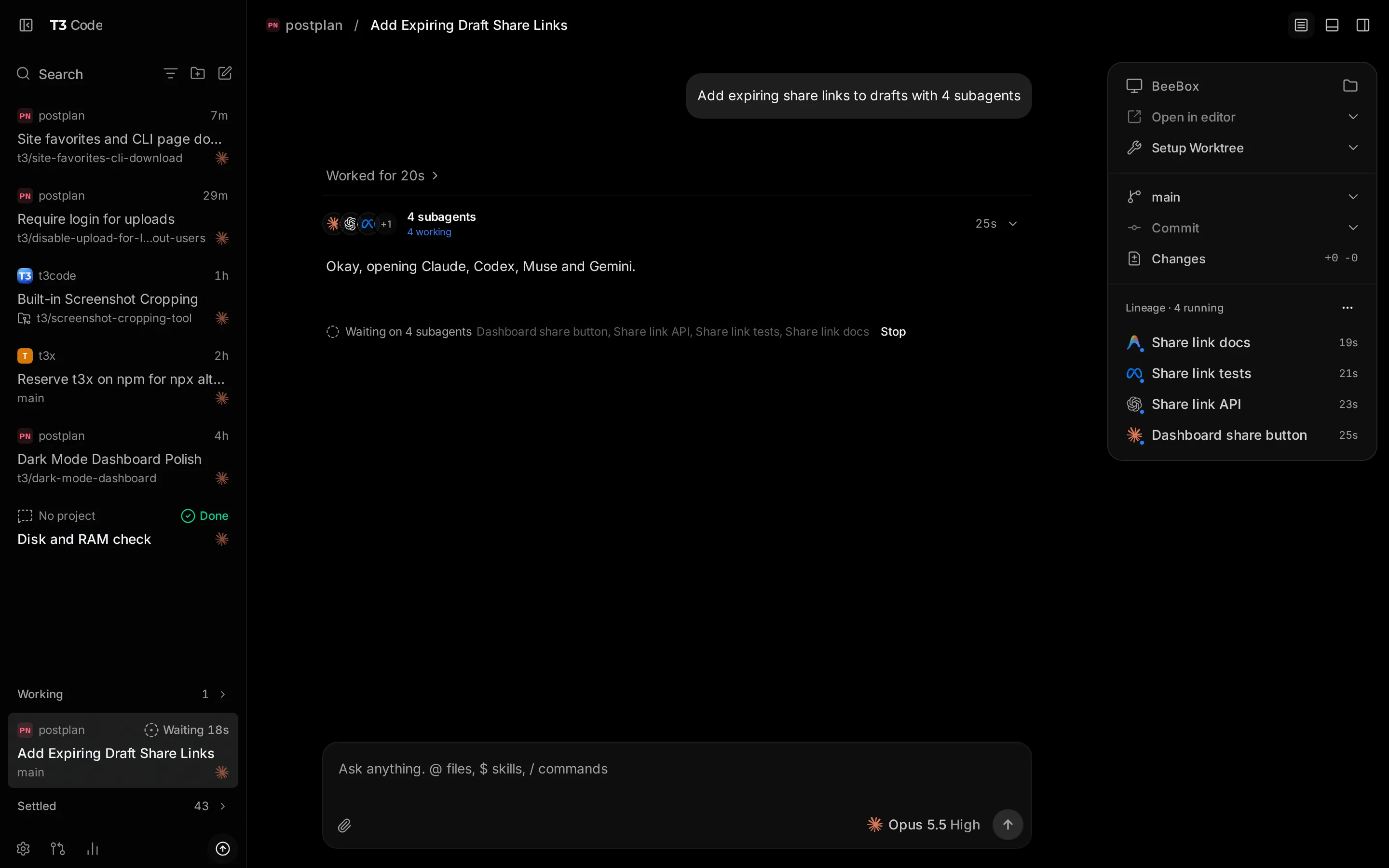
T3 Code running Claude, Codex and Gemini subagents in one thread. Screenshot: t3.codes (official site).
One window, every agent
The pitch is simple. Install the desktop app on Windows, macOS or Linux, or run npx t3@latest for a test drive, and T3 Code wraps your existing command-line agents in a proper interface. Each agent thread works on its own branch, and when the result looks good, one button commits, pushes and opens a pull request on GitHub with a generated title, body and changelog. No terminal dance, as the site puts it.
The part that made me smile: there is a real mobile app for iOS and Android, plus a web app, so a long-running thread can be babysat from the couch or, in my case, from the line at the coffee shop. A typical first session looks like this: install, sign in one provider (for example claude auth login for Claude Code), open a project, and watch the agent work from a clean thread view instead of a wall of terminal text. That is the intended tour, not lab results from my own benchmarking dungeon.
Free app, honest fine print
T3 Code sells you nothing. "Bring your own subscription" is the motto: the app is free under the MIT license, but it orchestrates agents you already pay for. If your Claude Code or Codex plan is what bills you every month, nothing about that changes. You get a free remote control, not free tokens.
That honesty runs through the whole project. The README warns, in its own words, "We are very very early in this project. Expect bugs." The version number agrees: 0.1.x, with nightly builds landing daily and large contributions politely refused for now while the team finds its footing. If you want to shape it anyway, the repo is built to be forked. "If you don't like something, fork it" is a literal section of the site, complete with the fork commands and the dev server instructions.
There is also some real traction behind the jokes. The GitHub repo has collected around 47,000 stars, the site claims over 500,000 developers tolerate it, and the quotes page is a wall of developers admitting, sometimes heartbroken, that the thing is genuinely good.
Verdict
For developers who already pay for one or more AI coding agents and keep losing track of which window does what, T3 Code is a tidy, genuinely free control panel from a team with a habit of shipping things developers actually like. Keep it away from anyone expecting free AI: the app costs nothing, the brains still do. And since it sits at version 0.1.x, treat it as a promising preview rather than a production pillar. I am keeping it installed, mostly for the phone-as-remote-control trick.
You can find the download links and the full technical sheet on the T3 Code page here on Freewares.