Teable Mobile: Your Bases and AI Agent, in Your Pocket
- Productivity
- Mobile Apps
- Databases
- Open Source
- AI Tools
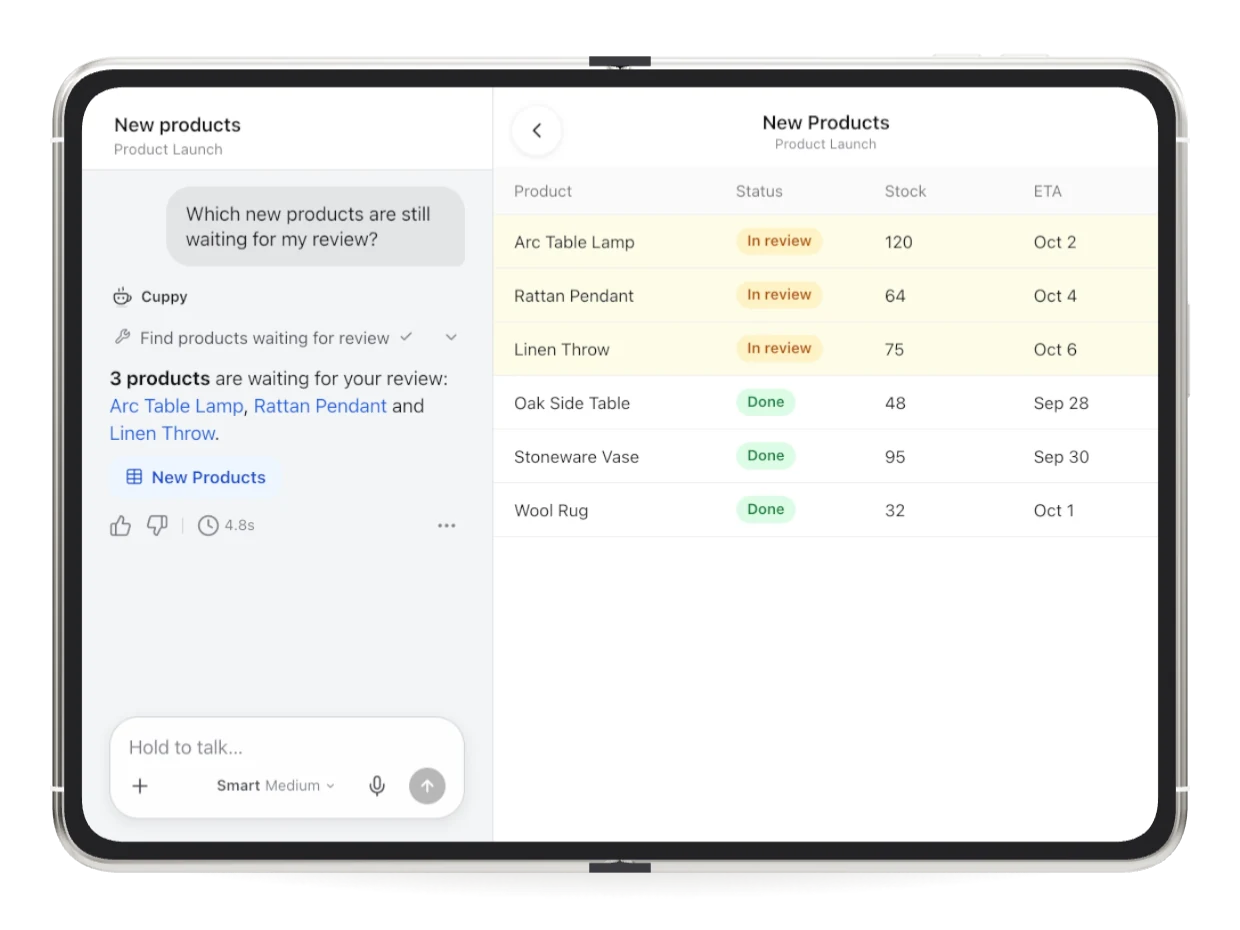
Some tools you install because they are useful. Some you install because they quietly become the place your whole team lives. Teable is trying to be the second kind: an open-source, Airtable-style database that you can run yourself or use in the cloud. It recently showed up in the Product Hunt launches with a piece that was missing until now: a proper mobile app for iPhone, iPad and Android, with its AI agent riding along.
Teable's mobile app: asking Cuppy which products still need review, with the base right beside it. Source: teable.ai.
What Teable is, in one breath
If you have never met it: Teable is a spreadsheet-database hybrid in the Airtable family, the kind of tool where a table of tasks, clients or content ideas stops being a flat list and becomes views, relations and automations. Two things make it stand out in that crowded family. First, the core is open source: the repository is public, it carries more than twenty-one thousand GitHub stars, and you can self-host the whole thing with Docker in minutes, the makers say. Second, it is not only a self-host project: there is a hosted cloud with a free tier, so you can try it without touching a server. The mobile app is the newest brick, and it is not a shrunken viewer.
What the phone app actually does
The obvious part first: your bases, tables and records are in your pocket, so the pipeline review in the hallway and the stock check in the warehouse actually happen against live data. But the launch is really built around Cuppy, Teable's AI agent. You can start a chat with Cuppy at your desk and finish it on your phone with no syncing ceremony. You can type, or hold to talk, and attach a photo, a PDF or a spreadsheet when the question needs one. The demos the team shows are very everyday: ask what needs your attention today, have it update records, approve an item and ask for the weekly report to be written and filed. There is also an ambitious one: describe the app or page you need, preview it, then publish it and share the link, all from the phone.
The part that respects your time
Two design choices deserve credit. The first is handoff: Teable notifies you when a task finishes or when Cuppy needs an answer, so you do not have to keep the app open while it works. Scheduled routines keep running in the background too. The second is that the whole thing works the same whether your data lives on Teable's cloud or on your own deployment, which is the point of picking an open-source core in the first place. For teams whose client data cannot wander into yet another SaaS, self-hosting plus a real mobile app is a rare combination.
The honest caveats
The app is free to download and the cloud has a free plan, but do not mistake that for everything-is-free: paid plans exist per seat for teams, there is a paid self-hosted option, and the practical limits, like monthly automation runs, scale with the plan. Cuppy's appetite presumably lives in those plan quotas too, so heavy AI use is where the bill would grow. Also, the open-source story comes with an asterisk worth knowing: the repository mixes the open core with enterprise-licensed parts, which is common but worth checking if your legal team cares. And a phone app, however good, is a companion: designing a whole base is still desk work. Finally, the AI demos are the vendor's own - expect the everyday reality to be a bit less tidy than a launch page.
Even with those asterisks, this is one of the more convincing mobile launches in the no-code database world lately, mostly because it did not settle for being a read-only viewer. If your team already lives in Airtable and flinches at the bill, this week is a good moment to look across the fence.
Full software listing: https://freewares.org/software/teable-mobile