LosslessCut: Trim Videos Without Losing Quality
- LosslessCut
Picture a Sunday evening: you open the videos from the weekend and discover that half the footage is an accidental documentary about your own shoes. You want the good bits, not another evening learning a video editor.
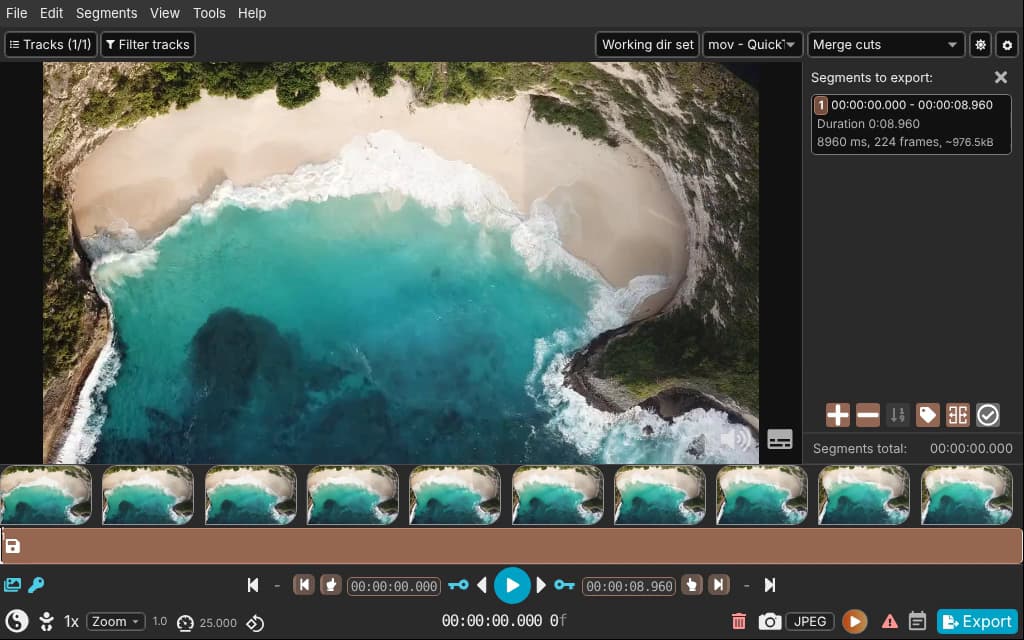
LosslessCut's timeline view: mark the segments worth keeping, export without re-encoding. Source: losslesscut.app.
That is exactly the kind of job LosslessCut is built for. This free, open-source video cutter keeps the useful parts of a recording without sending the whole thing through another round of compression. No cinematic ambitions required. Sometimes the director's cut just means removing the bit where you forgot to stop recording.
Cut the video, not its quality
A normal video-editing workflow usually ends by encoding a new video. LosslessCut takes a different route: for its standard lossless operations, it copies the existing media data rather than rebuilding every frame. That avoids another generation of compression and can make simple trimming much faster than a full export.
This is useful for a long phone recording, camera footage, a screen capture or a clip with several stretches worth keeping. It is not a promise that every file exports instantly. File size, storage speed, codecs and the operation you choose still matter. The useful distinction is that you are usually copying the material, not asking your computer to cook it again.
The LosslessCut software page (https://freewares.org/software/losslesscut) covers the download and platform details. The developer provides free manual downloads for Windows, macOS and Linux. Store editions are another way to obtain and support the app, so use the official download route rather than assuming every storefront listing must be free.
A sensible first job
Start with a copy of one recording, not the only copy of your entire holiday. Open it, find a section you want to keep, and mark its beginning and end. Add further segments if the interesting moments are scattered through the file. Check the export options, export the selected material, then watch the result in a separate player.
That last step matters more than it sounds. A preview shows where you placed a marker; the exported file shows what actually happened. Check the start, the end and the sound before deleting anything. An afternoon saved on editing is not a good trade for discovering that the birthday song lost its first line.
LosslessCut also handles more than trimming. It can extract audio or subtitle tracks, remove unwanted tracks, and remux compatible media into another container. Remuxing changes the wrapper, such as MKV to MP4 when the contained streams are suitable, rather than magically converting every codec. It can also join compatible clips, but files with different resolutions, codecs or audio settings are not guaranteed to fit together nicely.
The keyframe catch
Here is the limitation worth understanding before the first export. Many video formats store complete frames at intervals, with other frames describing changes between them. A normal lossless cut often has to start at one of those complete frames, called a keyframe.
As the official troubleshooting guide explains, an export may therefore begin slightly before your chosen start point. With widely spaced keyframes, that can mean several seconds. The app provides keyframe navigation and alignment tools to help choose cleaner boundaries. Its Smart Cut option is experimental and re-encodes a small section, but the developer explicitly warns that it does not work for every file.
If you need an exact cut on any frame, elaborate transitions, colour correction or a title sequence, a full video editor is the better tool. LosslessCut is the practical pocket knife, not the entire film studio. Keeping those jobs separate is what makes it useful.
Who should keep it installed?
Anyone regularly trimming long recordings should give LosslessCut a look. It makes particular sense when you want shorter files while preserving the original encoded quality, rather than compressing everything to the smallest possible size.
Keep the original, try a short segment first, and inspect the export. With those habits, it is a refreshingly direct answer to a small but persistent problem: a video worth keeping, trapped inside a much longer video that really is not.
Sources
Official project and downloads (https://github.com/mifi/lossless-cut)
Features (https://losslesscut.app/docs/features)
Cutting limits and troubleshooting (https://losslesscut.app/docs/troubleshooting)