MusicBrainz Picard: Put Your Music Library Back in Order
Give yourself one small weekend job: sort out the old music folder. Ten minutes later, you have three copies of the same album, a handful of "Track 01" files, and the uneasy feeling that your past self had been filing music with oven gloves.
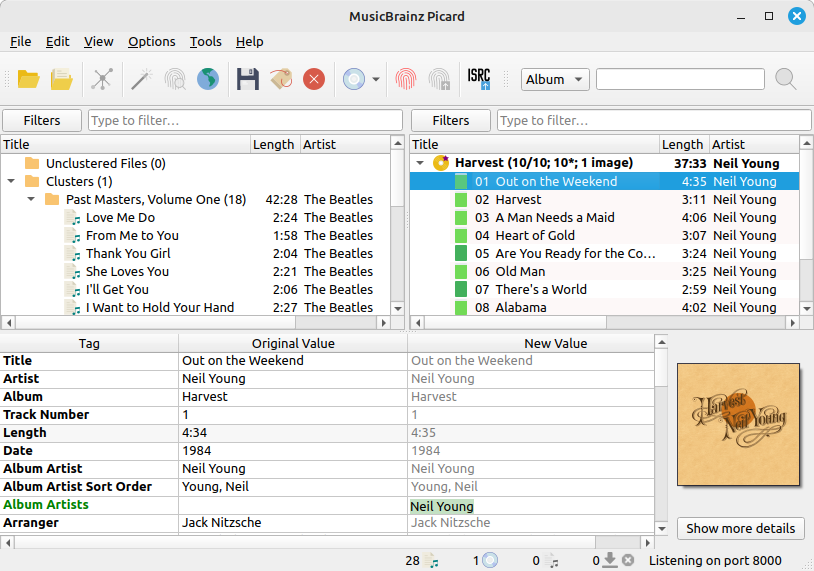
MusicBrainz Picard matching an album: original tags on the left, proposed values on the right. Source: picard.musicbrainz.org.
MusicBrainz Picard is the free music tagger for that sort of mess. It can look up an album, identify recordings from their audio, and write useful metadata into your files. It will not judge your collection. Whether it can explain why you kept four live versions of the same song is another matter.
Names are only half the problem
Renaming a file does not necessarily fix what a music player displays. The artist, album, track number and cover image usually come from metadata stored inside the audio file. If those tags are missing or inconsistent, your library can scatter one album across several entries even when the filenames look reasonable.
Picard uses the community-maintained MusicBrainz database to match recordings and releases. It supports common formats including MP3, FLAC, OGG, M4A, WMA and WAV. It is open source under GPL 2.0 or later, with downloads for Windows, macOS and Linux.
There are two useful routes into a match. Lookup uses the information you already have, while Scan uses AcoustID audio fingerprints to help identify a recording from the sound itself. A mystery filename is therefore not an automatic dead end. Identification still depends on finding a suitable match; it is not a guarantee that every obscure recording will be recognised.
Give it an album, not your entire hard drive
The official quick-start guide makes a useful point: Picard is not designed as a giant one-click fixer for unrelated single tracks. Start small. Copy an album folder somewhere safe, add those files, and use Cluster to group them before trying Lookup.
If the existing tags are useless, Scan offers the fingerprint route. If the automatic suggestion misses, you can search in a browser and choose the correct release manually. That distinction matters. A studio album, a remaster and a deluxe reissue can share songs while having different track lists, dates and artwork.
When a suggested album appears, check the track count and the proposed matches. Picard displays match colours, but green is a helpful signal, not permission to switch off your brain. Compare the Original Values and New Values for a few tracks, especially when an album looks suspiciously short or suddenly contains a bonus disc you have never owned.
Only save when the matches make sense. That is the point where the proposed metadata becomes changes to your files. Working on a copy for the first attempt gives you an easy way back without turning the exercise into a data-recovery hobby.
A tidier library, on your terms
Picard can fetch album art and use naming scripts to organise filenames and folders. This is where a repaired collection becomes much easier to browse in a player: consistent album names, proper track order, and fewer anonymous grey squares where the cover should be.
Treat file moving and renaming as a separate choice, though. First confirm that tagging works the way you want. Then explore how the naming rules organise a sample album. A tidy folder structure is lovely; an unexpected rearrangement of the only copy of your collection is less charming.
The app also supports plugins and scripting for more specific needs. You do not need to begin there. The basic album-matching workflow already solves the problem most people came for. Add complexity only when you can name the job it will do.
What Picard will not clean up
This is a tagger, not a damaged-audio repair service or a duplicate-file remover. A better album title does not improve the quality of the recording. Matching the wrong edition can also replace useful information with confidently incorrect information, which is why the review step belongs in the workflow.
Lookup, audio identification and artwork retrieval use online services. The files stay in your chosen folders, but this is not an entirely offline identification process. If a collection contains sensitive material, check the relevant service and plugin behaviour before using it.
For a library with recognisable albums and scruffy tags, Picard is a strong tool to try. Give it a small batch, inspect the matches, and save deliberately. There is no prize for reorganising twenty years of music in one reckless click.
Download details: https://freewares.org/software/musicbrainz-picard
Sources
MusicBrainz Picard (https://picard.musicbrainz.org/)
Official quick-start workflow (https://picard.musicbrainz.org/quick-start/?l=en)
Official downloads (https://picard.musicbrainz.org/downloads/)